
Jarvis Oxide: Survival Island Android Cheat
Updated

System Requirements
BIOS
Root not required (LuluBoxSuper 2.1.2)
Clients
Google Play (Android)
Windows Pro
Android (phone or tablet)
Features
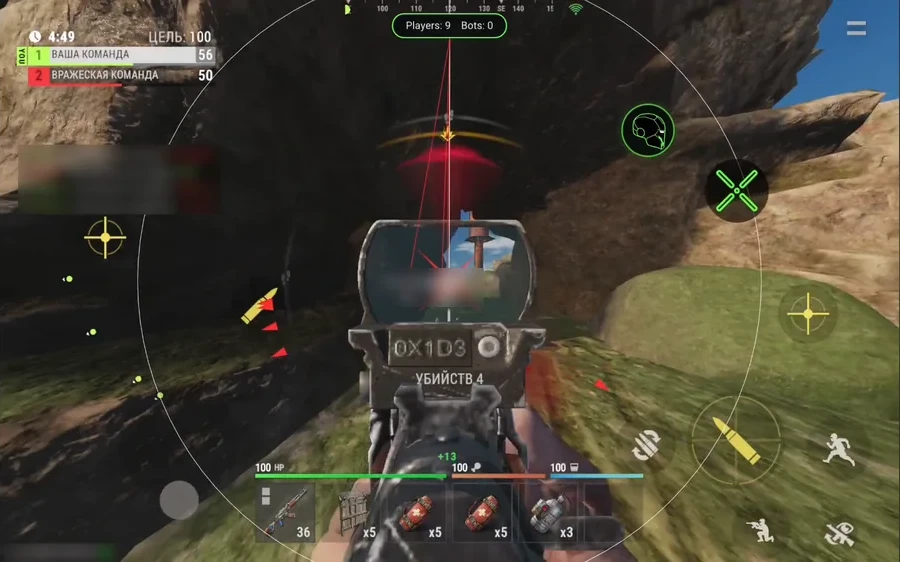
- AutoAim - aim assist with its own floating button, a short tap toggles it in a fight
- Zone and speed - radius 10 to 600 screen units, speed 1 to 30, circle and line to the target
- Aim point - head or hips, the head point moves down by up to 0.30 m
- HitRate - slider from 0 to 100, percent chance to trigger every 100 ms, not a hit percentage
- Modes - always on or only while aiming, can be limited to visible targets
- FRIENDS - team and in-game friends are safe by default, extra list of up to 64 IDs, AttackFriend and AttackNPC toggles
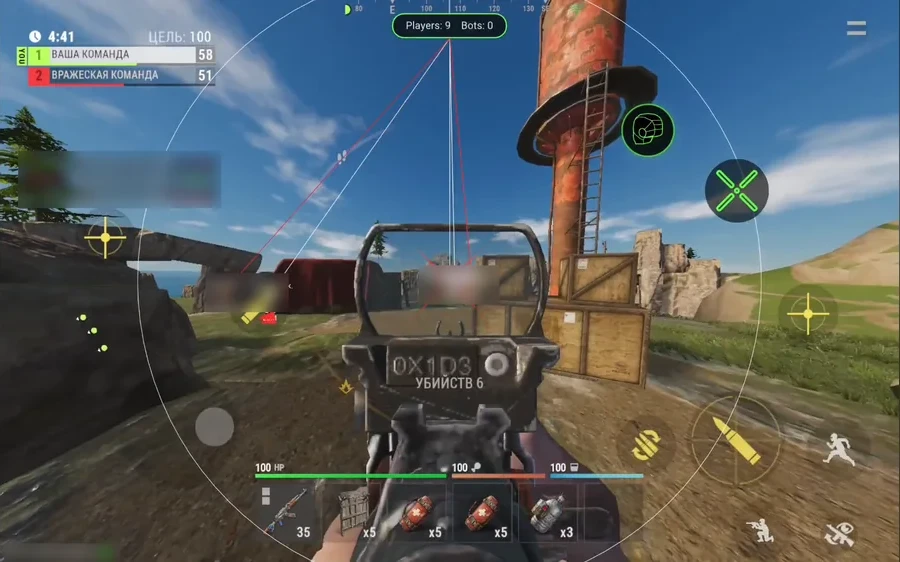
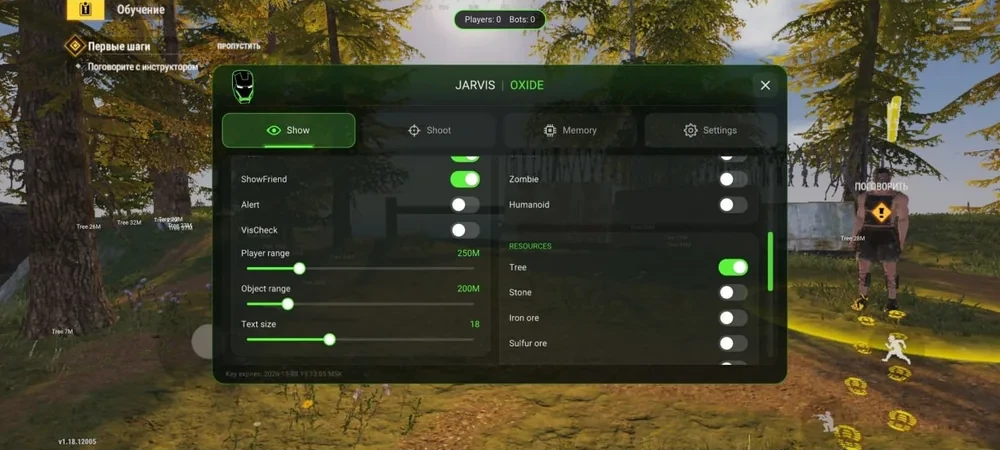
- Player ESP - boxes, lines, names, distance, skeleton, weapon in hand, ShowFriend for your team
- VisCheck and Alert - visible targets white, targets behind cover red, pointers to off-screen enemies
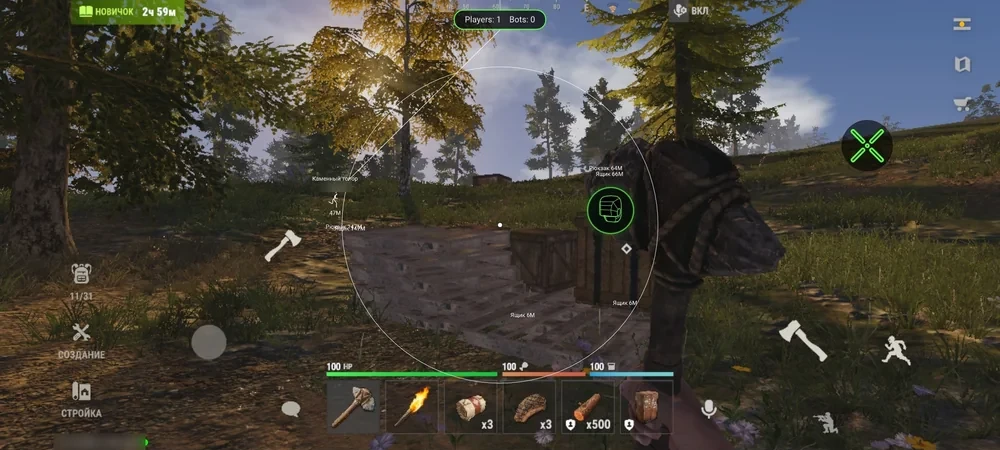
- NPC and animals - bots, zombies, humanoids, bears, wolves, boars, deer, rats, hares, chickens
- Resources - trees, stone, metal ore, sulfur, pumpkins, cloth, berries, ice, road signs
- Loot - crates, barrels, airdrops, backpacks, sleeping players, storage, cabinets
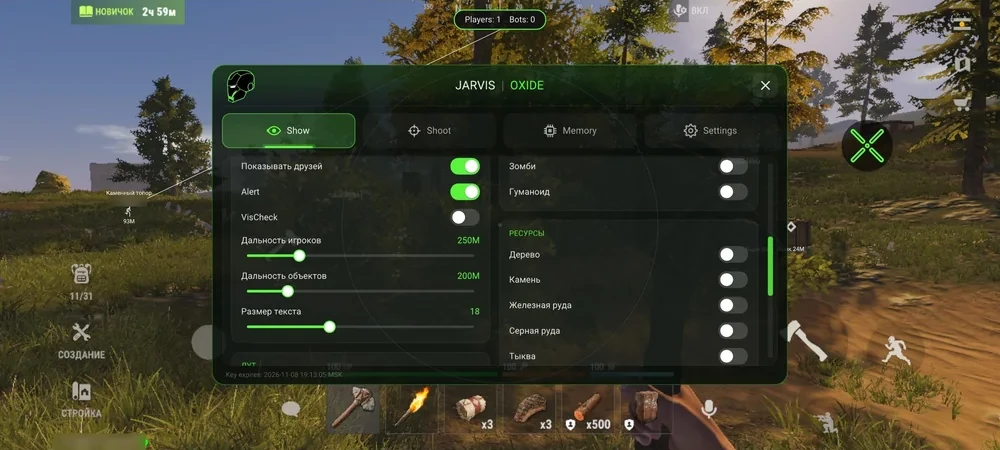
- Range and counter - sliders from 25 to 1000 m, label size 10 to 32, player and bot counter on top
- Speed - levels 1 to 10, 1.29x faster on the top level
- ReloadHack - reload duration multiplier from 0.05 to 1.00
- Visuals - Bright night, FOV 60 to 120, FPS cap 30 to 240
- AutoFarm - wood, stone, metal and sulfur, Auto walk, search range 10 to 250 m, stone axe autocraft
- Menu - English and Russian, folds into a floating green helmet icon you can drag
- Hide in Record - hides the overlay during screen recording on supported phones
Description
What Jarvis does in Oxide
Jarvis is a mod menu for Oxide: Survival Island on Android phones and tablets. It needs no root and no PC: it runs through LuluBoxSuper 2.1.2 on top of the original Oxide from Google Play, so the game you already have stays installed. The menu is in English and Russian and has four sections: Show, Shoot, Memory and Settings. AutoFarm is a fifth block of its own.
Show: ESP for players and objects
Player ESP draws boxes, lines, names, distance, skeleton and the weapon in hand. ShowFriend marks your team and friends separately. Alert adds pointers at the screen edge for targets that are off screen, and VisCheck paints visible players white and players behind cover red. A counter at the top of the screen shows how many players and bots are nearby.
Object ESP has a separate switch for every type:
- NPC and animals: bots, zombies, humanoids, bears, wolves, boars, deer, rats, hares and chickens
- Resources: trees, stone, metal ore, sulfur, pumpkins, cloth, berries, wood on the ground, ice and road signs
- Loot: crates, barrels, airdrops, backpacks, sleeping players, storage and cabinets
- Range sliders from 25 to 1000 m for players and objects, label size from 10 to 32
Shoot: AutoAim with its own button
The aimbot gets a floating button. A short tap turns it on or off in the middle of a fight, and you can drag the button anywhere on screen. Zone radius runs from 10 to 600 (screen units, not meters) and speed from 1 to 30. The aim point is head or hips, and the head point can be moved down by up to 0.30 m. It can work all the time or only while you aim, and you can limit it to visible targets. A circle marks the zone and a line points at the current target.
HitRate is set from 0 to 100 and works as a percentage chance that aim kicks in every 100 ms. It is not a hit percentage. Set it below the maximum and the aim looks more natural. Your team and in-game friends count as your own by default, and the FRIENDS section keeps an extra list of up to 64 players by ID (not by nickname). AttackFriend and AttackNPC decide whether the aim locks onto friends and NPCs.
Memory and AutoFarm
Speed has levels from 1 to 10, and at the top level you move 1.29 times faster. ReloadHack sets reload duration as a multiplier from 0.05 to 1.00, where 1.00 is the normal reload. There is also Bright night, a field of view slider from 60 to 120 and an FPS cap from 30 to 240 (the real FPS depends on your phone).
AutoFarm gathers wood, stone, metal and sulfur, each with its own toggle. Auto walk takes you to the resource, search range is 10 to 250 m, and if you have no tool it crafts a stone axe. For that you need the materials and a free hotbar slot. You can see the farm status in the same section.
Settings
This section shows the key expiry date and time, the connection status and diagnostics. Settings save automatically, and one button resets them. You can change menu size, background dimming, accent color, animations and the spin of the helmet icon. The whole menu folds into a floating green helmet icon that you can drag around. Hide in Record hides the overlay while you record the screen, but not on every phone and not with every recording method, so check a test recording before you post anything.
Things to know before you buy
Speed, fast reload and strong aim are visible to other players, so set the strength deliberately. Also, don't leave AutoFarm running unattended for long. Jarvis has no NoClip, no magic bullets, no recoil or spread removal and no building on slopes or underwater.
Installation, prices and key
You install LuluBoxSuper 2.1.2, add Oxide and the JARVIS OXIDE loader to it and turn on SandBox for both. None of this needs root. The full walkthrough is in our guide how to install Jarvis for Oxide. You need internet for the first login with the key.
Jarvis is undetected. Prices: 1 day for $2.5, 7 days for $14, 14 days for $23.5. Fourteen days is the longest plan; there's no 30-day subscription. The key arrives right after payment, and the download link for both files is in your account.
If you get stuck with setup or settings, ask in our Telegram (300+ members) or Discord (2000+ members).
Reviews
farm runs fine, aim feels natural
автофарм реально экономит кучу времени
Submit review
Questions about JARVIS
After payment you'll receive a download link and instructions written specifically for Oxide: Survival Island - with the required Windows version, Secure Boot settings, and the launch sequence. If something isn't working, message us on Discord or Telegram — we'll help.
The cheat is tested on the current patch of Oxide: Survival Island before publication. You can see the current status on the card — Undetected / Updating / Risk. If the status changes after a game update, the cheat is pulled until a fix ships.
We update the cheat within 24 hours after a patch. Subscription is frozen during the update - days don't burn. Once the fix is ready, the cheat reappears in the catalog.
Message us on Discord with a description of the error. Most issues are solved in 15 minutes: wrong boot mode, Secure Boot, antivirus. Support knows Oxide: Survival Island and the specific requirements of JARVIS.
Payment via crypto or anonymous payment systems. Access is granted automatically after payment confirmation - usually within a few minutes.
Digital products are non-refundable. But if the cheat didn't launch and support couldn't help - we'll sort it out individually.
Why JARVIS is in our catalog
Verified on current patch
JARVIS is tested after every update of Oxide: Survival Island. Card status is updated when verified, not when listed.
Instructions for Oxide: Survival Island
The cheat includes a guide with supported Windows versions, Secure Boot settings and the correct launch mode for Oxide: Survival Island.
Support knows Oxide: Survival Island
Message Telegram with a question about JARVIS. We help with setup for Oxide: Survival Island, not with template responses.
Subscription does not expire during downtime
If after a patch for Oxide: Survival Island the cheat is being updated — your subscription is frozen during this time.the cheat goes into update - the subscription period is frozen for that time.
Developer: Lovec
Only verified developers with an update history and real reviews. We resell — we don't develop (except custom orders).
From 210 RUB
Plans available for a day, week, month and lifetime. Pick what you need - no need to overpay for extra time.
Other cheats for Oxide: Survival Island
30+ games with working cheats
Only up-to-date private solutions • Daily updates
 HWID Spoofer
 ARC Raiders
 Rust
 WARDOGS
 Mistfall Hunter
 Arena Breakout
 Bodycam
 Rainbow Six Siege
 COD: Black Ops 7
 Escape From Tarkov
 Active Matter
 Valorant
 Albion Online
 Roblox
 Unturned
 Scum
 ARMA 3
 Minecraft
 DeadLock
 Overwatch
 DeadSide
 Russian Fishing 4
 Rust Mobile
 Hunt: Showdown
 Delta Force
 Squad
 CS2
 Marvel Rivals
 Fortnite
 Dune: Awakening
 Destiny 2
 Lost Light
 PUBG Mobile
 DOTA 2
 Battlefield 6
 Apex Legends
 GTA 5
 Dayz
 Battlefield 1
 Escape from Tarkov: Arena
 Oxide: Survival Island
 H1Z1
 Caliber
 Arma Reforger
 Mobile Legends: Bang Bang
 8 Ball Pool
 BloodStrike
 Call of Duty: Mobile
 EA SPORTS FC 27
 AION 2
 ARK: Survival Evolved
 Halloween: The Game
 Call to Arms - Gates of Hell: Ostfront
 Warface
 Path of Exile 2
 FragPunk
 Last Epoch
 Dead by Daylight (Dbd)
 Stalker Online / Stay Out
 War Tundra
 Megabonk
 Marathon
 Meccha Chameleon
 The First Descendant
 Ark: Survival Ascended
 Hell Let Loose
 Conan Exiles
 The Midnight Walkers
 Palworld
 HumanitZ
 Sea of Thieves
 THE FINALS