
Gates of Hell: Ostfront Cheats
Updated
The catalog has 1 private cheats for Call to Arms - Gates of Hell: Ostfront — from 200 RUB/day.
Every build is checked by hand, updated within 24–48 hours after a patch, and your key arrives automatically 1–5 minutes after payment.
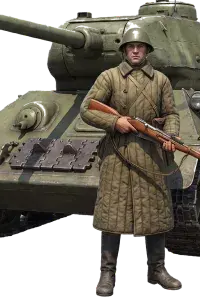
List of cheats for Call to Arms - Gates of Hell: Ostfront

Customer reviews of cheats for Call to Arms - Gates of Hell: Ostfront
no fog in 4v4 is unfair lol
туман снял, засады больше не страшны
ESP and Wallhack for Call to Arms - Gates of Hell: Ostfront
The Gates of Hell: Ostfront cheat from DHARMA starts its wallhack by switching off the fog of war, so the map shows every enemy squad and tank instead of the last spot your scouts saw it. Enemies stay visible through houses and tree lines, and an ambush turns into a list of targets. Espionage adds two things the game normally hides: the enemy team chat, and which of their units are under direct control. You know which tank has a human aiming it. On top of that you can select enemy units and give them orders yourself.Questions about cheats for Call to Arms - Gates of Hell: Ostfront
Look for the Top·1–3 pennant on a card — it marks the best stability on the current patch. For PvP, AIM and Silent Aimbot matter most — your crosshair stays invisible to other players. For survival and looting — ESP and Radar. If you need maximum safety, pick a cheat marked Undetected with an HWID Spoofer. Every cheat listed here is tested before publication and receives updates within 24-48 hours after a patch.
ESP (enemy highlight through walls) and Loot ESP (visibility of valuable items) are the most popular features. AIM and Silent Aimbot are critical for PvP: the aimbot works invisibly to others. Radar shows all player positions on the minimap in real time. NoRecoil removes weapon recoil. HWID Spoofer protects your hardware from bans. Each cheat's feature set is listed in the card tags.
After payment you will receive an activation key and a launcher link. Each cheat comes with instructions: supported Windows versions, whether Secure Boot needs to be disabled, and which window mode to use.
In most cases within 24-48 hours. Subscription time does not expire during the update period.
Message Telegram with a description of the issue and your Windows version. Most launch issues are resolved within 10-15 minutes. First check the system requirements on the specific cheat page.
From 200 RUB per day. Weekly and monthly plans are on each cheat page. Price depends on the feature set and developer.
What to know about cheats for Call to Arms - Gates of Hell: Ostfront
Verified on the current patch
Cheats for Call to Arms - Gates of Hell: Ostfront are tested after every game update. If a patch breaks compatibility - the cheat is pulled until a fix is released.
Instructions for Call to Arms - Gates of Hell: Ostfront
Each cheat comes with a guide covering supported Windows versions, Secure Boot settings and the correct launch mode specifically for Call to Arms - Gates of Hell: Ostfront.
Support knows Call to Arms - Gates of Hell: Ostfront
Message Telegram with a question about a specific cheat. We help with setup specifically for Call to Arms - Gates of Hell: Ostfront, not with template responses.
Subscription does not expire during downtime
If after a patch for Call to Arms - Gates of Hell: Ostfront the cheat is being updated — your subscription is frozen during this time.the cheat goes into update - the subscription period is frozen for that time.
Statuses updated at verification
The "Top" pennant and "Risk" tag on cards aren't marketing. We update them on every patch check Call to Arms - Gates of Hell: Ostfront, not when the product was added.
Comparison table on this page
Above is a table of all available cheats for Call to Arms - Gates of Hell: Ostfront with features, prices and statuses - choose without extra clicks.
Can you use Gates of Hell: Ostfront cheats in 4v4 multiplayer?
About Call to Arms - Gates of Hell: Ostfront our cheats
Gates of Hell: Ostfront cheats that change the whole battlefield
Our Gates of Hell: Ostfront cheats have little to do with aim. They change what you know about the battlefield and who controls the units on it. Call to Arms - Gates of Hell: Ostfront is a strategy game, so DHARMA, the build we carry for it, works on the level of the whole map. It removes the fog of war, shows enemies through cover, reads the enemy team chat, lets you command units of the other side, duplicates items, teleports units, moves respawn points and unlocks every doctrine in the middle of a match. There is no aimbot, and in a game where you mostly command squads from above, you probably will not miss it.
One day costs $2.5 and a week costs $12. The month key is $26. The key lands in your account the moment the payment clears. The cheat runs on the Steam version of the game on Windows 10 or 11 (22H2 to 25H2), and the processor can be Intel or AMD.
Launching it is also easier than with most DHARMA products. You do not need SteelSeries GG or a reboot after each session, and you can even inject while the game is already running. Below we go through the game, the situations where the cheat pays off, the protection the game uses, the complete feature list and how to use all of it in multiplayer without ending every match with a report.
Call to Arms - Gates of Hell: the Eastern Front in detail
Gates of Hell: Ostfront was made by Barbedwire Studios together with Digitalmindsoft and came out on Steam on June 11, 2021. Anyone who played Men of War will recognize the roots: it is a real time tactics game where every soldier and every tank is simulated in detail, and you can take direct control of any unit from a third or first person view. The war it covers is the Eastern Front from 1941 to 1945, the Soviet Union against Germany.
The scale is serious. The game has more than 250 vehicles and over 100 heavy guns, and armor and penetration are calculated honestly. The spot where a shell lands matters, and so do the angle and the range. A tank that would shrug off a hit from the front can die to the same gun from the side. That is why information in this game is worth so much, and why the fog of war hurts so badly.
There are several ways to play. The single player campaigns include 12 historical missions. Conquest is a dynamic campaign where you manage an army across a front and fight battle after battle, alone or in co-op. Then there are PvE matches against the AI and PvP from 1v1 up to 4v4, with doctrines that decide which units each player can buy during the match. The developers keep updating the game with new content and fixes, so years after release the community is still active and the multiplayer lobbies are still busy.
Why fog of war is the real enemy
In Gates of Hell you rarely lose to the unit you can see. Usually it is the one you cannot: a well placed AT gun behind a house or a tank waiting behind a hill. By the time the fog shows them, they have already fired. The usual answer is scouting, which costs units and time. With the fog switched off and enemies visible through obstacles, the answer is simply looking at the map.
Here is how that plays out in real matches:
- You push a village and see the AT gun set up behind the barn, so you send infantry around it or bring artillery down on it before your armor moves in.
- You see where the enemy concentrates for an attack and shift your reserves before the first shell lands.
- Espionage shows which enemy units are under direct control, so you know which tank is being aimed by a human and which is following the AI.
- The enemy chat tells you what the other team is planning, often minutes before the attack actually starts.
- In Conquest you see the composition of the enemy army before a battle and pick a fight you can win.
The speed hack covers the movement side. Vehicles lose their turning speed limit and get faster on top of that, so your tank can flank and get its front armor facing the threat before the enemy gun has time to react. In a game where angles decide penetration, a faster turn is often the difference between a bounce and a burning hull.
The fog also shapes how the AI fights you in PvE and Conquest. The computer is good at holding positions and counterattacking where you are weak, and without vision you often learn where its reserves were only after they hit your flank. With the map open, you see those reserves gather and choose the moment to strike first. For newer players this alone makes the game far easier to learn, because you finally see why a push failed instead of guessing.
Trainer protection instead of EAC or BattlEye
Gates of Hell: Ostfront does not use a third party anti-cheat like Easy Anti-Cheat or BattlEye. That does not mean anything goes. The developers actively fight trainers in multiplayer, and according to reports from both players and the studio on Steam, the game crashes when it detects one. Most public trainers and memory editors are caught this way sooner or later, which is why many people looking for a trainer for the game end up disappointed.
DHARMA is a private cheat, not a public trainer, and it is currently undetected against the game's own protection. As with every product in our catalog, that status is not something we copy from the developer and forget about. After every game update we run the cheat on our test accounts, and if anything changes, the status on the product card changes too and sales stop until there is a fix.
There is a second kind of protection that no software handles for you: other players. In PvP your opponents see the results of what you do. They notice when units teleport or respawn points move, and when their own squads start behaving strangely. A player who gets reported often enough can be looked at manually, so the section on playing smart below matters as much as the technical side.
The full list of DHARMA features
The features below are taken from the developer's own description, with nothing added. The menu is available in English and Russian and opens with Insert.
- Wallhack: fog of war switched off, enemies visible through obstacles.
- Speed hack: vehicles lose their turning speed limit. On top of that there are separate hacks for vehicle speed and turning speed.
- Espionage: read the enemy team chat and see which units other players control directly.
- Units: select enemy units and give them orders as if they were yours.
- Exclusive features: duplicate items in any inventory, your own or another player's, whether allied or enemy. The same applies to teleporting units and changing respawn points. You can also change your faction in the lobby and unlock all doctrines during a match, so you can buy units from any doctrine.
There is no aimbot and no separate radar. If you have seen a feature somewhere that is not in this list, ask us before buying. We would rather answer a question in chat than have you find out after paying.
Conquest, PvE and PvP: where each feature fits
Not every feature makes sense in every mode, and using the right ones in the right place is half the fun.
In Conquest and PvE the whole toolkit is fair game, since there is nobody on the other side to complain. Duplicating items keeps your army supplied. Unlocking all doctrines lets you mix units that normally never fight together, and teleporting units saves you the long drives across a big map. Taking control of enemy units against the AI is the kind of thing you will want to try at least once: order the AI's own tanks to drive away from the objective and watch the defense fall apart. In co-op Conquest, check with your friends first, because not everyone enjoys a partner who can do all of that.
In PvP the picture is different. The fog of war and wallhack are the quietest features: they change your decisions, not what the enemy sees on his screen. Espionage is just as invisible. The speed hack is noticeable if you overdo it, especially on heavy tanks that should not turn like a jeep. Unit control, teleporting, moving respawn points and duping are the loudest tools in the build, because the other side sees their effect directly. Changing faction in the lobby and unlocking doctrines sit in between.
A sensible approach for ranked style matches is to keep the visual features on and save the loud ones for casual lobbies or for one decisive moment, rather than using them all the time.
Doctrines are one of the things that make Gates of Hell multiplayer interesting. Each one shapes the army you can field during a match: what kind of infantry, which tanks, which guns and support you are able to buy. Picking a doctrine is a commitment, and a good part of the strategy is reading which doctrine the enemy chose and countering it.
DHARMA unlocks all doctrines during a match, so you are no longer limited to the units of one. You can mix heavy armor from one doctrine with artillery from another, or switch your whole approach halfway through a game when you see what the enemy is doing. Together with the wallhack it works well: you see what the other side has brought and buy the answer to it, whatever doctrine that answer belongs to.
Changing faction in the lobby works on the same level. You can decide at the last moment which side you play instead of being stuck with the slot you got. Unit teleporting and respawn point changes then decide where those forces enter the fight. In AI matches and Conquest you can go wild with all of it. In PvP an army that clearly does not fit any single doctrine is something experienced players will notice, so mix carefully if you play with people who know the game well.
Launching DHARMA for Gates of Hell
Call to Arms is one of the simplest DHARMA products to start. The developer's instruction is short:
- Run the DHARMA loader as administrator. It comes in RU and EU builds.
- Enter your key in the ACCESS KEY field and press AUTHENTICATE.
- Press INJECT. The loader switches to WAITING FOR GAME.
- Start Gates of Hell: Ostfront through Steam. You can also inject when the game is already running.
- Open the menu with Insert.
Unlike the other DHARMA games, you do not need SteelSeries GG here, and you do not need to restart the PC after each session. There is one quirk the developer mentions in the FAQ: if your decks do not show up with the cheat running, create any deck and delete it, and all your decks appear again. You need to repeat this on each launch. If the loader shows "Signature verification failed (timestamp too old)", sync the Windows time in the date and time settings. For anything else, write to our support and we will help you sort it out.
Playing smart in multiplayer
The game itself may only crash on a trainer, but players report what they see. A few rules keep you out of trouble:
- Do not react to things you could not have seen. If you counter every hidden AT gun before it fires, at least scout in its direction first.
- Keep the speed hack moderate. A tank that turns slightly faster than expected raises fewer questions than one that spins on the spot.
- Avoid teleporting units in front of the enemy, and do not move their respawn point into your artillery zone every match.
- Take control of enemy units sparingly. One tank that suddenly retreats at the wrong moment looks like a mistake; a whole army doing it looks like a cheat.
- Do not dupe items in a way your opponents can count.
- Do not quote the enemy chat back at them, however tempting it is.
Used like this, the cheat gives you a constant edge without turning every match into a scene. Save the loud features for casual lobbies and AI matches, where you can enjoy them without worrying about who is watching.
It also helps to remember what others can and cannot see. Anyone watching the match sees what your units do, not what your screen shows, so the wallhack and espionage leave no visible trace on their own. Trouble starts when your moves only make sense with knowledge you should not have. If you keep your moves explainable, nobody has much to report.
Questions players ask about this cheat
Do I need SteelSeries GG or a reboot? No. Unlike the other DHARMA games, Gates of Hell: Ostfront needs neither. You run the loader as administrator and inject.
Can I inject while the game is running? Yes. You can start the loader before the game and let it wait, or inject into a game that is already open.
Is there an aimbot for direct control? No. When you take direct control of a tank or a soldier, the aiming is still yours. What the cheat gives you is knowing where to aim, because the fog of war is gone.
What are the system requirements? You need the Steam version of the game on Windows 10 or 11 (22H2 to 25H2). The processor can be Intel or AMD.
Why did my decks disappear? That is the known issue from the developer's FAQ. Create any deck and delete it, and the rest show up again. It happens on each launch, so it becomes a habit after a couple of sessions.
Which key should I start with? One day for $2.5 is enough to try every feature in a couple of AI matches and a PvP game. After that, the longer keys are much cheaper per day: $12 for a week or $26 for a month.
Why buy Gates of Hell hacks from ForgeCheats
We are a shop, and our job is to make sure what we sell actually works. For Gates of Hell: Ostfront that means testing DHARMA on our own accounts after every update and keeping the status on the product card honest. The key is issued instantly after payment, without waiting for a manager. You can start with a one day key at $2.5 and decide on a longer one later: the 7 day key costs $12 and the 30 day key $26.
Our support knows the DHARMA loader and the quirks of this particular game, from the missing decks issue to the timestamp error. Write to us if anything does not work, and we will go through it with you.
If you want to hear from other players first, join our Telegram (300+ members) and Discord (2000+ members). People talk about which features they use in PvP and which they keep for Conquest. After patches they share how the build behaves, and status updates show up there as they happen. It is a good place to ask whatever you still want to know before buying.
Similar games
30+ games with working cheats
Only up-to-date private solutions • Daily updates
 HWID Spoofer
 ARC Raiders
 Rust
Rust
 WARDOGS
 Bodycam
 Mistfall Hunter
 Arena Breakout
 Pubg
Pubg
 Rainbow Six Siege
 Escape From Tarkov
 COD: Black Ops 7
 Active Matter
 Dayz
Dayz
 Albion Online
 Roblox
 Unturned
 Scum
Scum
 ARMA 3
 Minecraft
 DeadLock
 Overwatch
 DeadSide
 Russian Fishing 4
 Rust Mobile
 Lost Light
 Valorant
 Marvel Rivals
 Delta Force
 Squad
Squad
 CS2
CS2
 Fortnite
 Dune: Awakening
 Hunt: Showdown
 DOTA 2
 Battlefield 6
 Apex Legends
 GTA 5
GTA 5
 Destiny 2
 PUBG Mobile
 BloodStrike
 Arma Reforger
 Call to Arms - Gates of Hell: Ostfront
 FragPunk
 Caliber
 Battlefield 1
 Path of Exile 2
 H1Z1
H1Z1
 Oxide: Survival Island
 Mobile Legends: Bang Bang
 8 Ball Pool
 Call of Duty: Mobile
 EA SPORTS FC 27
 AION 2
 ARK: Survival Evolved
 Halloween: The Game
 Ark: Survival Ascended
 Stalker Online / Stay Out
 War Tundra
 Megabonk
 Dead by Daylight (Dbd)
 Marathon
 Meccha Chameleon
 Warface
 Last Epoch
 The First Descendant
 Hell Let Loose
 Conan Exiles
 The Midnight Walkers
 Palworld
 HumanitZ
 Sea of Thieves
 THE FINALS