
Melonity for DOTA 2
Updated


System Requirements
OBS Bypass
Undetected
Clients
steam
Window Mode
Windowed, Frameless, Fullscreen
CPU
Intel/AMD
Windows Pro
Windows 7, 8, 8.1, 10, 11
Features
- Player [Players]:
- AutoSnatch - Automatically steals items;
- Auto Control - Uses abilities and items on enemies under crowd control effects to extend the duration;
- ProCast Damage - Displays an exclamation mark near a hero if ability damage is enough to kill them;
- Global Failswitch - Prevents incorrect ability activations;
- Auto Buy Tome - Automatically purchases Tome of Knowledge (experience boost);
- Items Helper - Script assisting with using certain items, such as abusing Armlet, etc.;
- Blink Spam - Automatically uses Blink Dagger after cooldown when holding its keybind;
- KillStealer - Automatically uses items/abilities to finish off low-health enemies;
- Hp-Mp Abuse - Automatically drops items on the ground (or swaps via backpack) during HP/MP restoration to maximize health/mana gain;
- Illusion Splitter - While holding a key, spreads illusions in different directions, with the main hero following the cursor (thus hiding the real hero from enemies);
- Hit & Run - Automates the "attack-move" mechanic. The script moves the hero toward the cursor or enemy between attacks, maintaining DPS;
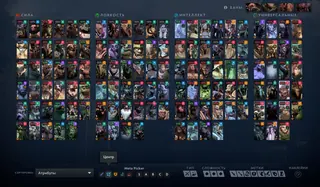
- Pick Helper - Automatically picks your desired hero, selects preferred lane, bans a hero, and sends custom messages to chat;
- Shop Helper - Helps purchase desired items with a single keypress and automatically delivers them via courier;
- Tree Destroyer - Automatically destroys trees placed by enemies;
- Map [Map]:
- MiniMap Ally Helper - Designed for allies, automatically displays various actions on the minimap (e.g., enemy teleportations);
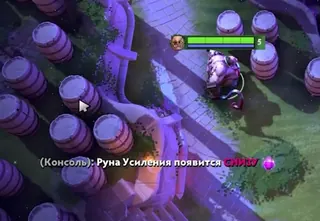
- Rune Status - Informs you about rune status (whether picked up, upcoming spawns, etc.);
- Ward Helper - Shows hints for optimal ward placement locations;
- ESP [Extra Sensory Perception]:
- Visible by Enemy - Displays a customizable particle effect around you when seen by enemy heroes, including True Sight effect if under Sentry Ward or Gem of True Sight;
- MapHack - Reveals enemy heroes through fog of war based on ability usage, teleports, attacks on neutrals, etc.;
- Show Hidden Spells - Highlights hidden abilities (e.g., visual indicator for Invoker’s Sun Strike);
- Ward Tracker - Displays enemy-placed wards;
- Experience ESP - Detects presence of enemy heroes within 1500 range by analyzing creep kill experience gain, showing visual effect on enemies;
- Show Cleared Camps - Hides camp icons from the minimap if they are guarded by enemies in fog of war;
- Illusion ESP - Highlights the real hero and marks illusions with a customizable color;
- Show Dropped Items - Displays locations of dropped items on the map;
- Jungle Helper - Draws jungle path lines indicating viable movement routes;
- Show Courier - Calculates and displays enemy courier's trajectory on the minimap (when last seen);
- Respawn MapHack - Shows estimated respawn position and timer for enemy heroes at their fountain;
- Ability Alerts (Minimap) - Displays various in-game events on the minimap (e.g., Templar Assassin’s Trap placement);
- Safeguard [Miscellaneous]:
- Auto Dodge - Automatically dodges or uses items/abilities to avoid enemy initiation, abilities, or items;
- Auto Saver - Saves allies from fatal damage, stuns, or ultimate abilities;
- Aggressive Disabler - Automatically uses selected disable abilities on enemies within range;
- Auto Disabler - Automatically disables enemies during their initiation (e.g., Hex on incoming Blink initiators);
- Information [Info]:
- Info Screen (Beta);
- AlternativeOverlay - Info screen optimized for low-end PCs;
- ItemPanel - Displays enemy items in a separate panel;
- MMR Tracking - Shows gained/lost MMR points during the match;
- Notification - Notifies about various events, including Roshan spawn time and enemy Glyph status;
- Range Display - Shows various ability/item ranges (e.g., Blink Dagger range, specific spell range);
- Show Buff/Debuff - Displays active buffs/debuffs on enemies and their remaining duration;
- Player Pick Analytics - During pick/ban phase, shows a panel with player statistics;
- Creeps [Creeps]:
- Aggro/Deaggro - Toggles aggro of enemy creeps onto your hero with a keybind; removes aggro if your hero is attacked by enemy tower;
- Units Auto Push/Farm - Sends controllable units to push lanes or farm jungle using Push/Farm keybinds;
- Jungle AFK Bot - Automatically farms jungle;
- Auto Neutrals - Assists in controlling tamed neutral creeps;
- Auto Stack - Automatically stacks jungle camps using controllable units;
- Creep Position - Displays current position of lane creeps on the minimap;
- Pull Helper - Automates pulling small neutral creeps to lane creeps;
- Creep Block - While holding a key, automatically blocks allied creeps using your hero or selected unit;
- Enemy Block - Blocks enemy heroes using available units when holding a keybind;
- Auto Last Hit - Automatically lands last hits on creeps;
- Last Hit Indicator - Shows a floating icon above creeps indicating who last-hit them;
- Last Hit Markers - Displays various info on lane creeps (e.g., last-hit feasibility indicator);
- Stack Helper - Shows hints for jungle camps (time until stack, next spawn composition);
- Griefing [Grief]:
- Spam Roll - Continuously sends "/roll" into chat;
- Bad Guy - Script designed to ruin games;
- General [General]:
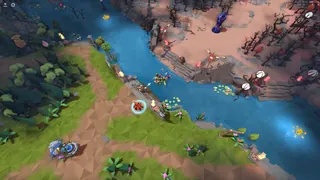
- Tree Changer - Replaces default tree models with any model from a list;
- Dota Plus - Unlocks "Dota+" features;
- Inventory Changer - Unlocks all cosmetic items;
- Force Sv Cheats - Forces Dota to treat sv_cheats as enabled (for certain console commands);
- Camera Hack - Allows camera to be pulled further back than normal;
- Auto Accept - Automatically accepts matchmaking games;
- Auto High Five - Automatically gives high-five to allies or enemies;
- T1 Glyph - Automatically uses Glyph when the first Tier 1 tower is near destruction. Once destroyed, refreshes Glyph cooldown;
- Auto Queue - Automatically starts searching for the next game;
- Fountain Bug Fix - Fixes bug where summoned units retain fountain invulnerability and cannot be selected;
- Philosopher's Stone Switcher;
- River Changer - Changes river model;
- Rune Snatch - Automatically steals runes;
- Mini Games - Collection of mini-games;
- Unlock all heroes (New Player) - Unlocks all heroes for selection on a new account;
- Weather Changer - Changes weather effects;
- Auto Buy/Leveling - Automatically levels abilities and purchases items from quick-buy;
- Abuse [Abuse]:
- Roll - Sends "/roll" to chat and clears it if result is below selected threshold. Can keep rolling until a higher value appears;
- Back Cast - Allows casting certain abilities (e.g., Pudge's Hook, Windranger's Arrow) in any direction without turning your hero;
- Courier - Automates courier actions, including combo delivery setup;
- Enemy Role - Displays enemy players’ roles (ratings);
- Players in search - Shows number of players searching when opening matchmaking window;
- Show Hidden Profiles - Unlocks ability to view the last 8 matches of any player by opening their profile;
- Unlock all emotions - Unlocks all chat emoticons and enables their use in chat wheel (compatible with "Dota Plus");
- Take all tutorial awards;
- Heroes [Heroes]:
- Strength;
- Agility;
- Intelligence;
- Targeting;
- Combo Maker;
- Humanizer;
- Render - Render;
- Language - Language:
- - English / English;
- - Russian / Russian;
- - Chinese / Chinese;
- Scripts - Scripts;
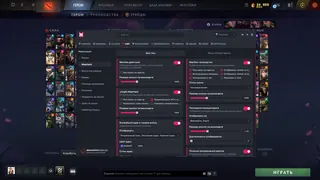
- Configs - Configs;
- Theme - Theme;
- Open menu key - Menu opening button;
- Open bind list key - Bind list opening button;
- Dev mode - Developer mode;
- HUD - HUD settings;
- Disability Integration;
- OBS Bypass - OBS bypass for streamers (We are the first in the world to write a full-fledged recording bypass. Now you can record videos and stream on any platform without any problems and without fear of getting blocked)
Description
Melonity for DOTA 2 — You Don’t Play. You Are the Game.
When every move, cooldown, and rune decides the battle, Melonity delivers total dominance. See enemies through fog of war — their items, illusions, wards, cooldowns, health, and mana. Automatically last hit, stack jungle, blink, block lanes, dodge skills, and steal runes. Scripts handle hero pick, item buy, courier, and initiation avoidance. You don’t play DOTA. You are its algorithm.
- ESP & MapHack: see enemies in fog, illusions, wards, cooldowns, runes, courier, Roshan
- Auto-functions: Auto Last Hit, Auto Stack, Auto Buy, Auto Saver, Auto Disabler, Blink Spam
- Info control: MMR Tracking, ItemPanel, Player Pick Analytics, Ability Alerts
- Tactical tools: Pull Helper, Creep Block, Tree Destroyer, Ward Helper, Range Display
- Full automation: Hit & Run, Aggro/Deaggro, Auto Snatch, ProCast Damage
- Stream-safe: OBS Bypass — record and stream freely, no ban risk
- Customization: change weather, trees, rivers, camera, HUD, theme, language (EN/RU/CN)
- Config system, keybinds, menu — your style, your control
You don’t win. You are the match outcome.
Reviews
ЛЕГЕНДА!
Настройка простая, для керри ок
Submit review
Questions about MELONITY
After payment you'll receive a download link and instructions written specifically for DOTA 2 - with the required Windows version, Secure Boot settings, and the launch sequence. If something isn't working, message us on Discord or Telegram — we'll help.
The cheat is tested on the current patch of DOTA 2 before publication. You can see the current status on the card — Undetected / Updating / Risk. If the status changes after a game update, the cheat is pulled until a fix ships.
We update the cheat within 24 hours after a patch. Subscription is frozen during the update - days don't burn. Once the fix is ready, the cheat reappears in the catalog.
Message us on Discord with a description of the error. Most issues are solved in 15 minutes: wrong boot mode, Secure Boot, antivirus. Support knows DOTA 2 and the specific requirements of MELONITY.
Payment via crypto or anonymous payment systems. Access is granted automatically after payment confirmation - usually within a few minutes.
Digital products are non-refundable. But if the cheat didn't launch and support couldn't help - we'll sort it out individually.
Why MELONITY is in our catalog
Verified on current patch
MELONITY is tested after every update of DOTA 2. Card status is updated when verified, not when listed.
Instructions for DOTA 2
The cheat includes a guide with supported Windows versions, Secure Boot settings and the correct launch mode for DOTA 2.
Support knows DOTA 2
Message Telegram with a question about MELONITY. We help with setup for DOTA 2, not with template responses.
Subscription does not expire during downtime
If after a patch for DOTA 2 the cheat is being updated — your subscription is frozen during this time.the cheat goes into update - the subscription period is frozen for that time.
Developer: Melonity
Only verified developers with an update history and real reviews. We resell — we don't develop (except custom orders).
From 150 RUB
Plans available for a day, week, month and lifetime. Pick what you need - no need to overpay for extra time.
Other cheats for DOTA 2
No other cheats.
30+ games with working cheats
Only up-to-date private solutions • Daily updates
 HWID Spoofer
 ARC Raiders
 Rust
Rust
 WARDOGS
 Bodycam
 Mistfall Hunter
 Arena Breakout
 Pubg
Pubg
 Rainbow Six Siege
 COD: Black Ops 7
 Escape From Tarkov
 Active Matter
 Roblox
 Albion Online
 Unturned
 Scum
Scum
 ARMA 3
 Minecraft
 DeadLock
 Overwatch
 DeadSide
 Russian Fishing 4
 Rust Mobile
 Lost Light
 Delta Force
 Dayz
Dayz
 Marvel Rivals
 Destiny 2
 Squad
Squad
 CS2
CS2
 Fortnite
 Dune: Awakening
 Valorant
 PUBG Mobile
 DOTA 2
 Battlefield 6
 Apex Legends
 Hunt: Showdown
 GTA 5
GTA 5
 Palworld
 Ark: Survival Ascended
 HumanitZ
 Sea of Thieves
 THE FINALS
 The First Descendant
 Arma Reforger
 FragPunk
 Path of Exile 2
 Caliber
 Battlefield 1
 The Midnight Walkers
 Conan Exiles
 Hell Let Loose
 Warface
 Last Epoch
 Stalker Online / Stay Out
 Meccha Chameleon
 Marathon
 Megabonk
 War Tundra
 Dead by Daylight (Dbd)