
PYSHARP Bodycam Cheat
Updated
System Requirements
OBS Bypass
Undetected
Clients
Steam
Window Mode
Borderless Windowed
CPU
Intel and AMD (x64)
Windows Pro
Windows 10, Windows 11
Features
- Silent Aim — the shot goes to the target while the camera stays put
- Capture zone — a FOV circle with adjustable size, drawn on screen if you want
- Target filters — team check and obstacle check before the shot
- Triggerbot — fires on its own when you are on target, with a delay and a team check
- Firing — no recoil, no spread and a raised rate of fire
- Ammo — infinite rounds and instant reload
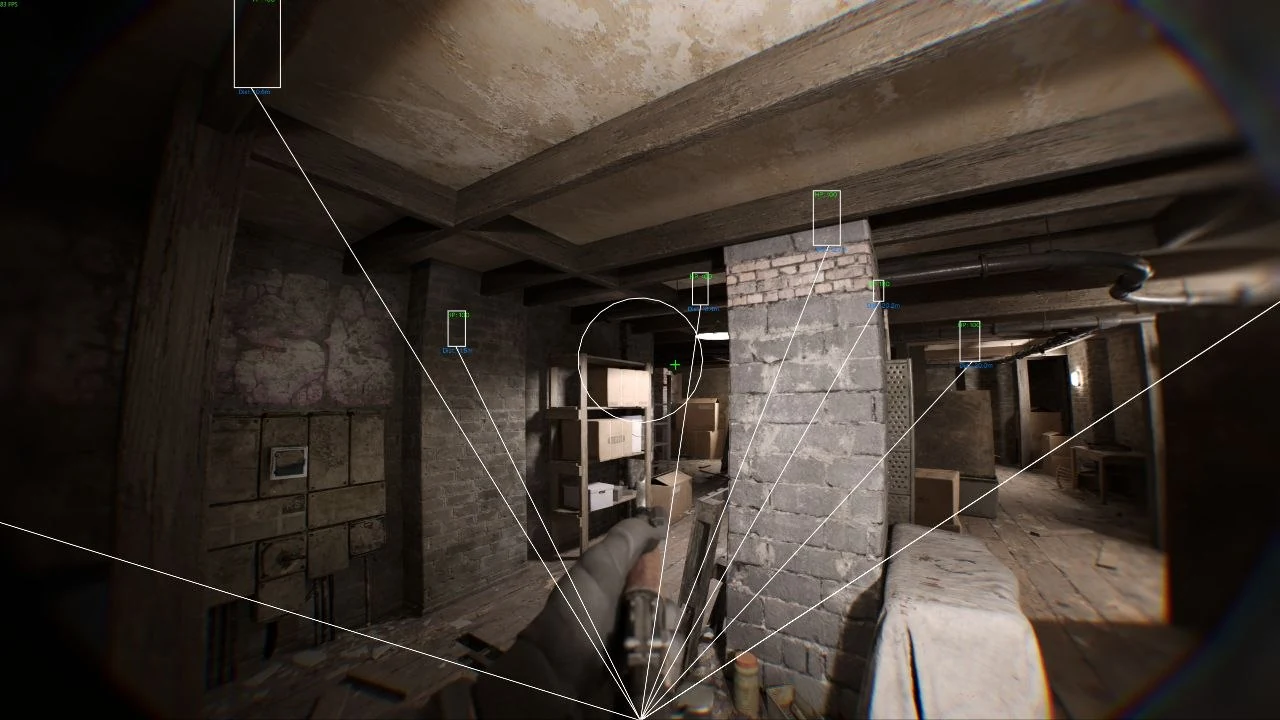
- Player ESP — enemies with health bars, snaplines and a team check
- Dead — a separate layer that shows where a fight already happened
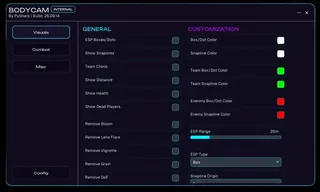
- Tuning — colours, render distance and box style to taste
- Clean picture — bloom, blur, grain, vignette, lens flare and depth of field all come off
- Lighting — ambient occlusion off and full bright for the dark corridors
- Screen — field of view on a slider, custom crosshair with type and colour
- Stream Proof — the menu and overlay stay out of recordings and streams
- Speed — a separate player speedhack toggle
- Configs — save, load and reset settings back to the defaults
- Menu — opens over the game with the Insert key, collapses with the corner button
- Launch — the loader starts after the game, and you log in with your key in its window
Description
PYSHARP for Bodycam: an internal cheat with silent aim
PySharp for Bodycam is an internal, so the loader injects the cheat into a game that is already running, and the menu opens over it on the Insert key. The status is undetected. The game needs to run in borderless windowed mode on the Steam client, under Windows 10 or 11, on an Intel or AMD processor. Order matters at launch: get into the game first and start the loader after that, because a loader started too early leaves you sitting there with no menu.
Bodycam is filmed as if through a chest camera, which means dark corridors, grain, blown highlights and blur. Enemies are hard to pick out even with no cheat running, so a good part of the visual section here goes on cleaning up the screen rather than on drawing boxes over people.
Combat: silent aim and triggerbot
Aiming goes through Silent Aim: the bullet goes to the target while your camera stays where you left it, so from the outside your movement looks like anyone else's. What the aim is allowed to pick up is limited by a FOV circle. You set the size of that circle yourself, and you can draw it on screen to see how much of the picture you are actually covering.
- Target selection for silent aim, with a team check so you do not shoot your own side
- An obstacle check, so the aim does not latch onto an enemy standing behind a wall
- A triggerbot with its own team check and an adjustable delay before the shot
- No recoil, no spread, and a raised rate of fire
- Infinite ammo and an instant reload
- A player speedhack sitting on its own toggle
Visuals and a clean picture
ESP draws enemies with health bars and snaplines from the crosshair, and you pick the colours and the render range yourself. Dead players get their own layer, and a team check keeps friendlies from being painted as enemies. A separate block takes off the post processing effects that Bodycam leans on for atmosphere.
- Bloom, motion blur, film grain, vignette, lens flare and depth of field all come off
- Ambient occlusion can be switched off, with full bright layered on top of it
- Field of view sits on a slider, so you can fit it to your monitor
- A custom crosshair where you choose the type and the colour
- Colours, render range and box style are all yours to set
Stream proof and configs
Stream Proof keeps the menu and the overlay out of screen capture, so neither one turns up in a stream or in a recording. Settings sit in configs: you save the current one, you load a saved one, and a reset puts the defaults back. That is handy when your solo setup and your squad setup are not meant to be the same.
Social links and support open when you click the BODYCAM label in the top left corner of the menu. If something breaks, the developer asks for a description of the problem, a screenshot, and the log file from the game folder.
Price and support
2026 pricing: 3.45 dollars for a day, 5.75 for a week, 11.50 for a month. The key reaches you right after payment, and you log in with it in the loader window. The launch guide is on our blog, and update statuses go out in Telegram (300+ members) and Discord (2000+ members), where we also help out if the menu refuses to open.
Reviews
Picture got clean, works well.
Submit review
Questions about PYSHARP
After payment you'll receive a download link and instructions written specifically for Bodycam - with the required Windows version, Secure Boot settings, and the launch sequence. If something isn't working, message us on Discord or Telegram — we'll help.
The cheat is tested on the current patch of Bodycam before publication. You can see the current status on the card — Undetected / Updating / Risk. If the status changes after a game update, the cheat is pulled until a fix ships.
We update the cheat within 24 hours after a patch. Subscription is frozen during the update - days don't burn. Once the fix is ready, the cheat reappears in the catalog.
Message us on Discord with a description of the error. Most issues are solved in 15 minutes: wrong boot mode, Secure Boot, antivirus. Support knows Bodycam and the specific requirements of PYSHARP.
Payment via crypto or anonymous payment systems. Access is granted automatically after payment confirmation - usually within a few minutes.
Digital products are non-refundable. But if the cheat didn't launch and support couldn't help - we'll sort it out individually.
Why PYSHARP is in our catalog
Verified on current patch
PYSHARP is tested after every update of Bodycam. Card status is updated when verified, not when listed.
Instructions for Bodycam
The cheat includes a guide with supported Windows versions, Secure Boot settings and the correct launch mode for Bodycam.
Support knows Bodycam
Message Telegram with a question about PYSHARP. We help with setup for Bodycam, not with template responses.
Subscription does not expire during downtime
If after a patch for Bodycam the cheat is being updated — your subscription is frozen during this time.the cheat goes into update - the subscription period is frozen for that time.
Developer: PySharp
Only verified developers with an update history and real reviews. We resell — we don't develop (except custom orders).
From 295 RUB
Plans available for a day, week, month and lifetime. Pick what you need - no need to overpay for extra time.
Other cheats for Bodycam


30+ games with working cheats
Only up-to-date private solutions • Daily updates
 HWID Spoofer
 ARC Raiders
 Rust
Rust
 WARDOGS
 Mistfall Hunter
 Arena Breakout
 Bodycam
 Rainbow Six Siege
 COD: Black Ops 7
 Escape From Tarkov
 Active Matter
 Valorant
 Albion Online
 Roblox
 Unturned
 Scum
Scum
 ARMA 3
 Minecraft
 DeadLock
 Overwatch
 DeadSide
 Russian Fishing 4
 Rust Mobile
 Hunt: Showdown
 Delta Force
 Squad
Squad
 CS2
CS2
 Marvel Rivals
 Fortnite
 Dune: Awakening
 Destiny 2
 Lost Light
 PUBG Mobile
 DOTA 2
 Battlefield 6
 Apex Legends
 GTA 5
GTA 5
 Dayz
Dayz
 Battlefield 1
 Escape from Tarkov: Arena
 Oxide: Survival Island
 H1Z1
H1Z1
 Caliber
 Arma Reforger
 Mobile Legends: Bang Bang
 8 Ball Pool
 BloodStrike
 Call of Duty: Mobile
 EA SPORTS FC 27
 AION 2
 ARK: Survival Evolved
 Halloween: The Game
 Call to Arms - Gates of Hell: Ostfront
 Warface
 Path of Exile 2
 FragPunk
 Last Epoch
 Dead by Daylight (Dbd)
 Stalker Online / Stay Out
 War Tundra
 Megabonk
 Marathon
 Meccha Chameleon
 The First Descendant
 Ark: Survival Ascended
 Hell Let Loose
 Conan Exiles
 The Midnight Walkers
 Palworld
 HumanitZ
 Sea of Thieves
 THE FINALS