PROMET R6S DMA is worth the money for players who already own a DMA board and a second machine and want three things in Rainbow Six Siege that no other live build in our R6 catalog has: a radar with enemy positions, protection from screen recording, and memory reading that happens on separate hardware instead of a process on the gaming PC. Status at the time of testing is undetected, reliability on the card is marked as good, price starts from $13 a week and $28 a month, there is no daily rate. You can buy PROMET R6S DMA right on the product page, where the current status and subscription period are always up to date.
We tested the build in the current season, Y11S2 Operation System Override, on several maps from the ranked rotation - Bank, Clubhouse, Oregon. The anti-cheat in Siege is BattlEye at the kernel level, and separately ShieldGuard Secure Platform checks system state for access to Legend Division. We looked at three things: how the radar behaves in real rounds with destroyed walls, how honestly the visibility check cuts off targets behind cover in aim and ESP, and what happens when you try to record a match on video.
How we tested PROMET R6S DMA
A DMA rig is put together differently from regular software: no foreign process runs on the gaming PC at all, and all the reading and rendering logic moves to the second machine connected through the board. We ran Ranked and Quick Match mixed together, around thirty rounds, and separately tracked behavior during wall and floor destruction and in the last seconds of a round, when defenders rotate positions between floors. BattlEye kept loading with the game as usual, status at the time of the check is undetected.
PROMET R6S DMA features in practice
Hardware memory reading: how DMA differs from regular ESP
The difference between DMA and regular ESP is not really "internal versus external" - it is a difference in where the code that reads the game's memory physically runs. A classic internal cheat runs inside the Rainbow Six Siege process, a classic external cheat reads the same memory as a separate process, but on the same machine and under the same Windows kernel that BattlEye watches. PROMET R6S DMA moves that reading to a second physical machine: the board connects to the gaming PC through a PCIe interface and reads RAM as a hardware device, while all the data interpretation and rendering of the radar, boxes and text happens on the other machine. On the gaming PC at that moment there is no foreign file open, no module loaded, no process with a suspicious name, because there is no software there at all.
That is also why it works through a hardware mouse emulator: crosshair movement is generated by a separate device, not a software driver on the gaming PC, and from the system's point of view it is just ordinary peripheral hardware, not software with access to input. For anyone who has already built a similar rig for another title, the difference is obvious right away - fewer points where something can be caught by software, but a higher entry cost and more setup time.
Hardware mouse emulator and MouseTrap are not the same thing
It is easy to mix up PROMET R6S DMA's hardware input with the MouseTrap topic, but these are two different protection layers in Siege. MouseTrap is Ubisoft's own system against input spoofers on consoles, devices that let people play with keyboard and mouse where everyone else is on a controller, and the system cares specifically about the input method on console. The hardware mouse emulator in PROMET R6S DMA runs on PC and solves a different problem - it removes the software driver from the chain rather than disguising the type of input device. Formally these are separate problems on separate platforms, and mixing them up in a review of one build would be inaccurate.
Radar: covers what the Siege minimap does not show
The minimap in Siege does not draw enemy positions at all, that is a deliberate design decision built around round tactics, and that is exactly what makes the PROMET R6S DMA radar the only option in the catalog that closes the gap directly. Player positions show up on a separate minimap, loot and objects are added to it too with a category filter, and every type gets its own draw distance limit so the screen does not turn into a mess of icons.
In practice this solves specific Siege situations, not some abstract "see everyone": defensive rotations between floors in the last seconds of a round, when you need to know whether the attacking squad is coming through the floor or through a window before a wall gets breached. Or finding a roamer who left the perimeter of an objective and does not show up in any regular ESP, because there is enough wall and floor between you that boxes would not read honestly through them without a separate map.
There is also a third, less obvious scenario - the prep phase before a round, when defenders place Valkyrie cameras and Kapkan mines, and attackers send a drone to scout. At that moment the radar shows not just people but objects through the filter, and you can estimate ahead of time where a Maestro (Evil Eye) turret is standing without spending a drone on the whole floor. On maps like Villa or Calypso Casino, where there are several breach routes, this saves seconds right before the push, and in Siege those seconds are what decide the round.
Stream proof: the software does not show up in screen recording
Screen recording does not capture the build's interface - among the live positions in our R6 catalog this is available only here. For streamers and for anyone who records their own matches for review, this removes a separate class of risk, not a software detection risk but a plain human one, when the overlay accidentally ends up in a published clip or in a screenshot sent to game support during a dispute.
Aimbot and trigger bot: aiming with a visibility check
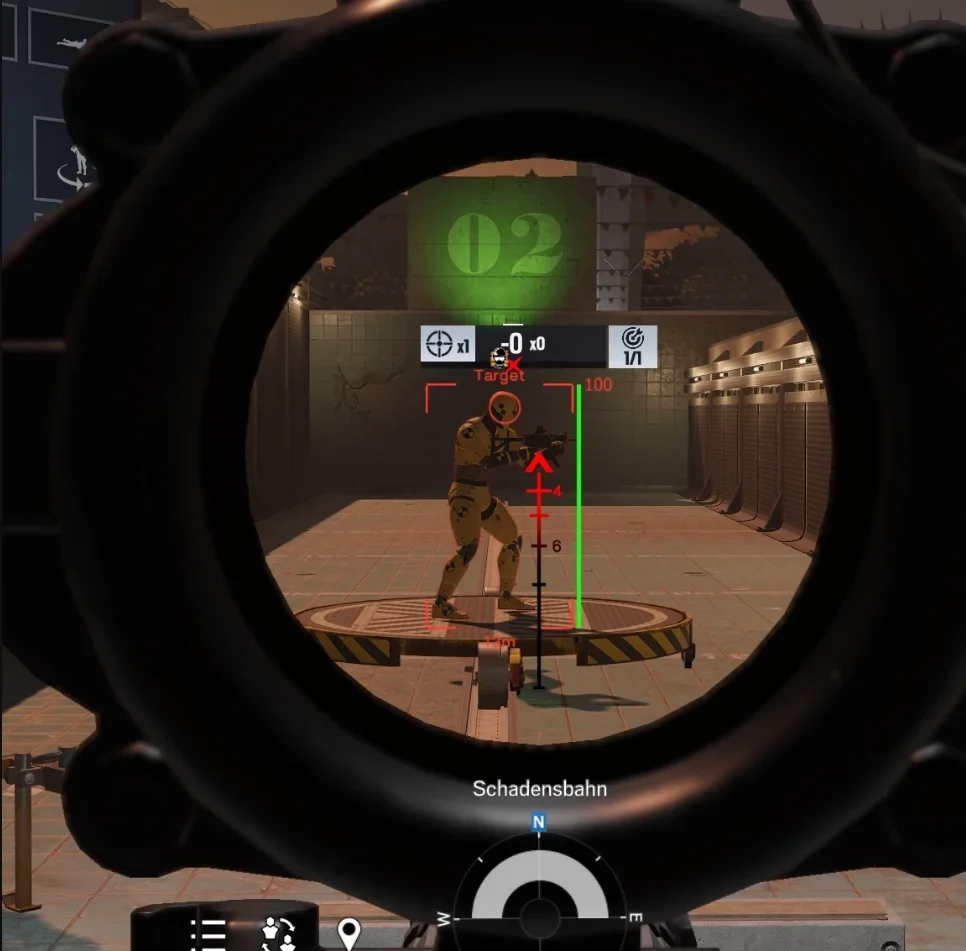
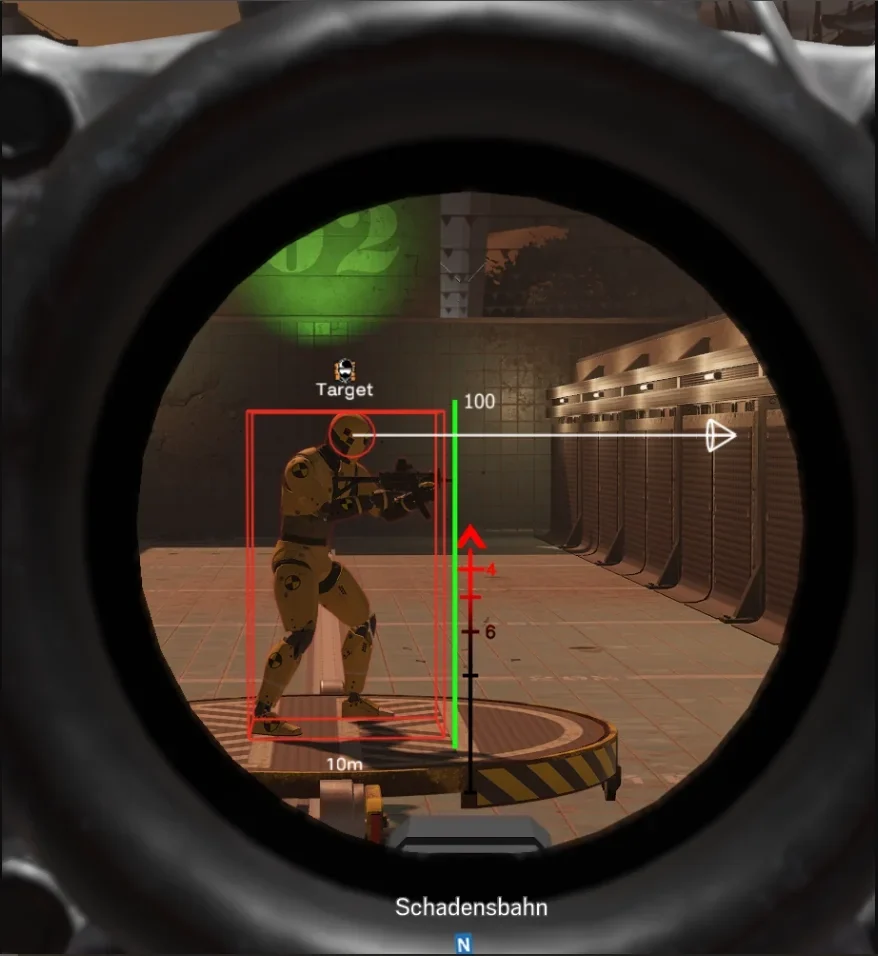
Aim is configured through FOV and bone selection, the smoothing is gentle, without sharp crosshair jumps that give themselves away visually even without any detection. The trigger bot separately fires the moment a target lands under the crosshair - useful anywhere a peek through a doorway needs a faster reaction than a manual click. The visibility check works honestly both ways: aim does not fire on targets behind cover, and this is not a decorative setting but a real limit, which we checked separately by shooting angles at Bank and Oregon through destroyed walls.
Player ESP: boxes, skeleton, weapon and a color for targets behind cover
Player ESP shows boxes, skeleton, health, distance and nickname, the enemy's weapon is shown separately - this helps you know in advance whether to expect a Hard Breach device or a regular push. The visibility check here works not as an on/off switch but as a color switch: a target behind cover is highlighted differently from a target on a clear line of fire, and the difference is visible at a glance without getting used to it. Colors, line thickness and text size adjust to screen resolution, which matters on a DMA rig: the second machine often drives a separate monitor with a different aspect ratio, and without this setting text either shrinks to nothing or covers half the screen.
Loot and objects: category filter and a separate draw distance limit
Objects on the map are split into categories with a separate filter for each, and every type gets its own draw distance limit - meaning close range gadgets can stay visible across the whole map, while something less important for round tactics gets cut off by distance. This is not Gadget ESP in the UDP sense, with recognition of specific operator devices, but a broader layer of objects and loot on the map, tied to the same radar.
Requirements and launching PROMET R6S DMA
The build works in Windowed, Borderless and Fullscreen with no window mode restrictions, supports both Intel and AMD, and installs on Windows 10 and 11. The key condition is not software on the gaming PC but hardware: you need a DMA board and a second machine, without them the build simply does not launch, regardless of Windows version or processor. In practice this is the one requirement worth checking before buying, everything else is covered by almost any current setup.
On stability during the test period the build behaved predictably: there were no connection drops between the board and the second machine, and the interface did not lag even during busy rounds with a lot of destruction. The difference from software cheats is that updates for game patches and updates for the DMA rig itself are formally two separate processes: software on the second machine can be updated independently of the game, while the board and the mouse emulator barely depend on client patches at all, because they are not built into its memory as a module.
What hardware DMA does not remove in Siege
One honest note that DMA build descriptions usually skip: hardware reading removes software traces on the gaming machine, but it does not remove the behavioral layer of the game. Four teammates play alongside you in Siege, they hear your calls on voice chat and see how you move around the map - suspiciously precise rotations without scouting read as human behavior faster than any scanner would. ShieldGuard Secure Platform separately checks system state for access to Legend Division, and BattlEye keeps running at the kernel level regardless of what hardware is sitting next to the gaming PC. PROMET R6S DMA is not sold here as invincibility, it is a way to remove one specific class of software risk, not a guarantee against every ban scenario.
Keep in mind how ban waves actually work in Siege: they usually come in batches shortly after a patch or seasonal update, not one account at a time in real time. Late 2025 showed this clearly - a major exploit flooded players with credits and cosmetics, thousands of accounts got caught in the resulting ban wave, including streamers, and some of the bans were later reversed. A software trace is not the only variable in this equation, hardware removes one specific risk, not the whole list of reasons a ban can arrive.
PROMET R6S DMA pros and cons
Pros:
- Radar with player positions, loot and objects - the only build in the R6 catalog that closes the Siege minimap blind spot
- Stream proof against screen recording - no other live position in the catalog has it
- Memory reading on separate hardware through a hardware mouse emulator, instead of a software process on the gaming PC
- The visibility check in aim and in ESP works honestly and marks targets behind cover with a color
- Subscription price is lower than UDP and ANCIENT when converted to a monthly rate
Cons:
- The highest entry barrier in the catalog - you need a DMA board, a second machine and time to set up the rig
- No spoofer at all
- No highlighting of operator gadgets and abilities, which in Siege is often more valuable than highlighting the players themselves
- Reliability on the card is marked as good, not excellent
PROMET R6S DMA price and how to buy it
The rates are simple: $13 a week and $28 a month, there is no daily period, the minimum purchase term is a week. If you count only the subscription without the hardware cost, PROMET R6S DMA works out cheaper per month than UDP at $40 and ANCIENT at $30, and close to COVCHEG. The difference is that ANCIENT's and COVCHEG's price is the whole cost of entry, while PROMET R6S DMA adds a one time board and second machine purchase on top of the subscription, one that is not included in the plan and pays off faster the longer you keep the rig and the more games the same DMA setup covers - we have separate breakdowns of this approach for the DMA cheat for ARC Raiders and for DMA in Delta Force, and in both articles the logic of selling DMA comes down to whether hardware delivers something a software build physically cannot. In Siege that argument is the radar and stream proof, which no software position in the catalog has, which is why DMA is sold here as a separate product rather than a replacement for a regular build.
Counting purely in subscription cycles, four weeks at $13 add up to $52, while the monthly rate is just $28 - the gap is noticeable already on the second cycle, so buying a week only makes sense as a short test before buying a month. The board and second machine cost is not part of this math and varies by builder, but it does not amortize against one game only: the same rig works for other titles without rebuilding it, ones we have covered separately in our own DMA breakdowns. So the real question is not "is DMA more expensive than a regular cheat" but "how many games and seasons will one physical rig cover" - in that sense PROMET R6S DMA is more of a long term investment than a one season purchase.
Set up the subscription and check the current status on the buy PROMET R6S DMA → page. To compare with the rest of the lineup, go to Rainbow Six Siege cheats, where UDP, ANCIENT, MACROS and COVCHEG live too. Questions about setting up a DMA rig and board compatibility usually get answered faster in the community: Telegram (300+ members) and Discord (2000+ members), and through support tickets we usually close this kind of question in one reply.
Who PROMET R6S DMA is a good fit for
There is no single "best" option here, the entry conditions for DMA and regular software are too different.
If you already have a rig: for anyone who already built a DMA board and second machine setup for another game, adding PROMET R6S DMA is just a new subscription with no new hardware spend, and the radar with stream proof come almost as a free bonus.
If you want a cheaper entry with no hardware: a regular software build fits better, and the first thing to check is the UDP review - it has Gadget ESP for drones, claymores and cameras, and Ability ESP for operator abilities, neither of which PROMET R6S DMA has at all.
If the radar and match recording matter most: there is simply no alternative in the catalog here, and the question stops being about price and becomes about whether you are willing to build the rig once and keep using it.
Also look at the mode you play: if the goal is climbing to Legend Division on PC, get ahead of it in our piece on ShieldGuard and Legend Division and see how that system works there.
Comparing PROMET R6S DMA with other live builds in the catalog
| PROMET R6S DMA | UDP | ANCIENT | COVCHEG | |
|---|---|---|---|---|
| Weekly price | $13 | $20 | $15 | ~$13 |
| Monthly price | $28 | $40 | $30 | ~$25 |
| Aimbot and trigger bot | yes | yes | yes | no |
| Player ESP | yes | yes | yes | no |
| Gadget / Ability ESP | no | both | ability icons | no |
| Radar and filtered loot | yes, only one | no | no | no |
| Recording stream proof | yes, only one | no | no | no |
| Spoofer | no | yes | no | yes |
| Requirements | DMA board and second machine | UEFI, Intel only | no BIOS requirements | NVIDIA only |
| Reliability | good | excellent | excellent | excellent |
Frequently asked questions about PROMET R6S DMA
Is PROMET R6S DMA detected or undetected right now?
At the time of this check the status is undetected, and the product card updates it as facts change, not on a schedule. Check the status right on the product page before buying, the same rule applies to every other build in the R6 catalog.
How much does PROMET R6S DMA cost?
The subscription costs $13 a week and $28 a month, there is no daily rate, the minimum purchase period is a week. Separately from the subscription you need the hardware: a DMA board and a second machine, neither is included in the plan's price.
Do you need a spoofer with PROMET R6S DMA?
This build has no built in spoofer, and unlike software cheats that matters less here: hardware memory reading does not leave the traces on the gaming PC that an HWID spoofer usually looks for in software solutions. If you need a spoofer for a different reason, there is a separate spoofer section in the catalog.
Is PROMET R6S DMA better or worse than UDP?
That is not really a "better" question, it is a feature set question: UDP has Gadget and Ability ESP, a built in spoofer and excellent status, but no radar and no stream proof. PROMET R6S DMA is the opposite picture - radar, stream proof and hardware input, but no gadgets and no spoofer. The choice depends on what matters more for your specific rounds.
What do I do if my DMA rig does not pick up PROMET R6S DMA?
First check the physical connection of the board and confirm the second machine can see the game process, most startup problems come down to exactly that. If the rig is set up correctly and the build still will not launch, describe the configuration to support through Telegram or Discord - we usually sort this kind of ticket out fast, because there are not that many hardware combinations.
Does the hardware aim feel different from software aim?
In combat the difference feels small, because the settings are the same - FOV, bone, smoothing, only the smoothing itself is produced by the mouse emulator rather than software input. To teammates watching and in a match recording, the crosshair movement looks like an ordinary physical mouse, because technically it is one, just with an automatic correction layer.