GHOST for Delta Force makes sense if you live in Hazard Operations and haul loot out of raids: it is the most loaded build in our catalog for this game. Inside you get an aimbot with its own Humanize block, full player ESP, loot sorted into six rarity tiers, and bots plus AI moved to a tab of their own. A day costs $6, a week $23, a month $47. At the time of our test GHOST holds undetected status, and the developer refreshed the listing on 12 August for the current patch.
What separates this build from the rest of the catalog sits in Humanize. Four parameters live there, and they exist purely so your aim does not look mechanical: Jitter, Deadzone, the Reaction Min and Max pair, and the Max Speed limiter. This is not about the technical layer of Tencent's ACE. It is about what the living players next to you in the lobby see, because their reports are what start an account review. Below is a walk through every tab of the menu with screenshots, the honest downsides of this software, and who it fits.
How we tested GHOST
Our testing landed on Season Reorientation, the second anniversary season, which went live on 8 September. Most of the hours went into Hazard Operations: solo runs and squad raids, always including the Mandelbrick scenario, where the cargo is picked up, your squad position is exposed to everyone on the map, and you simply have to hold the Decoding Site for four minutes. A few evenings went to Havoc Warfare, to see how the mini radar and the overlays read in 32 versus 32 fights with vehicles.
We checked four things: how the aimbot behaves on burst fire, how readable loot stays in a cluttered raid interface, how fast you can tell bots and AI from live raiders, and how stable this private software is on the current patch. ACE runs at kernel level and stays in the system as the active ACE-BASE.sys driver, so we recheck the status of any build after game updates instead of treating it as granted forever. We have a separate breakdown of ACE: the same Tencent module also ships in Arena Breakout Infinite.
GHOST features: a practical breakdown
Aimbot: Memory versus Silent
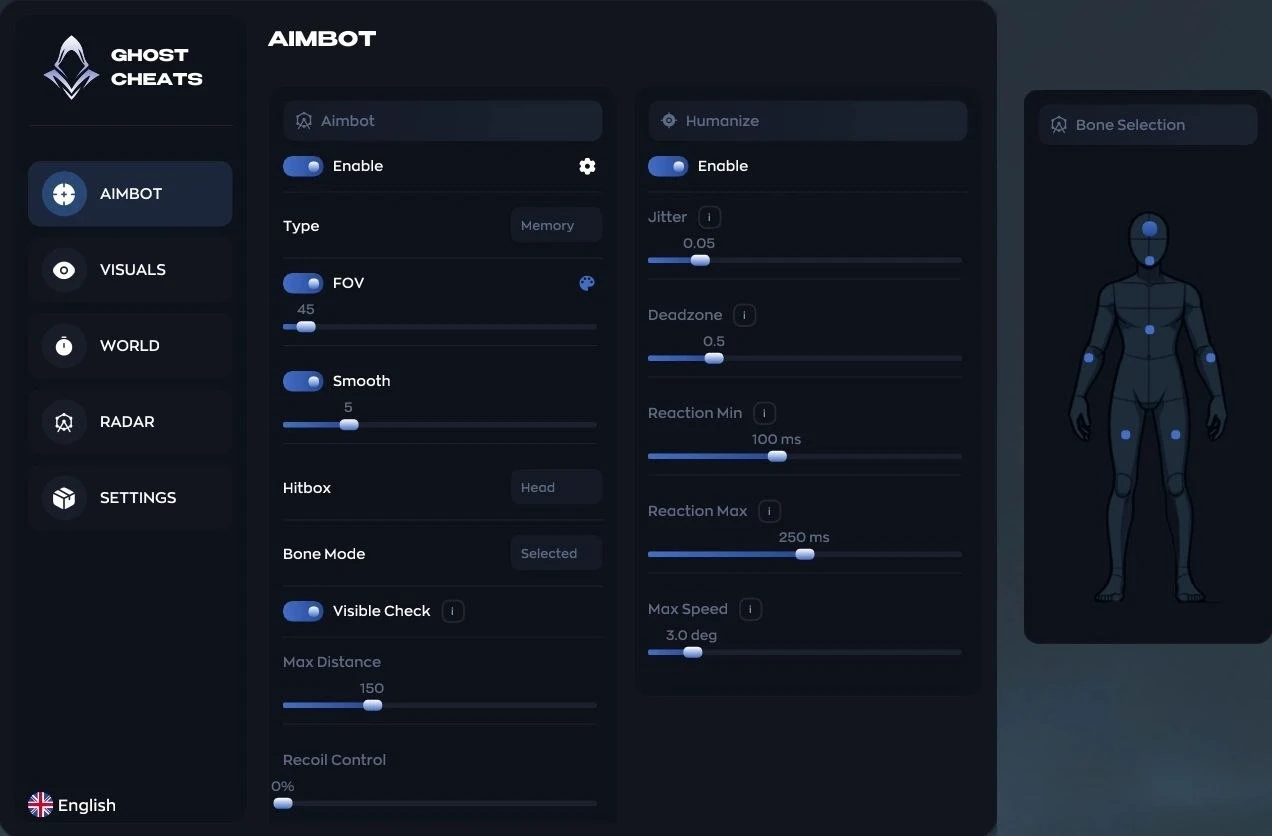
The aimbot switches between two working principles, and the choice here is not cosmetic. Memory turns the camera, you see the crosshair move on screen, and the mechanic is the familiar one. Silent leaves the camera where your hand holds it and pushes the correction into the shot itself: it looks calmer from the outside, but it takes getting used to, because there is no visual feedback at all.
The surrounding options are put together properly. FOV radius and smoothing decide how sharply the crosshair grabs a target. The distance limit removes the case where the software drags you toward a silhouette on the far side of the map. Visible Check cuts off targets behind geometry, and without it any aimbot turns into the most obvious form of cheating there is. Body part selection is backed by a choice of specific bone, so you can drop the eternal head shot and hit the chest consistently.
The Recoil Control slider turned out more useful than we expected. After Reorientation, sniper rifles in Operations took an accuracy penalty: standing still there is no spread, but any movement while scoped makes it significant. The outcome is plain, you end up firing bursts from an assault rifle more often, and on bursts recoil control shows up more than on single shots. The optional Crosshair can stay off if the game's own reticle is enough for you.
What we took away from the sessions: Silent holds up better at medium range, where the target has time to shift during a burst, while Memory feels calmer indoors, when someone jumps out point blank and you need to see where the crosshair actually went. Smoothing is worth keeping above zero even in Memory, otherwise the camera snaps hard enough that you notice it yourself on a recording, which means the enemy will notice it in the killcam.
Humanize: why your aim needs human mistakes
This block is the reason people buy the build. An instant snap onto a target with identical reaction time reads with the naked eye: people do not play like that, and the killcam shows it. From there it is not the technical layer doing the work but the social one, because a report from a live player triggers an account review. The numbers in Delta Force are harsh: the G.T.I. Security team punished 16,974 players in the week of 29 January to 4 February, and 1,099 of them received ten year bans. A ten year term instead of a permanent one is a rare mechanic, and EAC and BattlEye have nothing like it.
There are four settings in the block, and each closes off one tell:
- Jitter mixes in micro movements so the crosshair does not sit welded to the target.
- Deadzone keeps the aim quiet until the target leaves the zone, instead of twitching after every pixel.
- Reaction Min and Max set the spread of reaction delay, so the time from a target appearing to your shot is different every time.
- Max Speed caps the aim speed and removes the crosshair teleport across half the screen.
Tune this for your usual shooting style rather than for maximum efficiency. The combination that worked best for us used a moderate Deadzone and a wide reaction spread: hit rate drops, but from the outside the picture looks like a player with a good mouse rather than a robot.
ESP: players, party and a separate tab for bots
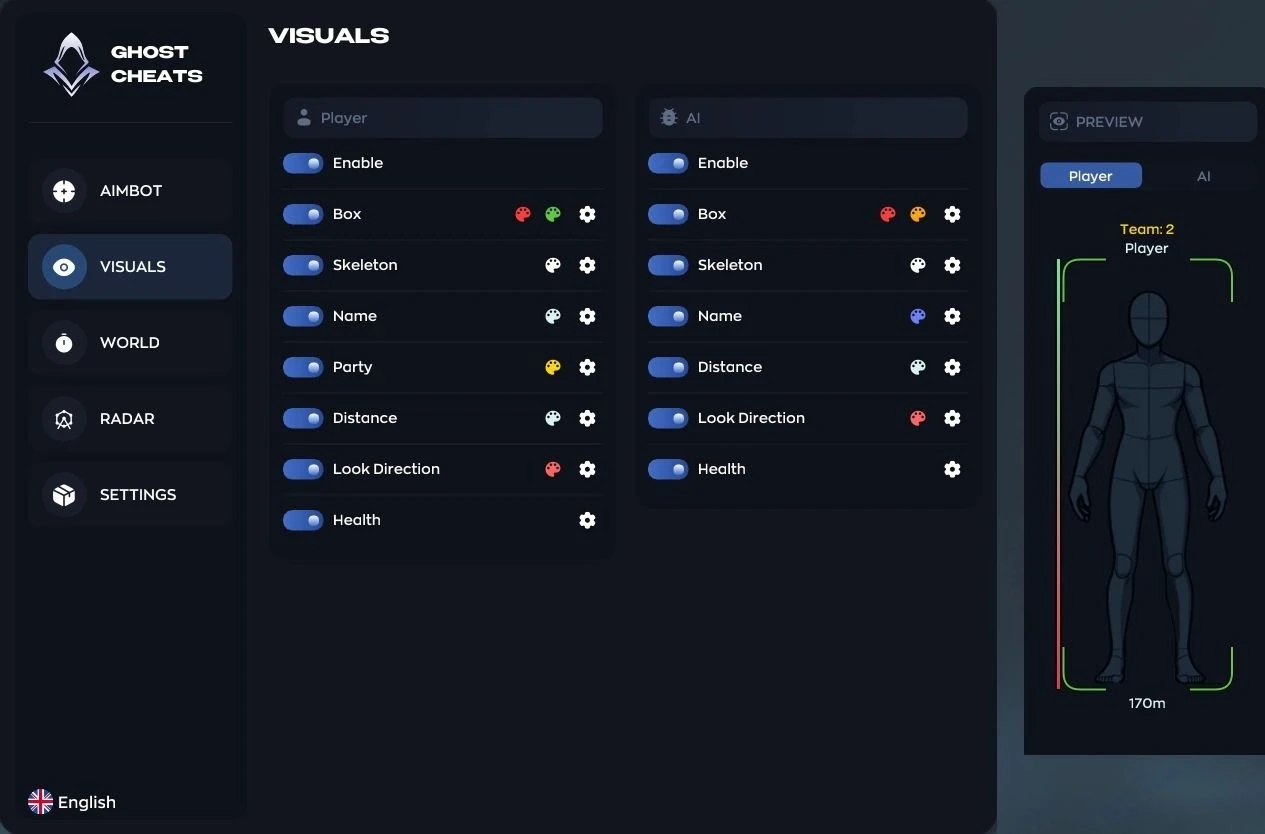
Player ESP is complete here: box, skeleton, nickname, distance, view direction and HP, each element with its own color. View direction matters more in extraction raids than it sounds, because it answers the main question before you enter a building, whether the enemy is looking your way or not. Your party gets a separate color, and in dense fights on the decoding point that saves seconds.
The tab for bots and AI is split out, with its own color and its own toggle for bot corpses only. Operations is full of bots, and mixing them up with live raiders is expensive: you react to a human differently than to a scripted target. Clover falls into this category too, the combat dog of the new support operator Rover. She is AI driven, finds her own path to the nearest enemies and marks whoever she reaches, so seeing her before she finds you is useful.
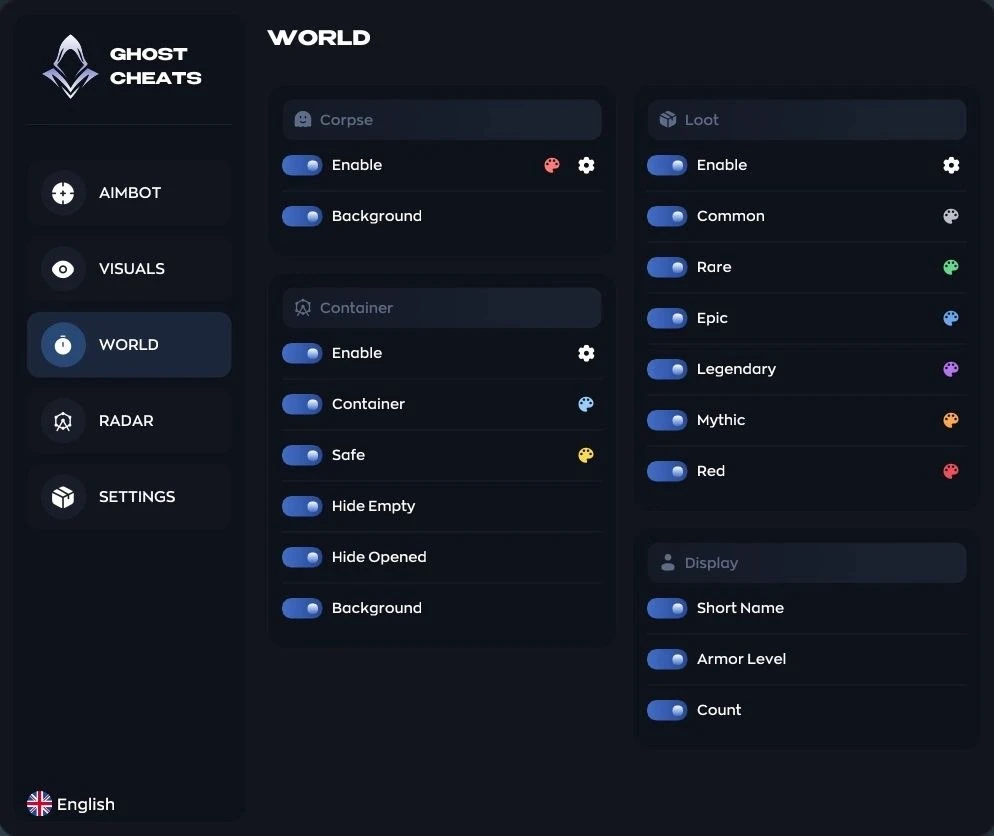
Corpses and containers are drawn with a filter that removes the ones already opened or empty. It sounds like a small thing until you land on a map where half the containers have been stripped by an earlier squad: without the filter the screen becomes a mess of markers that are pointless to run to.
Loot ESP: six rarity tiers
Loot is broken down into six tiers: Common, Rare, Epic, Legendary, Mythic and Red. This tab is exactly what separates the full build from everything else in the catalog, because ANCIENT has no loot ESP whatsoever, only player highlighting and a radar.
The point of six tiers is not pretty colors but routing. A raid in Operations is always a decision about where to run first and when to turn toward extraction, and that decision comes from the value of what lies ahead. When legendary and mythic show up in their own colors, you stop burning a minute on a container full of common junk, and that minute goes into the path to the exit before a second squad gets there.
The labels are configured separately: short item names instead of full ones, armor level, and stack count. Turn short names on right away, because full names in Delta Force are long and start overlapping once ten items are on screen. Armor level helps when you decide whether to strip gear off a corpse or keep your own. If you are weighing bare ESP against a full pack in general, we have a breakdown of ESP versus the full pack using another extraction shooter, and the logic there is the same.
Misc: mini radar, configs and menu details
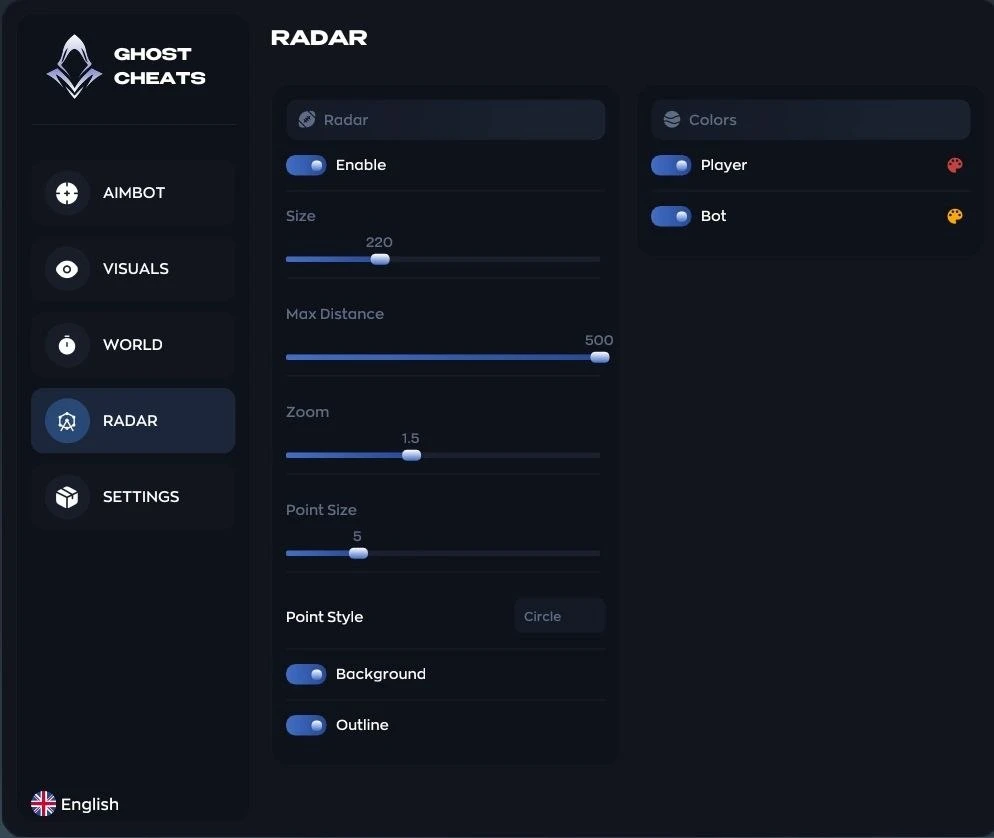
The mini radar is configured in detail: window size, maximum distance, scale, plus the shape and size of the dots, where you pick between circle, square and triangle. We used the shapes as a second information channel next to color rather than for looks: circles for live players, squares for bots, and the radar tells you at a glance who is moving out there. In Warfare the radar helps more than in raids, because at 32 versus 32 the general direction of pressure matters more than one silhouette.
Configs support creating, saving, loading and deleting. The feature is not decorative: settings for Operations and for Warfare differ a lot, and nobody will flip twenty toggles by hand every time. There is also Battle Mode, which clears the extra overlay off the screen during a fight, a custom menu key through Menu Key, and interface scaling via DPI Scale, which you need at 1440p and above, where the default menu runs small.
Two small things affect readability the most: text shadow and the watermark. The shadow saves labels on bright parts of the map, and the watermark keeps service information in the corner of the frame. The hotkey list sits inside the menu, which beats hunting for it in the support chat after your first launch. We kept the shadow on for the whole test: on the bright open areas of the new map The Mog, labels without it blur into the background.
No spoofer, no streamproof either
Now the honest part. The build has no built in HWID spoofer and no streamproof against OBS recording. For Delta Force that matters, because ACE collects a hardware fingerprint: CPU identifiers, GPU data, and storage serial numbers. A machine with a fingerprint on the ban list gets blocked, and any account logged in from that machine inherits the ban, because the hardware is checked before the account.
The conclusion from that is simple. If your account or your hardware has already caught a ban, the spoofer becomes a separate purchase, and the options are gathered on our HWID spoofer hub. If you want a spoofer and streamproof in one build with no add ons, look at the ANCIENT review: both are built in there, but you have to accept the missing loot ESP.
Operations versus Warfare: where the build pays off
The two Delta Force modes ask different things of your software, and that is worth understanding before you buy. Havoc Warfare is 32 versus 32 with vehicles, where you die and come back, and the cost of death equals a few seconds until respawn. Hazard Operations works the other way: you go in, load up, leave through an evac point, and failure takes away all the gear you walked in with. Information improves your stats in the first mode, while in the second it converts into money directly.
Hence the conclusion about this build. Loot across six rarity tiers, the opened container filter, armor level on corpses and the separate bot tab make sense specifically in raids. In Warfare what stays from the whole set is the radar, player ESP and the aimbot, while half the menu takes no part in the match.
We already mentioned the clearest scenario. A squad picks up the Mandelbrick, carries it to the Decoding Site and holds the point for four minutes, while the squad position is exposed to everyone on the map, and the decoding site itself is known to everyone as well. The reward for a successful extraction with decoded cargo opens after the match, with a chance at rare items and skins, so there is no shortage of players who want to take it. Those four minutes are the stretch where knowing enemy positions is worth the most: you see which side they come from, who is looking your way, and where an abandoned pile of loot sits on the approach so you can grab it without stepping into a firing lane. If you do not play Operations, a good part of what you pay for stays switched off.
Stability and launching GHOST
Requirements for this build are mild by catalog standards. Only one client is supported, Steam, and that is worth checking before purchase, because Delta Force has regional launchers. Display modes are Windowed and Borderless, processors are Intel and AMD with no caveats, Windows 10 and 11 in any version. There is no BIOS fiddling at all: no disabling Secure Boot, no TPM, no repartitioning your disk to GPT, unlike FECURITY, where that whole list is mandatory.
Stability gave us nothing to complain about during the test: the loader started on the first try, the menu opened on its key, and there were no crashes between raids. The catalog listing was updated on 12 August 2026 for the current patch, status undetected. We deliberately avoid the wording about permanent invisibility: any build lives from patch to patch, and after a major game update the status has to be checked again instead of trusted from the purchase date.
Updates follow game patches rather than a schedule. The pattern in our catalog looks like this: after a major update the developer pulls the software from sale for a check and brings it back rebuilt, so short gaps in a listing's availability are a normal working cycle rather than a sign of trouble. Tracking it is easy, since items being rebuilt carry a separate status, and right now we have several such listings for Delta Force, while GHOST is on sale.
GHOST strengths and weaknesses
Pros:
- A Humanize block with four parameters that no other listing in our catalog for this game has.
- Loot ESP across six rarity tiers, plus armor level and stack count.
- A separate tab for bots and AI with its own color and bot corpses only.
- A mini radar with configurable dot shapes, as useful in Warfare as in raids.
- Mild requirements: Intel and AMD, Windows 10 and 11, no BIOS edits.
Cons:
- No built in HWID spoofer, so with flagged hardware you buy one separately.
- No streamproof against OBS recording, which is a stopper for streamers.
- Only the Steam client is supported, Garena is out.
- Pricier than the catalog minimum: $6 a day against $3.5 for the chams.
GHOST price and how to buy
Catalog prices run like this: $6 for a day, $23 for a week and $47 for a month. A day makes sense for checking the build on your own hardware and your own shooting habits, after which you can weigh the value of a week. A month pays off if you farm Operations regularly instead of logging in once a weekend. Checkout is on the product page: buy GHOST for Delta Force.
The same developer ships a stripped down version, and people sometimes take it instead of the full one. The money gap is small, $3.5 against $6 a day, but the approach differs: there you get only Chams on players and a fast toggle for the highlight right inside the match, with no aim, radar or loot, in exchange for a clean screen and the bare minimum of things that can break after a patch. The chams also work on the Garena client. Details are in the GHOST CHAMS review. You can compare it with the rest on the hub, where all Delta Force cheats are gathered.
Questions about compatibility, payment and current status get answered faster in the community: Telegram (300+ members) and Discord (2000+ members).
Who GHOST suits
There is no universal build in the catalog, and a comparison with its neighbors shows that.
| Task | GHOST | Alternative |
|---|---|---|
| Loot in Operations | six rarity tiers, bots split out | ANCIENT has no loot ESP |
| Flagged hardware | spoofer needed separately | ANCIENT, spoofer built in |
| Streaming and recording | no streamproof | ANCIENT, streamproof included |
| Clean screen and a lower price | full menu, $6 a day | GHOST CHAMS, $3.5 a day |
| Vehicle highlighting in Warfare | no | FECURITY, yes |
If you farm Operations: this is the first listing to look at. Loot by rarity and separate bots cover the two main questions of a raid, and Humanize lowers the chance that the squad you took the cargo from files a report with full confidence.
If your account has already caught a ban: start with a spoofer rather than this listing, otherwise hardware on the ban list cancels out any purchase.
If you mostly play Warfare: you will use the radar, ESP and aim from this build, while the loot side stays idle, so compare the price against simpler catalog items here.
If you stream: this one is not for you, look for a build with streamproof.
Common questions about GHOST
Is GHOST detected or undetected right now?
At the time of publication the catalog status is undetected, reliability is rated excellent, and the listing was refreshed on 12 August for the current patch. We promise no invulnerability: after every major Delta Force update the status gets rechecked, and the current state is always visible on the product page and in the support chat.
How much does GHOST for Delta Force cost?
A day is $6, a week $23, a month $47. For comparison, the minimum price in our catalog for this game is $3.5 a day for the chams, while full builds from other developers run from $4 to $6 a day. On feature count for the money, GHOST comes out ahead.
Do you need a spoofer with GHOST?
If this machine has never taken a ban, you can start without one. If a ban happened, the spoofer is mandatory: ACE checks the hardware fingerprint before the account, and a new profile on the same hardware inherits the block. There is no built in spoofer in the build, so it is a separate purchase.
Does GHOST work on the Garena client?
No, the full build supports Steam only. Garena is listed for the stripped down version from the same developer, the one with nothing but Chams on players. If you play through a regional client, the full build will not fit you, and you need to check that before paying.
How is GHOST different from ANCIENT?
Briefly: GHOST has loot ESP across six rarity tiers and a separate bot tab, but no spoofer and no streamproof. ANCIENT is the exact opposite, with a spoofer and streamproof built in and no loot highlighting at all. We went through the detailed comparison in the ANCIENT review.
Does Humanize actually lower the risk?
It lowers the odds of a report from a live player, not the risk of technical detection. Aim with no micro movements and identical reaction time looks suspicious in the killcam, reports lead to a review, and a review in Delta Force ends with a term of up to ten years. Tune the block around your usual playing style.