GHOST CHAMS for Delta Force makes sense in one situation: you want to see the enemy through a wall and nothing else. The build has exactly two options, chams on enemy player models and a hotkey that turns that highlight on and off during a match. There is no aimbot, no radar and no loot highlight. A day costs $3.5, a week $12, a month $23, and at the time of testing GHOST CHAMS holds undetected status with an excellent reliability rating. The product page carries two buyer reviews and a catalog priority of six.
We tested the build on Season Reorientation, which shipped on September 8, 2026, under ACE, the kernel-level anti-cheat from Tencent. Whether it works at all was settled in the first five minutes, so we spent the rest of the time on boring questions: how readable the silhouette stays across different maps, what happens to the highlight when indoor lighting changes sharply, whether the hotkey keeps up in a firefight, and whether recolored models make you start mixing up squadmates with enemies. We also ran the launcher through Garena, because the full build from the same developer has no support for that client at all.
How we tested GHOST CHAMS
Launching happened from two clients. Steam first, Garena second, both times in windowed and frameless mode, since the build offers nothing else. The loader behaved identically on both platforms, no separate version for the regional client had to be downloaded, and the highlight was already visible at the shooting range before the raid.
After that we alternated between Hazard Operations and Havoc Warfare, because those modes break software in different ways. In Operations we cared about tight interiors and pushes toward an extraction point, in Warfare about the reworked Layali Grove with its three new zones and the new map The Mog, built around the events of Black Hawk Down. Whole evenings went into checking the same handful of things: whether an enemy stays visible through smoke, whether the silhouette gets lost against a bright texture, whether the highlight blends with squadmate markers. We logged the status of the software after every play session, because ACE sits in the system as the ACE-BASE.sys driver and quietly checks the machine fingerprint before it ever looks at the account.
GHOST CHAMS features: a practical breakdown
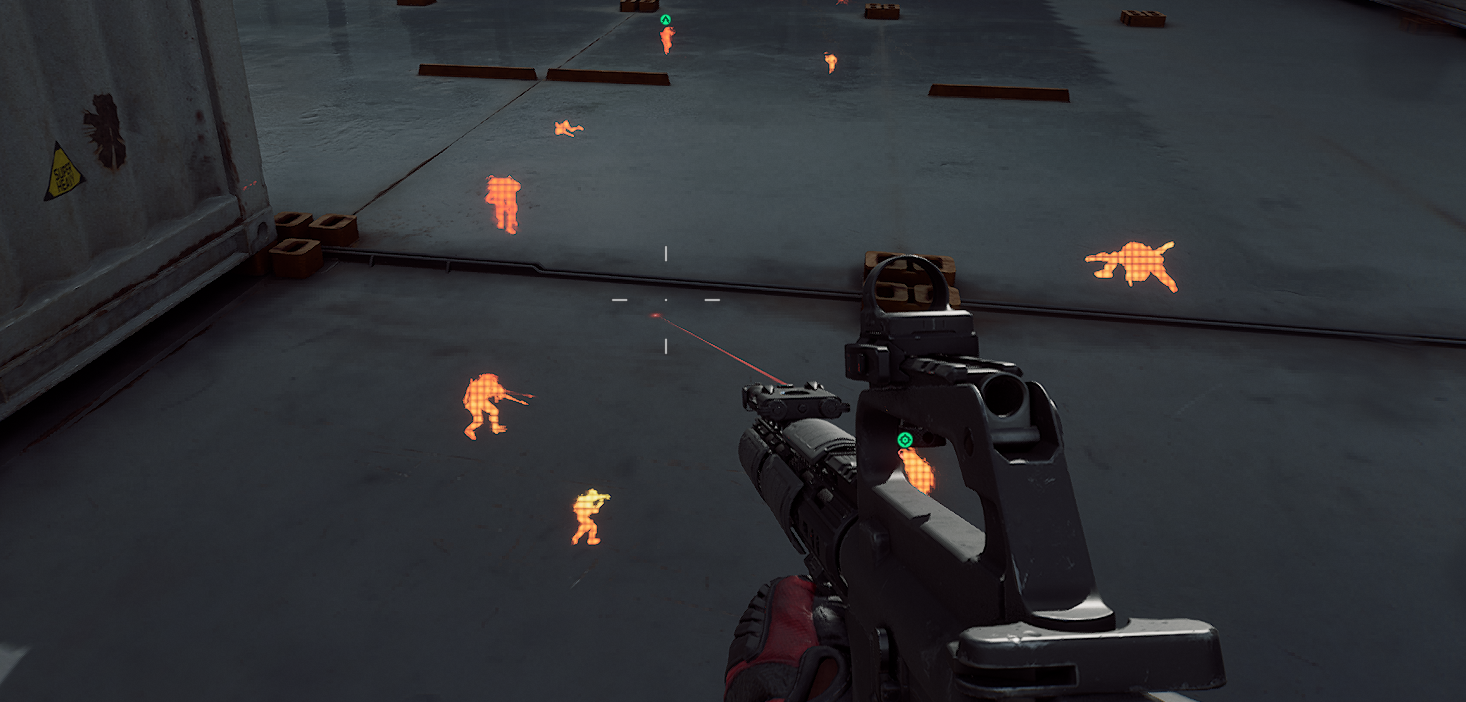
The feature list is short enough to say in one sentence, so instead of counting toggles we will walk through how the build behaves in a fight. Screenshots below come from the product page and were taken in game.
Chams on players: what you actually see in a fight
The only combat feature in this build recolors enemy models into a bright, obviously non game color, and it does so in a way that keeps the silhouette visible through walls, containers, vehicles and terrain folds. What separates this from the familiar box is that you see a body rather than a rectangle: where the head sits, which way the person is looking, whether they are standing or dropping into a crouch, whether they leaned out with a shoulder or with the whole torso. In the corridors of The Mog that matters more than any number on screen, because you shoot into a doorway that opens half a second later.
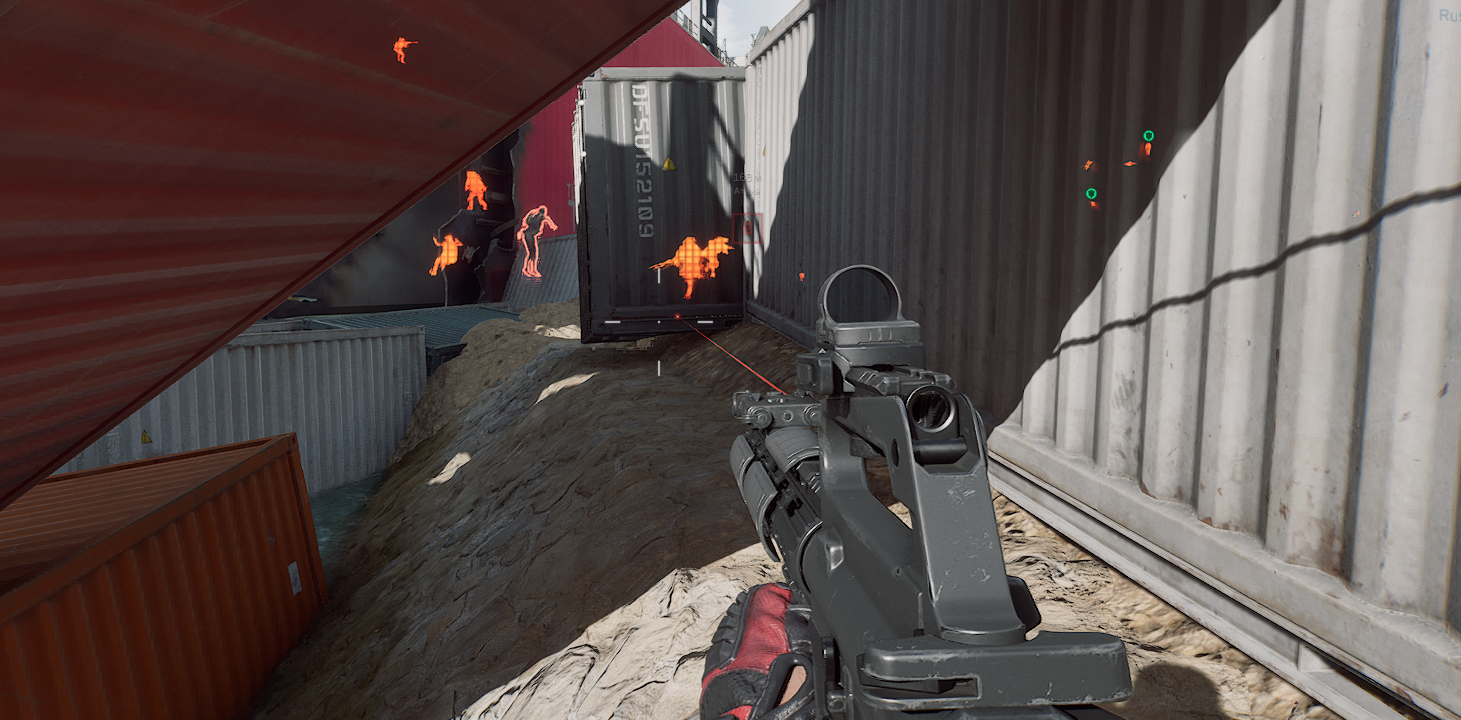
Open stretches of Warfare look different. With thirty two players per side, bright silhouettes at range read as a highlighted crowd, and they show the direction of pushes and the place where the enemy is stacking bodies before hitting a point. Distance has to be judged by eye, from model size and familiar landmarks, and the first couple of matches feel awkward if you came from a full ESP with numbers.
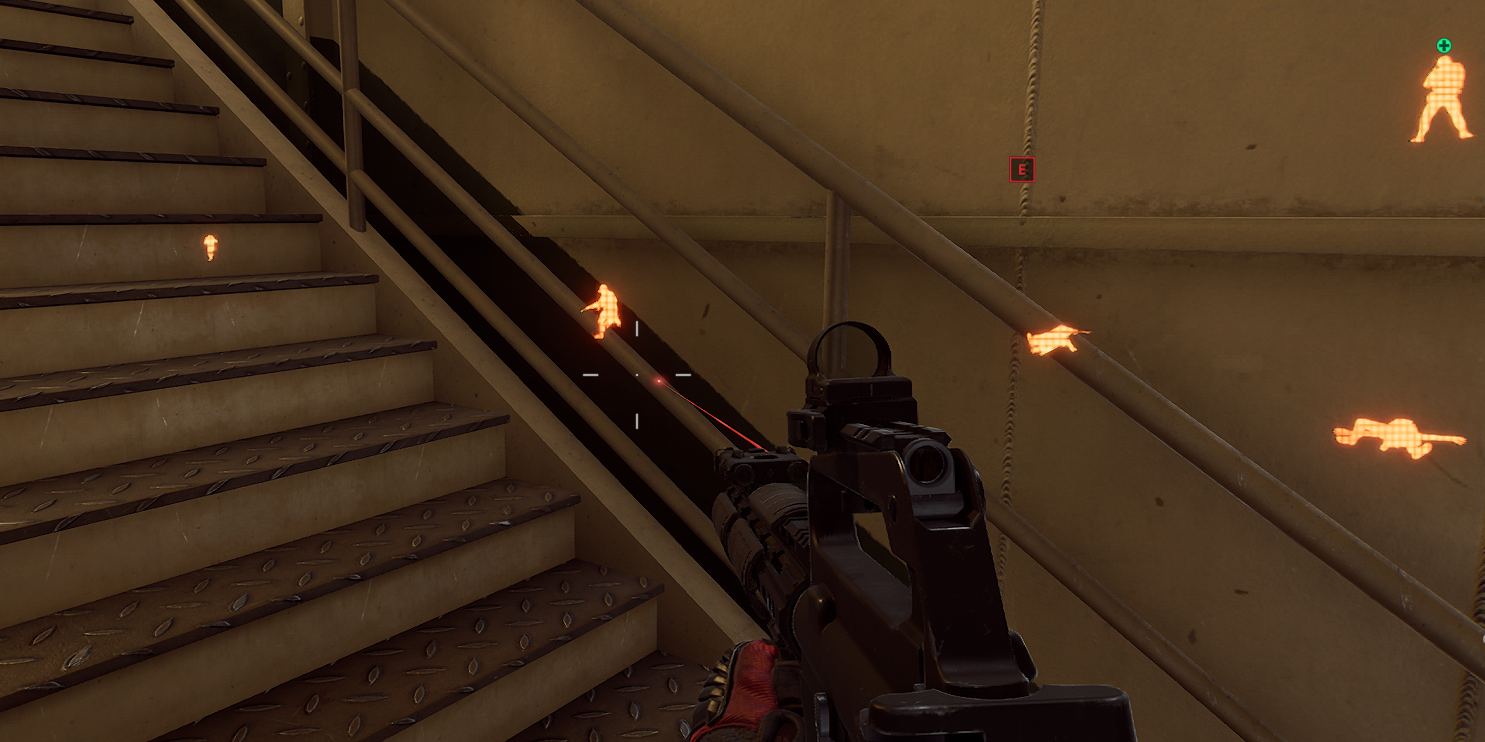
One warning about Operations: bots and AI enemies get highlighted there the same way live players do. This build has no separate tab for them, no color separation, and in scenarios with dense bot spawns around a boss that adds noise to the screen. We got used to it over an evening, but anyone who logs in specifically to hunt humans has to remember that not every glowing silhouette is worth ammunition.
Turning the highlight on and off mid match
The second option looks trivial until you start using it. The hotkey kills and restores the highlight without opening the menu and without a pause, which is exactly the workflow you want while recording or streaming: kill it before an interesting moment, play the fight on your own hands, turn it back on once the scene is over. We noticed no delay between the press and the reaction, the frame does not stutter and the audio does not tear.
The practical value goes further than recording. The highlight sometimes gets in the way: point blank, when an enemy is right on top of you and his recolored model floods half the screen, it is easier to switch it off for a second and finish the kill on the normal picture. Same thing in spots crowded with squadmates, where you need to work out fast who is in front of you. The build does not force one mode for a whole raid, and after a week of play your finger finds the key on its own.
Chams and ESP: the difference at the mechanics level
These two technologies get lumped together constantly, even though they work at different stages of drawing a frame, and understanding the difference pays off before you buy. Chams interfere with the character model itself: the enemy material gets swapped for another shader, depth testing for it is switched off, and the engine draws the body over level geometry. The wall does not go anywhere, what you see is the model, with its real pose, torso lean and limb positions, meaning with the place your bullet will actually land.
ESP works the other way around. It never touches models, it draws a flat layer on top of the finished frame: a box, a skeleton made of lines, a nickname, a health bar, a distance number, a line to the target. That is an overlay, graphics laid over the picture that know the target coordinates and convert them into a screen point. Which is where the strength of ESP comes from, it can show things the model does not contain: a name, health, range in meters, container state, squad membership.
The practical consequences follow from that difference. Chams give you exact target geometry and say nothing about its condition. ESP reports condition, but paints the world in flat shapes and turns the screen into a soup of boxes and labels in a heavy fight. We laid this choice out in detail for a different extraction game in our piece on ESP versus a full pack, and the logic holds for Delta Force. Raw power has nothing to do with it, what decides is which information you actually manage to read during a fight.
What this build does not have
The honest list of missing things is longer than the feature list. There is no aimbot in any form, no memory mode, no silent, no assist. There is no radar and no minimap with markers. No Loot ESP, so containers, corpses and items stay exactly as the game draws them. It carries no vehicle highlight, no split between bots and humans, no spoofer and no stream proof, no counters and no timers. If you need even one item off that list, the thing to buy is not chams but the full GHOST build from the same developer, which has an aim with the Humanize system, loot across six rarity tiers, a dedicated tab for bots and a mini radar.
Why a minimal set works in favor here
The idea that more toggles mean a better build holds up badly in extraction shooters. Below are four reasons why we read this short feature list as a deliberate decision by the developer.
After a seasonal patch there is almost nothing to break
Delta Force updates in seasons, and every one of those patches touches the whole client: new maps, new operators, ballistics changes. The more features a build carries, the more places inside it are tied to game structures, and the higher the chance half the menu falls off after an update. Right now three entries in our catalog for this game sit under rework: BTG, CROOKED and DULLWAVE. Chams have few dependencies, which is why they usually come back online sooner. That is not a guarantee, we recheck the status of every build after each patch, but the difference in workload on the developer side is real.
A clean picture on screen and on video
There is no text, no boxes, no numbers and no lines to the target. The screen stays a game screen, only enemy bodies glow. In a heavy fight that is noticeable: nothing covers your view at the moment when it matters to see what is happening to the right of the crosshair. On recordings the difference shows even more, because a highlighted model on video looks far more natural than a dense grid of labels over the frame. Add the hotkey from the previous section and you get a build you can leave running during screen capture.
The crosshair stays yours
Part of the checking in Delta Force is built not on hunting files in memory but on analyzing player behavior in a match: how the mouse moves, how fast a player reacts to a target appearing, how uniformly the aim settles from shot to shot. An aimbot by its nature adds a trace to that profile, and the developers of the full GHOST build did not pour work into Humanize with jitter, deadzone and reaction delay spread for nothing. Chams add nothing to the input profile: the human shoots, the human moves the mouse, the software only changes a model color. That does not cancel the G.T.I. Security ban waves, and we are not going to promise you will never get caught, but one risk surface simply is not present in this scheme.
The price gap barely matters against all that
A day of GHOST CHAMS costs $3.5 against $6 for the full build, so roughly two and a half dollars. Over a month the gap is wider, $23 against $47, and that still is not the kind of money worth giving up a feature you need. So the choice between two builds from one developer runs on what information a person actually reads off the screen, not on cost. If you cannot recall after a raid whether you looked at distance numbers, chams will suit you. If you caught yourself playing off health bars, they will disappoint you.
GHOST CHAMS in Operations and Warfare
Hazard Operations: where chams are enough and where they are not
A raid in Operations consists of two different jobs, and the build covers only one. The combat part is fine: highlighted bodies tell you how many people are in a building, which way they are coming in and which of them has already turned toward you. Around Mandelbrick that is felt most. While the valuable cargo is on you, your position is revealed to every squad on the map, the decoding point is known to everyone as well, and four minutes of defense turn into a straight fight over information. Seeing which side of the Decoding Site people are pulling in from is worth more than any loot.
With the second half of the point of a raid the build helps not at all. Extraction in Operations is half the reason to go in, and chams will not show container contents, the value of an item on the floor, or a corpse that has already been searched. You run the map the same way you would without software, opening everything in sequence and spending the same time on it. For play around Mandelbrick, where knowing the number and direction of enemies together with their condition matters in advance, two options are also thin: how much health the enemy has and what range he is at, chams will not tell you.
Havoc Warfare: 32 versus 32 and what the highlight gives there
Large battles with vehicles suit the build better than you might think. Warfare has no loot, gear is not lost, and the information that costs the most here is body density and the direction of pushes, which bright silhouettes convey fine. On the reworked Layali Grove with its waterways the highlight helps catch the people flanking through water, on The Mog with its dense urban blocks you can see who is sitting on the upper floors.
The weak spot in Warfare is single and predictable: vehicles are not highlighted at all. A tank behind a terrain fold is as invisible to you as it is to a regular player, and in a mode where armor decides the fight for a point that is a visible gap. Vehicle highlight in our catalog for this game comes from FECURITY, but you pay for it with system requirements we covered separately.
Stability and launching GHOST CHAMS
Requirements for the build are mild, and that saves you an evening of setup. It runs on Windows 10 and Windows 11 in all versions, both Intel and AMD processors are supported, and there is no need to touch the BIOS: no disabling Secure Boot, no TPM, no repartitioning a drive to GPT. FECURITY from the same catalog has a list of mandatory firmware changes that takes up half its product page.
Game launch modes are windowed and frameless only, there is no fullscreen. Clients are Steam and Garena, and one detail matters to a slice of players: the full GHOST build lists Steam only, so in our Delta Force catalog this is the single entry from that developer that starts from the regional client. For people playing through Garena the choice usually ends right there.
Stability gave us nothing to complain about during testing: no crashes in a match, the highlight did not disappear after death and respawn, hotkey switching worked in both Operations and Warfare. Status on the product page is undetected as of publication, and reliability is marked excellent. We will not promise it stays that way after the next patch, ACE updates along with the game, and checking the status before buying is still worth doing.
GHOST CHAMS strengths and weaknesses
Pros:
- The enemy silhouette reads through walls in full, with pose and facing, instead of a box around a target.
- The screen stays clean: no text, numbers or lines, nothing covers your view in a fight and nothing spoils a recording.
- A hotkey kills and restores the highlight mid match, with no menu and no frame drops.
- Steam and Garena client support, which the full build from the same developer does not have.
- Mild requirements: Windows 10 and 11 in any version, Intel and AMD, no BIOS changes.
- Minimal dependence on game structures, so after a seasonal update there is almost nothing in this build to break.
Cons:
- It shows no distance, no health and no container contents, every piece of numeric information stays off screen.
- It does not help with loot at all, and in Operations the haul is half the point of a raid.
- Bots and AI get highlighted the same way live players do, with no separate color for them.
- No aimbot, no radar, no vehicle highlight, so for Warfare with armor and for hard scenarios around Mandelbrick the set falls short.
- The build has no spoofer and no stream proof, so a hardware ban is a problem you will have to solve separately.
GHOST CHAMS against the rest of the catalog
The three other entries we covered in this same wave of reviews sit next to it in the table. That shows where chams belong in the catalog faster than descriptions do.
| Parameter | GHOST CHAMS | GHOST | ANCIENT | FECURITY |
|---|---|---|---|---|
| Price per day | $3.5 | $6 | $4 | $6 |
| Price per month | $23 | $47 | $40 | $75 |
| Aimbot | no | yes, with Humanize | yes | yes |
| Loot ESP | no | yes, 6 rarity tiers | no | yes |
| Radar | no | yes | yes | no |
| Bots and AI separately | no | yes | no | no |
| Vehicle highlight | no | no | no | yes |
| Built-in spoofer | no | no | yes | no |
| OBS stream proof | no | no | yes | no |
| Processors | Intel and AMD | Intel and AMD | Intel and AMD | Intel only |
| BIOS changes | not needed | not needed | not needed | Secure Boot, TPM, UEFI, GPT |
| Clients | Steam and Garena | Steam | Steam | Steam and launcher |
The table shows chams losing to everything on feature count and winning in two columns: price and Garena support. Worth a separate look is ANCIENT with its built-in spoofer, if what worries you is hardware history rather than the feature set: it is the only Delta Force entry in the catalog where the spoofer ships inside the build.
GHOST CHAMS price and how to buy
The product page carries three periods: a day for $3.5, a week for $12, a month for $23. Together with the separate CHAMS build this is the cheapest way into Delta Force software that we stock, and the daily rate here is worth taking seriously: finding out whether a highlight without numbers is enough for you costs less than guessing. You can order straight from the product page, buy GHOST CHAMS in a couple of steps, and the loader plus instructions open in your account area after payment.
If two options turned out to be too thin for you along the way, it makes sense to compare the whole line: the rest of the Delta Force cheats are gathered on the game hub, where the current status of each entry is visible too. Hardware bans are a separate topic, and if ACE has already written your machine into the ban list, the direction to look is HWID Spoofer, because hardware in this game is checked before the account and a fresh login on the same PC inherits the block. How that mechanism works in the Tencent anti-cheat we covered in our article on ACE in Arena Breakout.
Questions about launching, configs or the status of a build get answered fastest in the community: Telegram (300+ members) and Discord (2000+ members). Buyers post there about how software behaves after each new patch, and that is usually fresher than any product page.
Who GHOST CHAMS suits
There is no single right answer here, it depends on what you do in the game.
If you want a clean screen: this is the main scenario for the build. No labels and no boxes, the picture stays a game picture, it looks natural in a recording, and your view is not covered in a fight.
If you play through Garena: the choice is effectively made for you, because this is the only build from this developer that works with the regional client.
If you sit in Operations for the haul: walk past, without Loot ESP half the raid stays blind, and what you need here is the full GHOST build with six item rarity tiers.
If you worry about your hardware: there is no spoofer here, and the sensible move is looking at ANCIENT with its built-in spoofer or buying a spoofer separately.
If you want the maximum feature set at once: chams are not that, and the price gap against full builds is too small to save money on features you would use every raid.
Frequently asked questions about GHOST CHAMS
Is GHOST CHAMS detected or undetected right now?
As of publication this build sits in our catalog with undetected status and an excellent reliability rating. Guaranteeing that status months ahead is impossible: ACE updates along with the game, and we recheck the status after every seasonal patch. Look at the product page before buying, the current state is listed there.
How much does GHOST CHAMS cost?
A day is $3.5, a week $12, a month $23. That is the lower bound of Delta Force pricing in our catalog, together with the separate CHAMS build. For comparison, the full GHOST build from the same developer runs $6 a day and $47 a month, while FECURITY costs $6 a day.
How do chams differ from ESP and wallhack?
Chams recolor the enemy model itself through a shader, so you see the body through level geometry, with pose and facing. ESP draws a flat overlay on top of the frame: boxes, nicknames, health, distance. The first gives exact target geometry, the second gives numbers about its condition.
Do you need a spoofer with GHOST CHAMS?
The build has no spoofer of its own. ACE collects a machine fingerprint, including processor identifiers, GPU data and storage serial numbers, and any account on banned hardware inherits the block. If a hardware ban has already happened to you, a spoofer is needed, and if your history is clean the decision is yours.
GHOST CHAMS will not launch, what should I check?
Window mode first: the build does not support fullscreen, you need Windowed or Frameless. Then your Windows version, 10 and 11 are supported. Either Steam or Garena works as the client. If all of that lines up and the loader stays silent, write to the Telegram or Discord from the block above, the question usually gets closed in chat.
Are chams alone enough against bots in Operations?
The highlight covers AI as well, so you will see bots, but telling them apart from live players by color will not work. In scenarios with bosses and dense bot spawns the screen gets noisy. If separating by target type matters to you, look at the full GHOST build with its dedicated bot tab.