MASON INTERNAL for War Thunder suits players who want to pick apart enemy vehicles piece by piece instead of just pointing a crosshair at a silhouette. It's an internal cheat (runs inside the game process, no overlay drawn on top of the window), developer Mason keeps it at undetected status, and pricing starts at 500 rubles a day, 2000 for a week, and 4000 for a month. You can buy it and check the current status on the MASON INTERNAL page.
We ran the software through Realistic Battles and Simulator Battles on ground vehicles and in the air in late July and early August 2026, right after a client update. We watched three things: how the module ESP reads at different distances, how honestly the auto lead behaves against moving targets, and whether the launcher throws any warnings from BattlEye or Viking on startup. We also tracked how long it takes the launcher to update after each War Thunder patch, since that window usually decides whether the cheat is still working the next day.
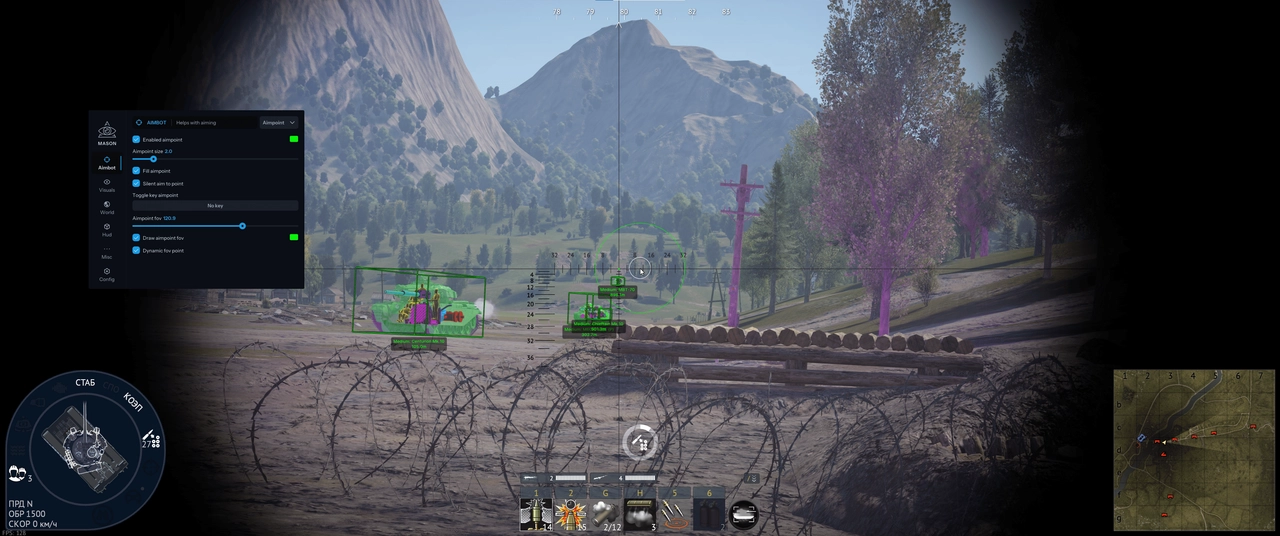
Unlike typical ESP cheats that only show a silhouette and a nickname, MASON INTERNAL highlights specific armor components: the ammo rack, engine, transmission, gun breech, barrel, and crew positions. In War Thunder, where a hit to the ammo rack is almost an instant explosion and a hit to the engine or transmission kills your mobility, that's not cosmetic, it's a direct tool built around the game's damage mechanics.
How we tested MASON INTERNAL
We tested in Realistic Battles on ground vehicles (the main mode where most of the cheat's users play) and in Simulator Battles, where there's no aim assist at all and you normally calculate lead by hand, which makes MASON's auto lead especially noticeable. We ran roughly a dozen matches across different maps: forest and urban locations for ground combat, a couple of mixed sorties with aircraft, and separate checks on the naval side, where the module ESP is noticeably less detailed than on tanks. In Arcade Battles we mainly watched how well the game's built-in aim assist plays together with the cheat's silent aim, so the reticle doesn't jitter or look suspicious in a match replay.
We also judged how the cheat behaves across vehicle ranks separately: at low ranks, where fights are fast and a crowd of vehicles converges on one point, the module ESP helps the most because there's simply no time to read a silhouette manually. At top ranks with modern tanks and aircraft, the difference feels smaller, positioning on the map matters more there, and the cheat mostly just tells you exactly where to put the crosshair once a target is already exposed.
War Thunder's anti-cheat has been dual since December 2024: BattlEye at the system kernel level, plus Viking, which is built directly into the game client and runs on top of the process without needing admin rights. The data both systems send to the server is encrypted, which makes Viking harder to analyze from the outside. At the time of our check, the MASON launcher started without any warnings, and the cheat is listed as undetected.
MASON INTERNAL features: a hands-on breakdown
MASON INTERNAL aimbot: aim point and auto lead
The base aim is configured through an aim point (hull, turret, or a specific module) and silent aim, which pulls onto a target without a sharp camera jerk, plus an adjustable dynamic FOV that narrows on lock and widens during free camera movement. In Arcade Battles this is already enough thanks to the game's own built-in aim assist, so the software mostly speeds up your reaction there rather than deciding the outcome of a fight.
The aim is far more noticeable in Simulator Battles, where aim assist only exists for radar-guided ordnance, there's no third-person view, and players normally calculate lead and range by hand using the gunsight reticle. MASON's auto lead takes that off your hands: against a moving target the software calculates the aim offset with a choice of where to aim, turret or hull, and keeps updating the calculation as the target's speed and heading change. There's also auto artillery with a filter by vehicle type, which is handy when firing at groups of targets at long range.
In the air and at sea, auto lead works on the same logic but the point of application differs: for aircraft the software calculates the tracer lead based on the target's speed and angle, while for ships, where speeds are lower but engagement ranges are longer, the gap between manual and auto calculation feels the biggest. We compared our own hits against MASON's calculation over a couple of Simulator Battles matches on ships, and the cheat's spread at range was consistently tighter. A detailed breakdown of lead ballistics across all three combat domains, aviation, ground, and navy, is available in a separate piece, a detailed lead breakdown.
- aim point with zone selection (hull, turret, module)
- silent aim without camera jerks
- dynamic FOV, adjustable per battle mode
- auto lead with aim point selection against moving targets
- auto artillery with a filter by vehicle type
- auto recon, helping you find targets on the map faster
- aim warning indicators showing when someone already has you locked
The last item on the list, the indicator that someone's aiming at you, doesn't affect your own aim directly, but it changes tactics: seeing that an enemy already has a lock, it's easier to duck behind cover or angle your armor in time instead of relying on reaction speed alone. Combined with auto recon, this cuts down on the random hits from bushes that people usually complain about in team chat after a match.
Module ESP: MASON INTERNAL's main feature
This is the reason to look at this cheat separately from the usual run of ESP cheats. Instead of a silhouette and a nickname, MASON highlights specific armor components in different colors with precise hitboxes. Modules can be toggled individually, which is useful when the screen is already cluttered with icons during a drawn-out 8v8 fight.
- ammo rack (near instant explosion of the vehicle if penetrated)
- engine (loss of mobility without a single hit on the crew)
- transmission (the vehicle stops in its tracks)
- gun breech (temporary loss of the ability to fire)
- barrel (reduces the enemy's accuracy)
- commander's position
- gunner's position
- loader's position
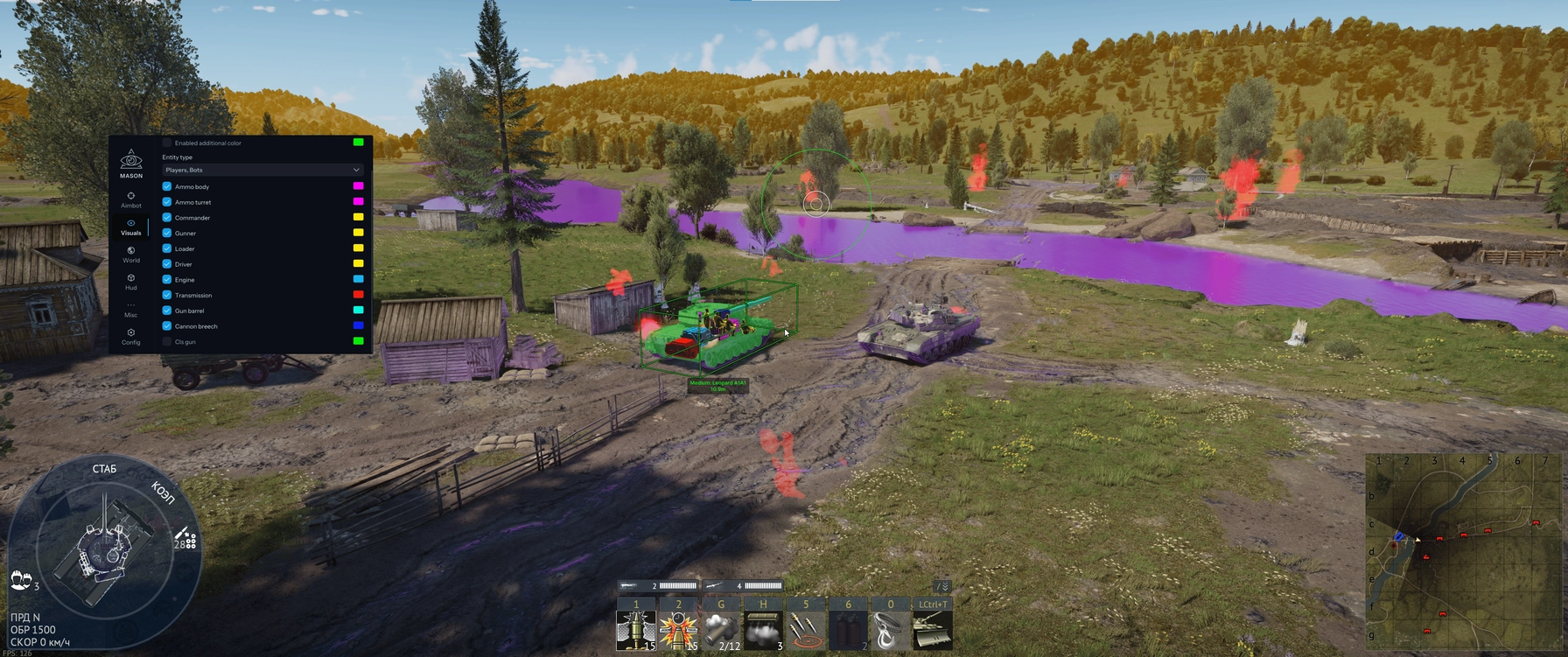
The value here is tied to War Thunder's damage model, not some abstract highlight. A hit to the ammo rack almost always causes an instant explosion, penetrating the engine or transmission stops the vehicle in its tracks without firing a single shot at the crew, and accurate fire on the gun breech disables the weapon faster than the enemy expects. Knowing exactly where each component physically sits on a specific tank model makes it easier to aim for the decisive spot instead of bouncing a series of shots off frontal armor. Each module's color is configured separately: in our setup the ammo rack and engine were marked in contrasting colors, while lower-priority spots like crew positions were dimmed down so they don't clutter the screen.
Player and bot ESP works separately: silhouettes, distance, vehicle status, plus reload and repair timers, which helps decide whether to finish off a target or switch to the next one. The repair timer is especially useful against players putting out an engine fire under cover of a smoke screen, you can see exactly how many seconds are left before the vehicle moves again and whether it's worth spending a shell to finish it off or better to look for the next target.
In practice, the difference between reading modules manually and with highlighting is most noticeable on vehicles with an unusual armor layout, for example casemate tank destroyers or heavy tanks with a spread-out crew. Without ESP you have to keep component positions in your head from memory or past experience on that vehicle line, with cheat highlighting the decision takes a split second because the colored marker points straight at where to bring the barrel. On vehicles you're seeing for the first time this is especially noticeable: without a hint some of the first shots go into frontal armor without effect, with highlighting a miss happens less often.
| Combat domain | What ESP shows | How detailed |
|---|---|---|
| Ground vehicles | Ammo rack, engine, transmission, gun breech, barrel, crew by role | Maximum, full set of modules |
| Aviation | Target silhouette, distance, status (alive, shot down) | Basic level, no modules |
| Navy | Silhouette, distance, gun reload timer | Medium, some ship modules |
For navy and aviation, module detail is noticeably lighter than for tanks: for ships and aircraft ESP shows more of a silhouette and basic markers than a full set of components. The reasoning is straightforward: War Thunder's own damage model is most detailed for ground vehicles, so that's where the cheat squeezes the most out of it too. On the naval side this is partly offset by longer engagement ranges, where a precise hit on a specific compartment matters less than simply holding the lock through a long shell flight time. How modules and terrain read on screen under different conditions, with examples from specific maps, is covered in a separate piece, module ESP and terrain.
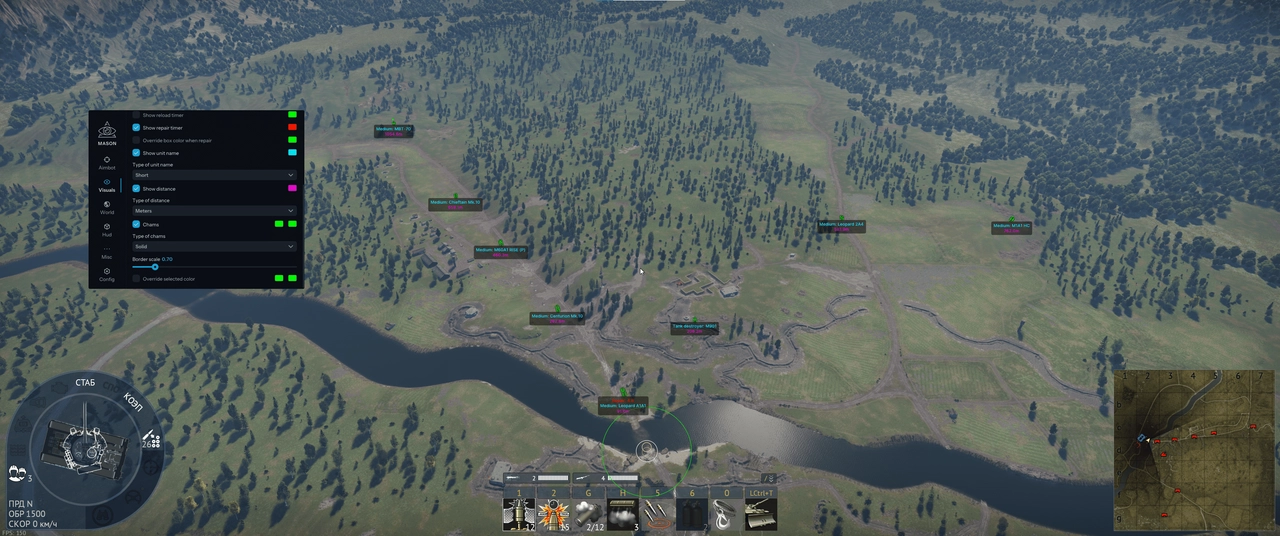
Misc and world options in MASON INTERNAL
Besides combat features, the cheat has a script system for unlocking promo vehicles that would otherwise require event bundles or a purchase, plus a World options block: disabling trees, smoke, and decorations, and changing the color of water, fog, and the overall environment, up to rainbow-style effects. Some of it is purely cosmetic, some of it genuinely affects the fight: without thick foliage and smoke screens it's easier to keep watch over forest maps, where a tank destroyer or a light tank usually hides on the flank.
On arctic and urban maps, changing the fog and environment color has a different effect: a high-contrast background makes it easier to spot silhouettes at range, where the game's default palette blends vehicles into the terrain. On desert maps, where there's already little cover, this option feels weaker, but disabling decorations clears the narrow passages between buildings where ambushes usually sit. There's also a separate HUD setup and a free camera for scouting a position without risking exposure to fire, more of a support function than a combat one, but useful when scouting an approach on a new map.
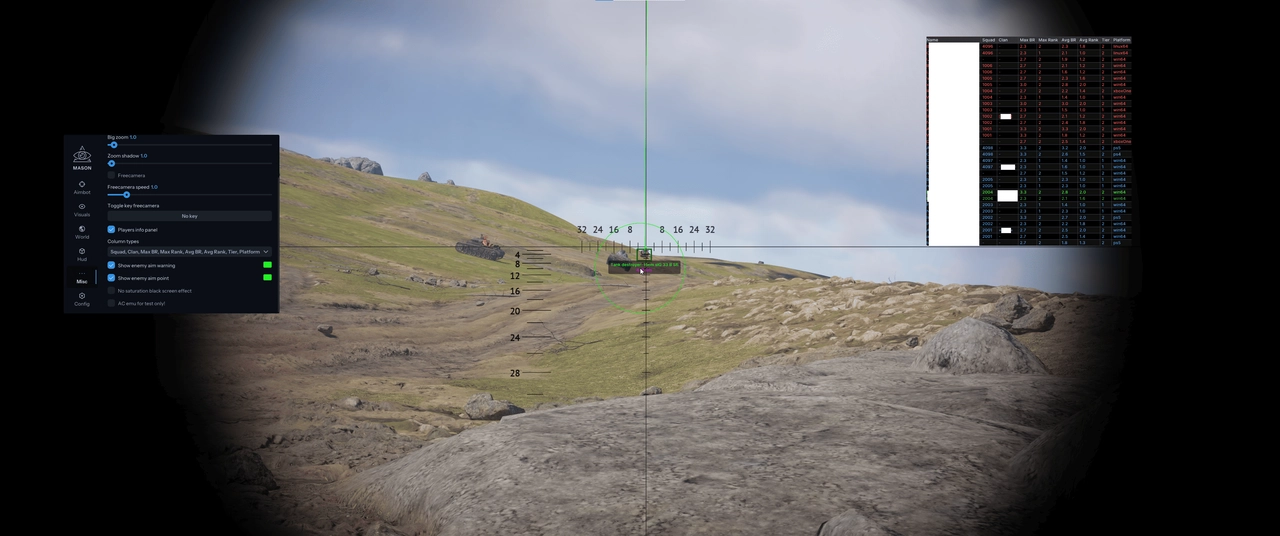
The software also feeds into the economy indirectly: faster wins and accurate hits on weak spots earn more Silver Lions and Research Points in the same amount of time, and unlocking promo vehicles through scripts fills gaps in the hangar without spending on Golden Eagles or a premium account.
Closed source and a limited user base
Developer Mason keeps the code closed and deliberately limits the number of active cheat users. The logic is simple: the more people running the same build at once, the faster BattlEye and Viking accumulate enough signatures to flag it. A smaller user base combined with daily updates after patches is a tradeoff between accessibility and how long the undetected status survives, and it's exactly what keeps the price higher than mass-market cheats with open source code that get banned in batches within a couple of weeks of a patch release.
Stability and launching MASON INTERNAL
The software is internal, launched by a loader on top of the running War Thunder client, without any complicated BIOS work. The system requirements listed on the cheat's page are as follows:
- Windows 10 or 11, builds from 2004 through 26H1
- Intel or AMD processor
- DirectX 11 in x64 mode
- launch through the Gaijin game launcher or through Steam, in windowed or fullscreen mode
Over the course of our check the launcher started on the first try, and there were no crashes out of the client in either Realistic or Simulator Battles. The developer pauses the subscription during major game updates and updates the build daily after patches, which makes sense given the dual BattlEye and Viking protection: skipping a day after an update raises the risk of getting flagged by signature detection.
In December 2024, Gaijin banned 7106 accounts in a single month based on player reports, server-side replays, and signatures from both protection systems, so pausing the subscription looks like a reasonable call rather than a box-ticking precaution. War Thunder's ban process is built around manual review: first a report from another player or a saved server replay of the match, then a review by Gaijin's team checking BattlEye and Viking signatures, and only after that a ban, often without the right to appeal if kernel-level BattlEye triggered it. The status on the cheat's page right now is undetected with an excellent reliability rating, but with any War Thunder update it's worth checking the status before launching rather than starting blind.
MASON INTERNAL pros and cons
Pros:
- Module ESP tied to War Thunder's actual damage model, not an abstract silhouette highlight
- Auto lead with aim point selection, especially noticeable in Simulator Battles without aim assist or a third-person view
- Daily build updates after game patches and undetected status at the time of our check in August 2026
- Internal execution with no overlay on top of the window, reducing how visible the process is when recording a stream or screen-sharing
- World options for a clear view on forest and urban maps, useful when scouting new vehicle lines
Cons:
- Module ESP is noticeably weaker for aviation and navy than for ground vehicles, where detail is at its maximum
- The subscription pauses during major updates, so access temporarily disappears until the developer confirms safety
- Constant status checks before launch are needed because of the dual BattlEye and Viking protection, better not to open the launcher blind
- Some World options, like changing the environment color, are noticeable to other players in match replays
MASON INTERNAL price and how to buy it
| Subscription period | Price | Who it suits |
|---|---|---|
| 1 day | 500 rubles | a one-off session, testing features before buying a longer plan |
| 7 days | 2000 rubles | an active week of play, closing out a specific vehicle line |
| 30 days | 4000 rubles | regular players, seasonal events with promo vehicles |
The weekly subscription is nearly one and a half times cheaper than the daily one per day, and the monthly plan makes sense if you're planning to grind out a specific vehicle line or a seasonal event with promo machines. You can set up a subscription and check the current status (undetected or updating) on the buy MASON INTERNAL page.
If module ESP isn't the only thing you're interested in, take a look at the rest of the War Thunder cheats on the hub, where you can also compare prices and features across other options for ground, air, and naval combat, and pick a combo that fits your play style instead of forcing one piece of software to cover all three domains at once.
Questions about installation or compatibility are best handled directly with support: Telegram (300+ members) and Discord (2000+ members), where the community also shares the cheat's current status after every War Thunder update, setup screenshots, and firsthand experience on specific vehicle lines, which is often faster than reading an instruction guide from scratch.
Who MASON INTERNAL fits
There's no one-size-fits-all "just buy it and don't think" answer here, people behind the stick and behind the tank levers have too many different needs.
If price matters most: grab a day for 500 rubles for a one-off session to get a feel for the module ESP over a couple of matches. Upgrading to a week or a month only makes sense if you actually play every day and are closing out a specific vehicle or event, otherwise the extra cost doesn't pay off in the number of matches you get.
If safety matters most: watch the status on the cheat's page before every launch after a War Thunder patch, the developer pauses the subscription during major updates for exactly this reason. Don't launch the cheat blind in the first hours after a client update, even if everything worked fine yesterday.
If you need maximum functionality across all three domains at once: MASON's module ESP is strongest in ground combat, where the tank damage model does the heavy lifting, while detail for aviation and navy is noticeably simpler. For a more even balance of features across all three combat domains, it's worth looking at alternatives in the catalog, such as ARCANE PRO.
Frequently asked questions about MASON INTERNAL
Is MASON INTERNAL detected or undetected right now?
At the time of our check in August 2026, the status is undetected, with an excellent reliability rating. Developer Mason updates the build daily after War Thunder patches and pauses the subscription during major client updates until the safety of the new version is confirmed in closed testing. The current status is always visible on the cheat's page on ForgeCheats, check it before every launch rather than relying on yesterday's experience.
How much does MASON INTERNAL cost?
A daily subscription costs 500 rubles, a weekly one costs 2000 rubles, and a monthly one costs 4000 rubles. Prices are listed in the ForgeCheats catalog and can change with major feature updates, so check the current values on the product page before paying.
MASON INTERNAL won't launch, what should I do?
First check the cheat's status on the product page: if it shows updating after a War Thunder patch, the launcher is intentionally unavailable for a while. If the status is undetected and it still won't launch, contact support through Telegram or Discord with your Windows version and the error text.
Do I need a spoofer with MASON INTERNAL?
The product page doesn't list a spoofer separately, and a ban in War Thunder usually comes not from HWID but from a manual review of a player report or a server replay by Gaijin's team combined with BattlEye and Viking signatures. So launch discipline and checking the status matter more than a spoofer, but if an account has already been banned, it's worth asking support about the hardware question specifically.
How is MASON INTERNAL different from ordinary ESP cheats for War Thunder?
Most ESP cheats for War Thunder only show a vehicle silhouette and a player nickname. MASON INTERNAL adds highlighting for specific armor components: the ammo rack, engine, transmission, gun breech, barrel, and crew positions, each with its own color and a precise hitbox. This is tied to the game's actual damage model, so a hit on a highlighted component gives a predictable result instead of just registering damage against a silhouette.