
NN PRO for Wardogs is worth buying if you play around vehicles, structures and long-range fire: in our whole catalog for this game, it is the only build with mortar aiming that filters targets by object type. It is an internal cheat from the developer NN, undetected at the time of our check, compatible with Elytra, and a day costs $5. Besides the aim you get full ESP that shows the enemy's rounds in the magazine and armor durability, a world layer with vehicle hull condition, and a radar that puts markers right on the in-game map. The product page with all screenshots is here: NN PRO.
About its age: NN PRO only joined the catalog on September 21, 2026, so there are few reviews under the product page so far, and this review rests on our own run rather than a hundred other opinions. We tested the software on the game build after Patch 0.11, on Bakurani and Ozeti, on official and community servers, and looked at the aim, ESP, world layer, radar and how the menu behaves over a long session. Below is a tab-by-tab breakdown from actual play, a separate section on the lighter NN LITE, and a note on who does not need this pair at all.
How we tested NN PRO
We built the test around how a Wardogs match actually plays out: up to 100 players, three teams, a 2x2 km Control Zone inside a big map, and a Hot Zone that shifts inside it where every player counts as two. You cannot really test that format on a shooting range, so we spent almost all our time in live matches and tuned the quieter settings on an empty community server before joining. We used both maps currently available: Bakurani has plenty of open slopes and long sightlines, while Ozeti has dense buildings and a stadium, which is where the world ESP carries the heaviest load.
We paid separate attention to Elytra compatibility. The Wardogs anti-cheat runs at the Windows kernel level. The beta used Easy Anti-Cheat, which was replaced with Elytra for release, and according to the press the focus there is behavior analysis: unnatural aiming and repeatedly tracking an enemy through walls. That is why we did not test the aim at maximum speed but at the settings we would recommend ourselves for long-term play. The build stayed undetected throughout the test, but the status applies at the time of purchase, and with an anti-cheat like this there is always some risk.
In every session we logged how quickly the aim returns to a target after it leaves the capture circle, whether vehicle markers get lost when a vehicle drops behind a hill, how the radar behaves when you switch windows, and how long it takes to find a specific setting in the menu. That last point seems minor until you urgently need to switch off half the world layer in the middle of a fight for the point. Alongside that we watched for small rendering bugs: labels overlapping each other in dense buildings and markers that stay behind where an object has been destroyed.
NN PRO features in practice
The NN PRO menu is split into tabs for player, world, radar, skeleton, colors, system and configs, and on the right there is always a model preview with a box, health bar and armor marks. We go through it in order, from the aim to small things like the remaining subscription time.
Vector aim: hold key, bones and capture circle
The main aim here is called vector aim and works on a hold key, so it only kicks in when you want it to. Target priority can be set two ways: closest to the crosshair or closest by distance. On a 16x16 km map the second option is useful less often than you would expect, because in the Control Zone enemies often stand far away but close together, and crosshair-based capture behaves more predictably. The capture circle is drawn on screen and shows at a glance whom the aim will take.
There are four bones: head, neck, chest and pelvis. For aiming you get smoothing, a dead zone and a speed limit on crosshair movement, and we consider that last setting the most important one for Wardogs. If Elytra's behavior analysis looks for sharp snaps, a speed limit makes the adjustment look like a normal hand. Target lock stops the crosshair from jumping between enemies mid-burst, and teammates are ignored automatically, which saves you a lot of grief in a three-team fight with mixed squads.
- Crosshair priority works better inside the zone, distance priority on the open slopes of Bakurani.
- Chest and pelvis at medium range look far more natural than the head.
- The speed limit and dead zone matter more than smoothing strength.
- Keep the capture circle small so the aim does not reach for targets at the edge of the screen.
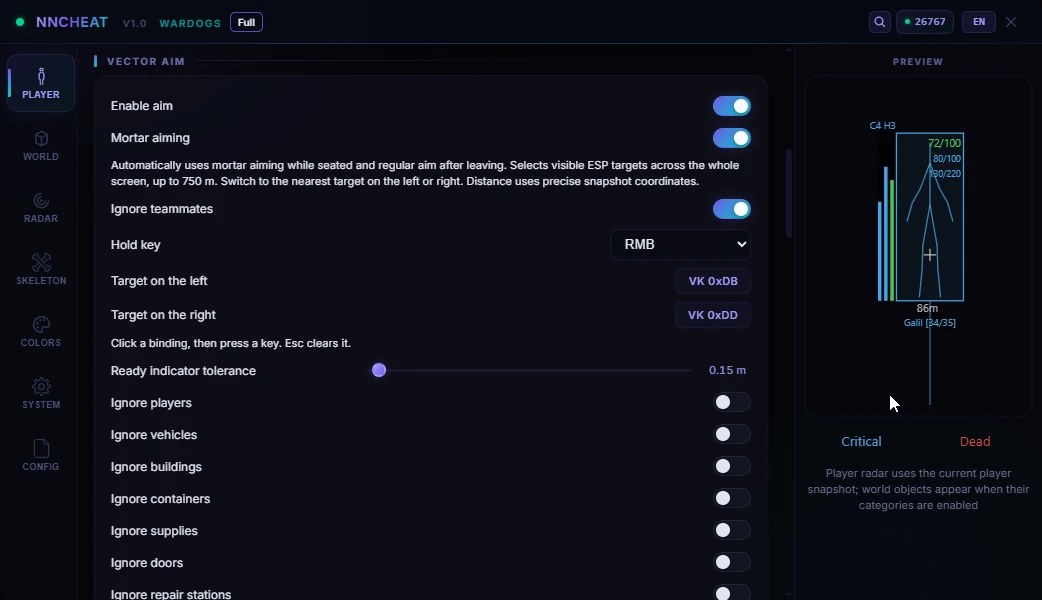
Mortar: aiming with object type filters
This is the most unusual part of the build and the main reason we wrote a separate review at all. Mortar aiming in NN PRO works on a left and a right target: two keys pick the nearest target to the left or to the right, and the aim switches between them without you working out the angle by hand. No other product in our Wardogs catalog has this feature.
What makes it useful is the filters. The menu lets you switch off object types you do not need right now: players, vehicles, structures, containers, supplies, doors, repair stations. In a Control Zone fight that means something simple: if the job is to break enemy fortifications, you leave only structures on and the aiming does not get distracted by infantry. If you need to clear a squad off the point, you flip the filter the other way. In a game where you can bring down an apartment block with an RPG and the vendor FOB went up to $7,500 in Season 1, working on structures makes direct economic sense.
Classic projectile teleport and no recoil
Projectile teleport in NN PRO uses the Classic mode. The projectile does not land dead center on the target but with an offset from the hit point, and the side it seems to come from is chosen in the settings. The point of these two parameters is to keep your hit pattern from looking identical shot after shot. We would not keep this feature on for the whole match: it is the most noticeable part of the package, and it makes more sense to use it selectively.
The combat block is rounded out by no recoil and no spread. Spread is removed completely, recoil too, and at long range that makes a noticeable difference, especially with a machine gun. For quieter play you can leave no recoil on and not touch projectile teleport at all.
Player ESP: rounds in the magazine and head and chest armor
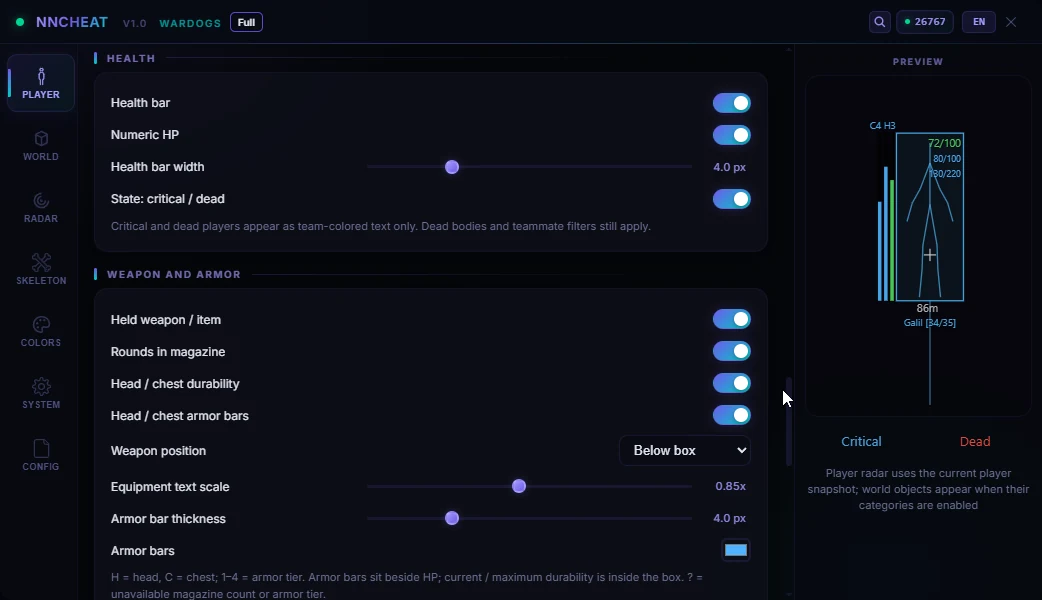
Boxes in NN PRO come in four styles, and each changes color depending on whether you see the enemy directly or they are behind cover. On top of the box you get the name, distance and weapon in hand, and then data we have not seen in other Wardogs builds: the number of rounds in the enemy's magazine and their armor durability, separately for head and chest.
In a fight it works like this. You see the enemy has only a few rounds left, so a reload is coming, and that is exactly the second to step out. You see their chest armor has dropped while the helmet still holds, so aiming at the body makes sense. The health bar shows critical and dead marks, so you will not confuse a downed enemy with a live one, or a finished one with someone medics are about to revive.
The skeleton is drawn with a glow, and the color can be set for each bone separately. It sounds cosmetic, but on busy Ozeti with a dozen targets on screen, separate colors really help you quickly see where an enemy is looking and what stance they are in.
World ESP: vehicles, structures, supplies
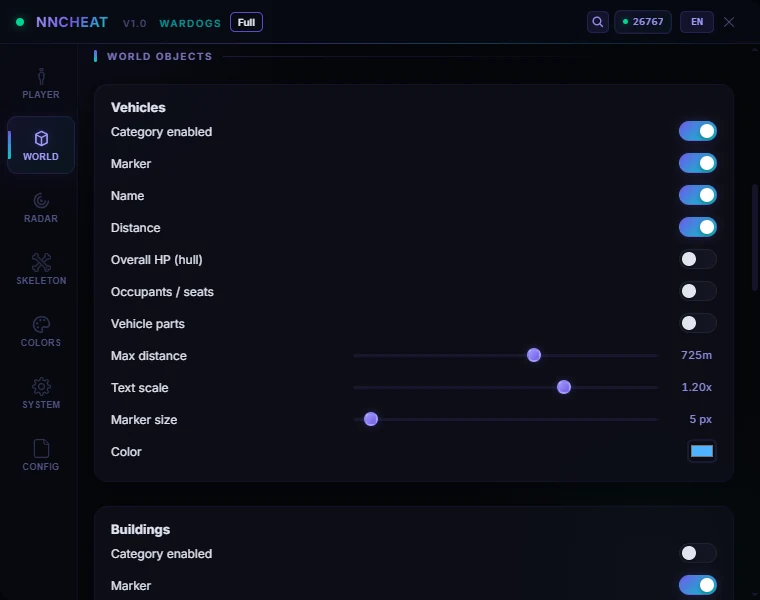
The world tab is what sets NN PRO apart from most of its catalog neighbors. Vehicles are labeled with more than a name: next to it you see hull condition and the number of occupied seats. When an Artillery Tank costs $500,000 and a Little Bird with miniguns $50,000, knowing that an enemy tank is already damaged and has one person inside is worth more than any distance number. We covered in detail why this economy calls for a vehicle layer in our piece on Vehicle ESP and radar for vehicles in Wardogs.
Besides vehicles, the world layer shows structures, containers, supplies, doors and repair stations. Structures give you a picture of enemy fortifications before you reach the ridge. Supplies and containers hint at where a squad will restock. Repair stations help the other way round: you see where a damaged vehicle will head, and that is a good place to meet it. Distance, marker size, text scale and color are set separately for each category, so the screen does not turn into a Christmas tree.
- Vehicles: name, distance, hull condition, occupied seats.
- Structures and doors: handy when storming a fortified point.
- Containers and supplies: where the enemy will restock gear.
- Repair stations: where damaged vehicles retreat to.
Radar and markers on the in-game map
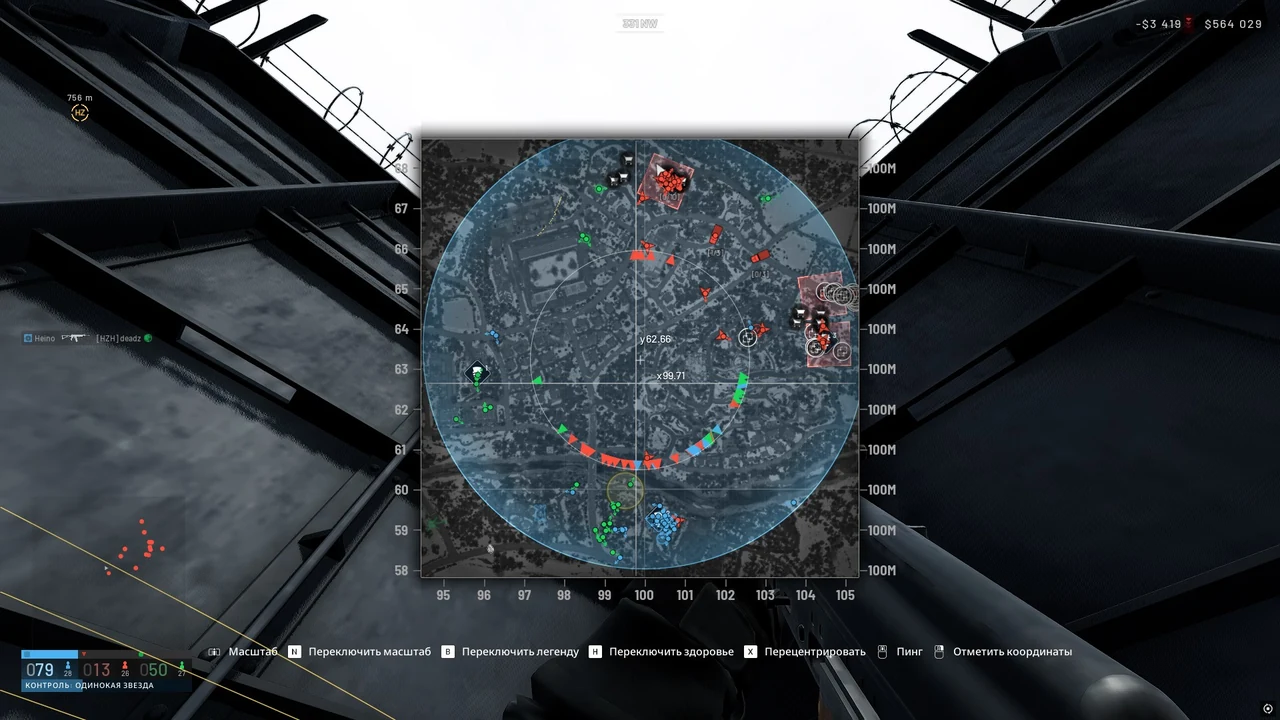
You can set the radar's size, range and shape, it can rotate with the camera, and most importantly it puts markers straight onto the in-game map. In Wardogs this matters more than usual: the Hot Zone shifts inside the Control Zone, and it is easier to see where most enemies are standing right now on the big map than on a small circle in the corner. We explained how this ties into scoring to 100 points in our article on Control Zone and Hot Zone.
One more small thing we liked during the test: the radar keeps working while the game is minimized. While you wait for a respawn and sort through gear, you do not lose the picture on the point.
Misc: tracers, overlay hiding, searchable menu
Bullet tracers draw the trajectory, so you can see exactly where fire is coming from even if the shooter is not in frame. Hiding the overlay from screen capture keeps the visuals out of recordings and streams, which is one reason NN PRO is easy to keep running during a broadcast. The menu is available in Russian and English and has a search across settings: with seven tabs, finding the right slider without search can take longer than playing a round. Configs are saved, and the remaining subscription time shows right in the menu, so your key running out will not surprise you mid-match.
HWID spoofer and safety with Elytra
There is no spoofer included with NN PRO, and it is better to know that up front. The Bulkhead policy has four steps, the last being a hardware ban tied to a device identifier, and that ban cannot be appealed. If you have already been punished in Wardogs, look separately at the HWID spoofers in our catalog. As for the software itself, the advice is simple: the fewer sharp adjustments in your play, the calmer things are. We explained in detail why builds without aim get flagged less in our article on wallhack without aim and closet cheaters, and the same logic applies to NN PRO with the aim turned off.
NN LITE: the lighter version from the same developer
NN has a second build for Wardogs, and for some players it will be the smarter pick. NN LITE is visuals only: there is no aim at all, no vector aim, no mortar, no projectile teleport. It costs $3 a day, $12 a week and $25 a month, which makes it one of the cheapest ways into the catalog for this game.
What LITE keeps: boxes, visibility-based color, name and distance, snap lines, skeleton, and filters for corpses, teammates and distance up to 1000 m. There is a radar with names and view direction, markers on the minimap and on the big map via the M key, and overlay hiding from recording. And one LITE feature is even more interesting than in the older version: a per-bone skeleton editor where each bone is configured on its own.
| Parameter | NN PRO | NN LITE |
|---|---|---|
| Aim | vector aim, projectile teleport, mortar | none |
| Player ESP | boxes, ammo, head and chest armor | boxes, name, distance, skeleton |
| World ESP | vehicles, structures, supplies, repair stations | none |
| Radar | with markers on the in-game map | with names, markers via the M key |
| Recording hiding | yes | yes |
| Price per day | $5 | $3 |
The choice comes down to a simple rule. If all you need is a wallhack, LITE is cheaper and safer by its very nature, because there is nothing in it that could produce unnatural aiming. If the purchase makes no sense for you without the mortar, vehicles and structures, take PRO. To compare pure ESP options, also check our ANCIENT review for Wardogs: another ESP-only build that shows allies through walls.
NN PRO stability and launch
The build launches through NNLauncher, and its instructions are available in your account after purchase. The game must be from Steam and run in Windowed or Borderless mode; fullscreen is not supported. Both Intel and AMD processors work, and the OS can be Windows 10 or 11. The game currently has no Secure Boot or TPM requirement: Bulkhead officially does not require them but reserves the right to introduce that requirement at any time.
In our test after Patch 0.11 there were no crashes caused by the software, and the overlay stayed stable even on crowded Ozeti. The world layer is the heaviest part if you enable every category at maximum distance, so on weaker hardware we would cut the range for structures and containers. If the game will not start with an anti-cheat error, the cause is almost never the cheat: Elytra has its own launch problems, up to WD-L020 after the Windows 11 preview update KB5124010. It is better to sort those errors out first and only then run the software.
It is too early to judge update frequency: the build is less than a week old, and no major game patch has come out in that time. The next big checkpoint will be the Season 2 release on October 15.
NN PRO pros and cons
This list comes straight from our test run.
Pros:
- Mortar aiming with object type filters, unique in the Wardogs catalog.
- Rounds in the magazine and head and chest armor durability in player ESP.
- A world layer with vehicle hull condition, occupied seats, structures and repair stations.
- A radar with markers on the in-game map that works with the game minimized.
- Overlay hiding from recording and a Russian and English menu with settings search.
Cons:
- The build is new, there are few reviews and a short update history.
- No spoofer included; after a hardware ban you will need one separately.
- Projectile teleport is noticeable, and we do not recommend leaving it on all the time.
- No fullscreen mode, only Windowed and Borderless.
NN PRO price and how to buy
A day of NN PRO costs $5, a week $15, a month $30. Compared with the daily price, a week costs the same as three days, and a month works out five times cheaper than renewing daily. We would start with a day: that is enough to tune the aim for yourself, try the mortar in a live fight for the point, and see whether you need all that depth at all. The key arrives right after payment, then comes the launcher and the instructions from your account. You can place the order on the product page: buy NN PRO for Wardogs.
If after reading this PRO feels like overkill, look at the other cheats for Wardogs: the catalog has full packs with Loot ESP, pure ESP builds and DMA options on a second machine. The difference between them is not just price but which jobs in a match they cover.
Ask questions about setup and launch in the community: Telegram (200+ members) and Discord (637+ members). The first ready-made NN PRO configs from players are already showing up there.
Who NN PRO is for
It all comes down to what you actually do in a match.
If price matters most: NN PRO at $5 a day sits in the middle of the catalog range. If you do not need aim, NN LITE at $3 gives you visuals and radar for less.
If safety matters most: keep the aim off or on a soft speed limit, and do not turn on projectile teleport. Played this way, NN PRO works as an advanced ESP with recording hiding.
If you want the most features around vehicles: NN PRO shines for players who drive, repair and destroy vehicles and structures. If you need aim specifically at vehicles and turrets with ballistics, compare it with our BYSTER review for Wardogs, which has a different set of strengths.
If you play the point: the filtered mortar and the big-map radar give you a picture of the Control Zone that is hard to get any other way. The full list of alternatives is in the Wardogs cheats section.
NN PRO FAQ
Is NN PRO detected or undetected right now?
At the time of our check after Patch 0.11, NN PRO is undetected and compatible with Elytra. The status on ForgeCheats reflects the situation at the time of purchase, not a lifetime guarantee. In Wardogs a punishment can go as far as a hardware ban with no warning, so check the current status on the product page before every renewal.
How much does NN PRO cost?
A day costs $5, a week $15, a month $30. The lighter NN LITE without aim costs $3 a day, $12 a week and $25 a month. For a first look we recommend a daily key: it is enough to tune the aim, test the world ESP and see whether the build fits your style.
NN PRO will not launch, what should I do?
First check that the game is started from Steam in Windowed or Borderless mode. If the game itself shows an anti-cheat error, such as WD-L020 or ANTI-CHEAT LOGIN FAILED, the problem is on the Elytra and Windows side, not the software. If the game starts but the cheat does not, contact support with the error text.
Do I need a spoofer with NN PRO?
For a clean account and hardware with no ban history, a spoofer is not required. But if the device has already received a Wardogs hardware ban, a new account on the same machine will not help, because the restriction is tied to the device. In that case you need a spoofer separately; it is not part of NN PRO.
How is NN PRO different from NN LITE?
PRO adds aim, mortar aiming, projectile teleport, no recoil and no spread, plus a world layer with vehicles, structures and supplies and extended enemy data. LITE keeps only player visuals, the radar and map markers, but it costs less and gives aim behavior analysis nothing to catch.