BYSTER for Wardogs is worth buying if you fight in and around vehicles: it is an internal cheat with aim that works on vehicle crews and turret gunners, ballistics for long shots and one of the most detailed world ESP setups among the Wardogs cheats in our catalog. The build is undetected and works with Elytra after Patch 0.11. Entry costs about $3 for a day, the lowest price for this game in our catalog. All periods and the live status are on the BYSTER for Wardogs product page.
First, the limits. The product card lists no stream protection, it runs only in windowed mode, and some features such as the boosted fire rate are visible to any attentive opponent. Below we go through what in the menu actually works in a 100-player match, where BYSTER beats the other builds in the catalog and where you should hold back. This text is based on our own testing, not on a retelling of the developer's description.
How we tested BYSTER in Wardogs
The test rig was ordinary: Windows 11 build 24H2, the Steam version of the game, the client after Patch 0.11 from September 12. We played on Bakurani and Ozeti, on official servers and on several community servers picked from the browser. We looked at four things: how the aim tracks infantry and targets in vehicles, how readable the world ESP is inside the Control Zone, how the weapon modifiers behave and whether the game crashes on map changes and reconnects.
The anti-cheat in Wardogs is now Elytra, and it runs at the Windows kernel level. The alpha and the closed beta used Easy Anti-Cheat, but it was replaced before Early Access launched on September 10. According to the press, Elytra focuses on behavior analysis: unnatural aim, repeatedly tracking an enemy through walls. So the question of whether it gets caught was secondary for us. First of all we checked how the settings look through the eyes of another player on the server. At the time of publishing BYSTER is undetected, and the current status is always shown on the product card.
Moderation at Bulkhead combines AI with a manual review by a human, and in Season 1 reports became weighted: complaints from people who report everyone carry less influence. That means a single report does not decide much, what matters is how strange a player looks from the outside. We kept this in mind while choosing the settings for the test.
BYSTER features: a hands-on breakdown
The BYSTER menu is split into four tabs: Aim, Visuals, World and Tools, with a settings search in the header. We go in order, from targeting to weapon modifiers, and in each block we say what helped in a real match and what stayed switched off.
BYSTER aimbot: infantry, crews and the vehicles themselves
The basic part of the aim will be familiar from any internal software: bone and target priority selection, FOV with an on-screen circle and a distance cap, smoothing, a humanizer and a visibility check. The FOV circle is drawn over the crosshair, the radius is set with a slider, and the distance cap filters out targets your bullet would not reach accurately anyway. We kept the humanizer on for the whole test. Without it, snapping at low smoothing looks like a jerk, and those jerks are exactly what both live players and Elytra's behavior analysis notice first.
The main difference from the other builds in the catalog sits in the vehicle targets block. BYSTER's aim works on enemies in vehicles and on turrets: the gunner on a Humvee with a minigun or the shooter in the back of a URAL Attack is the same kind of target for it as an infantryman on a slope. A separate toggle enables aiming at the vehicle itself, and then the target becomes the hull of the machine, not the person inside. This comes in handy when you need to finish off a damaged vehicle or put a burst into a helicopter hovering over a point.
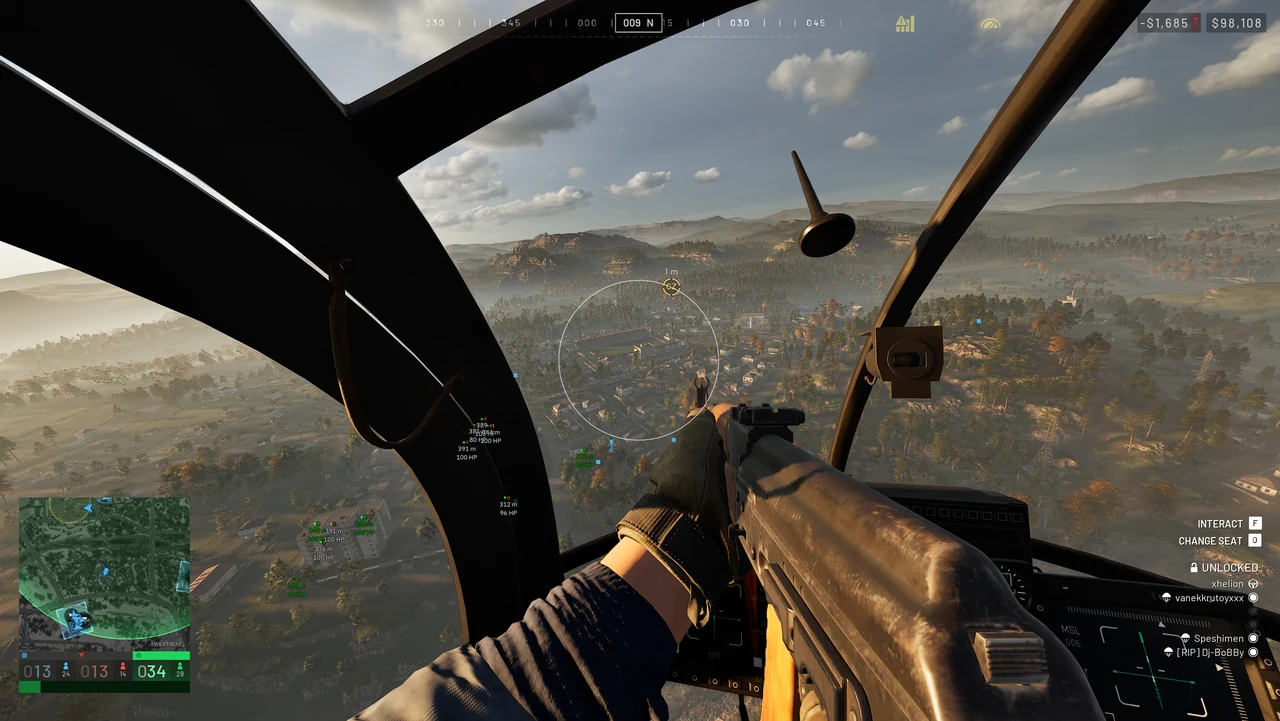
In Wardogs this feature matters more than in a regular shooter because of the Season 1 economy. A Little Bird with miniguns costs $50k, a Z20 Lakota $35k, an Artillery Tank $500k, and every vehicle you bring down knocks a noticeable chunk of cash out of the enemy team. Why vehicles shape the match and why you should track them with ESP and radar, we covered in detail in our article on $500,000 vehicles and Vehicle ESP. The aim also works from inside a helicopter: in the screenshot above the FOV circle hangs over the buildings while the door gunner looks for a target below.
The aim settings we ended up with after several evenings on Bakurani turned out modest:
- a small FOV circle, so the aim does not grab targets at the edge of the screen;
- smoothing above average with the humanizer switched on;
- the visibility check always on, otherwise the crosshair follows an enemy through a hill;
- priority by the target closest to the crosshair, not by distance.
With this combination, onlookers just see confident shooting, not a crosshair glued to someone's head. If you want to play more aggressively, raise the FOV radius gradually and rewatch a recording of your match: a sharp 90-degree flick is what people notice first.
This block has a weak spot too. Aiming at vehicles does not make your weapon stronger: you will not get through a tank with a rifle, the aim only places the bullets precisely on the hull. The feature pays off with an RPG and heavy weapons, and against light vehicles like the Dune Buggy, where hull damage takes the machine out fast.
Ballistics: prediction and gravity compensation
Long range is handled by the Ballistics tab. There you switch on prediction, the projectile speed is picked up automatically from the current weapon or set by hand, and next to it sit the prediction scale and gravity compensation. The Wardogs map covers 16 by 16 km, the terrain is mountainous, and firefights across a valley at hundreds of meters are routine here. Without ballistics the aim is useless at such ranges.
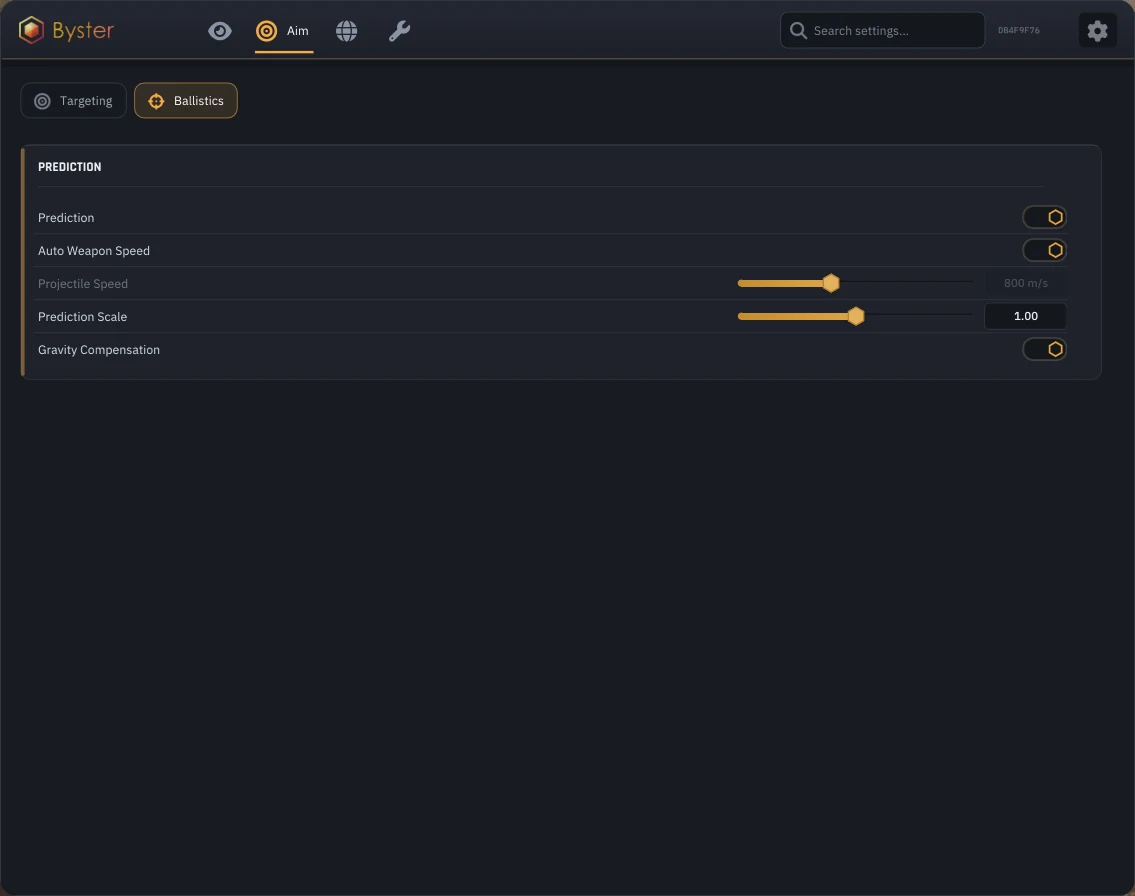
With automatic projectile speed the ballistics follow your weapon swaps on their own: pick up a sniper rifle and the lead point is recalculated without any extra steps. We rarely needed the manual mode, mostly against fast vehicles when we wanted a little more lead. The prediction scale defaults to 1.00, and we left it alone for infantry.
Gravity compensation solves bullet drop. Without it, the aim looks at the chest while the bullet lands below the target. With it, the vertical lead is calculated for you, and a shot at a sniper on a roof across half the Control Zone lands where the selected bone is. For anyone holding long-range positions above the 2 by 2 km zone, this is the most useful part of the whole aim.
Player ESP: armor, stance and squad marker
The player overlay in BYSTER is dense: box, skeleton, name, health, distance, held weapon, armor durability, stance and wound state, squad marker. Every layer is toggled separately and gets its own color, and there is a visibility check plus a render distance limit.
Our favorite part was armor durability in the label. Before a duel you can see whose armor is almost broken and pick the target that will drop faster. Stance and wound state tell you who is lying downed waiting for a revive and who is simply prone behind a rock. The squad marker helps you see where the core of a group holds and where the stragglers are running around.
In a fight with 100 players and three teams, such a detailed label quickly clutters the screen. We kept name and distance only for close targets and left armor and wounds on for everyone. Next to the player overlay sits Battle Mode: it is bound to a key, works as hold or toggle, and lets you switch the set of visuals quickly in the middle of a fight.
Radar and full map over the radar
The radar itself is adjusted by range and size, and teammates can be hidden on it. The better part is that over the radar BYSTER draws a full map with its own size, zoom, rotation with the player camera and clustering of nearby markers. It shows not a small patch around you but the balance of forces across the whole area.
For Wardogs the full map is more useful than a regular radar. The 2 by 2 km Control Zone spawns randomly inside a 256 km² map, and a good part of the match goes into driving to the zone and figuring out who is already sitting in it. How scoring works, why the team with the majority in the zone takes the initiative and how the Hot Zone doubles each fighter's contribution, we explained in our piece on the Control Zone and Hot Zone in Wardogs. In that setup BYSTER answers the key question: how many enemies are in the zone right now and where reinforcements are coming from.
World ESP: vehicles, points, timers and FOB resources
The World tab is the reason to pick BYSTER over another internal. Object categories are toggled one by one, and each has its own color and its own render distance:
- vehicles, from light buggies to helicopters and tanks;
- projectiles, grenades and explosives with threat lines;
- points and hot zones together with capture timers;
- buildables and FOB resources;
- interaction objects with extra details.
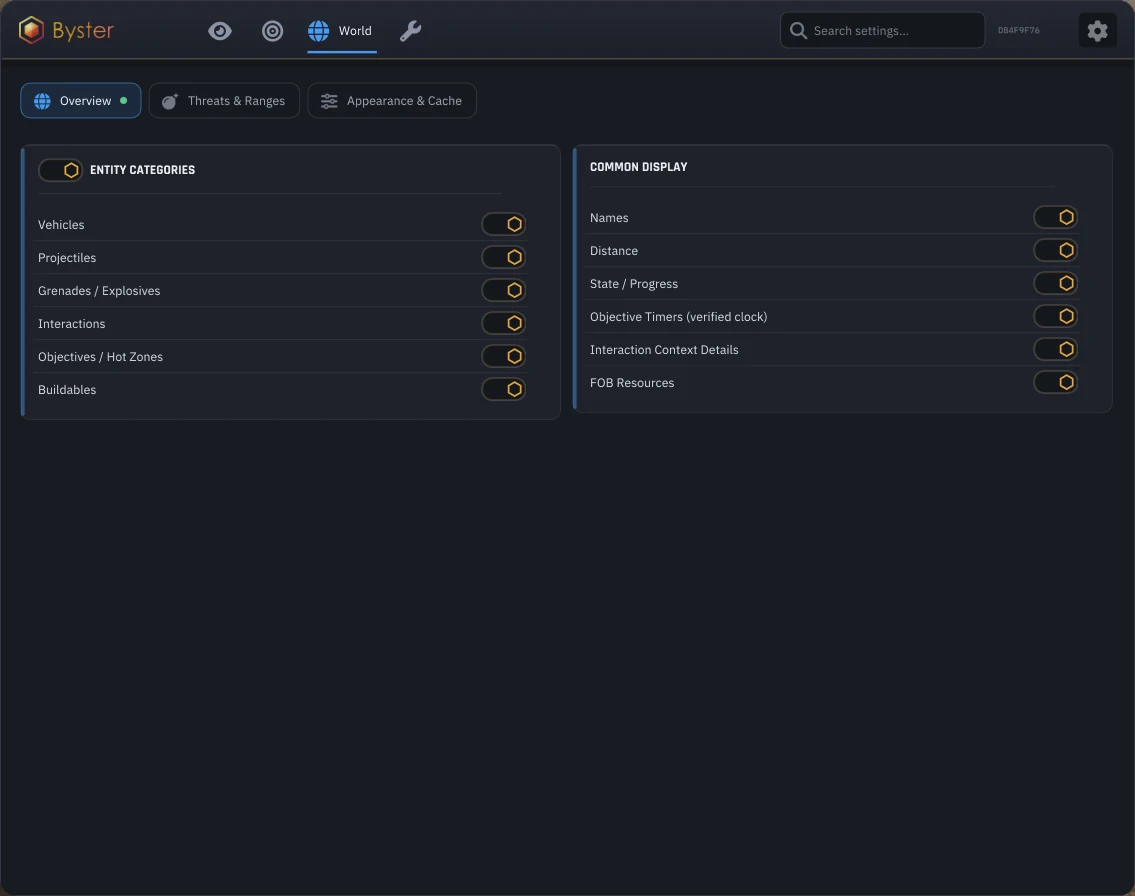
Point timers show progress right in the world. The Hot Zone shifts inside the Control Zone, every player there counts as two, and money comes in at double rate. When the timer and the hot zone are visible through the terrain, the decision to hold the position or relocate takes seconds, not a run to the edge of the hill. On Ozeti, where the buildings around the stadium block the view, the world markers saved us a lot of time.
FOB resources and buildables serve a different purpose. After Season 1 a FOB costs $7,500 at the vendor, and an enemy forward base often becomes both their spawn point and their depot. The ESP shows where fortifications stand and how many resources the base has, so the choice between tearing it down and going around it is made before the squad steps into open ground. Threat lines add incoming projectiles and grenades on top of that: you see where it is coming from and get a couple of seconds to leave the blast radius.
The range of each category is set with its own slider. We raised it for vehicles and points and kept it short for buildables and interaction objects, otherwise on a big map the world ESP turns into a scatter of markers where the players get lost.
Loot ESP by category
Wardogs is not an extraction shooter, you buy your gear for every life, so loot plays a supporting role. Still, Loot ESP in BYSTER is split into categories: weapons, ammo, armor, backpacks, attachments, medical items and scrap. Each one is switched on separately.
In practice we kept ammo and medical items enabled. After a long fight for a point it is easier to pick up magazines and med kits from the fallen than to spend cash on a new loadout or run to a supply crate. Weapons and attachments came in handy less often, mostly when we wanted to swap a rifle for one we found without going back to the vendor.
Tools: weapon stability and fire rate
The Tools tab collects the weapon modifiers. Here you can remove sway (including breathing), recoil, spread and camera shake, and you also get instant aim-down-sights, a boosted fire rate with a rounds-per-minute slider, a custom bullet speed and a custom effective range.
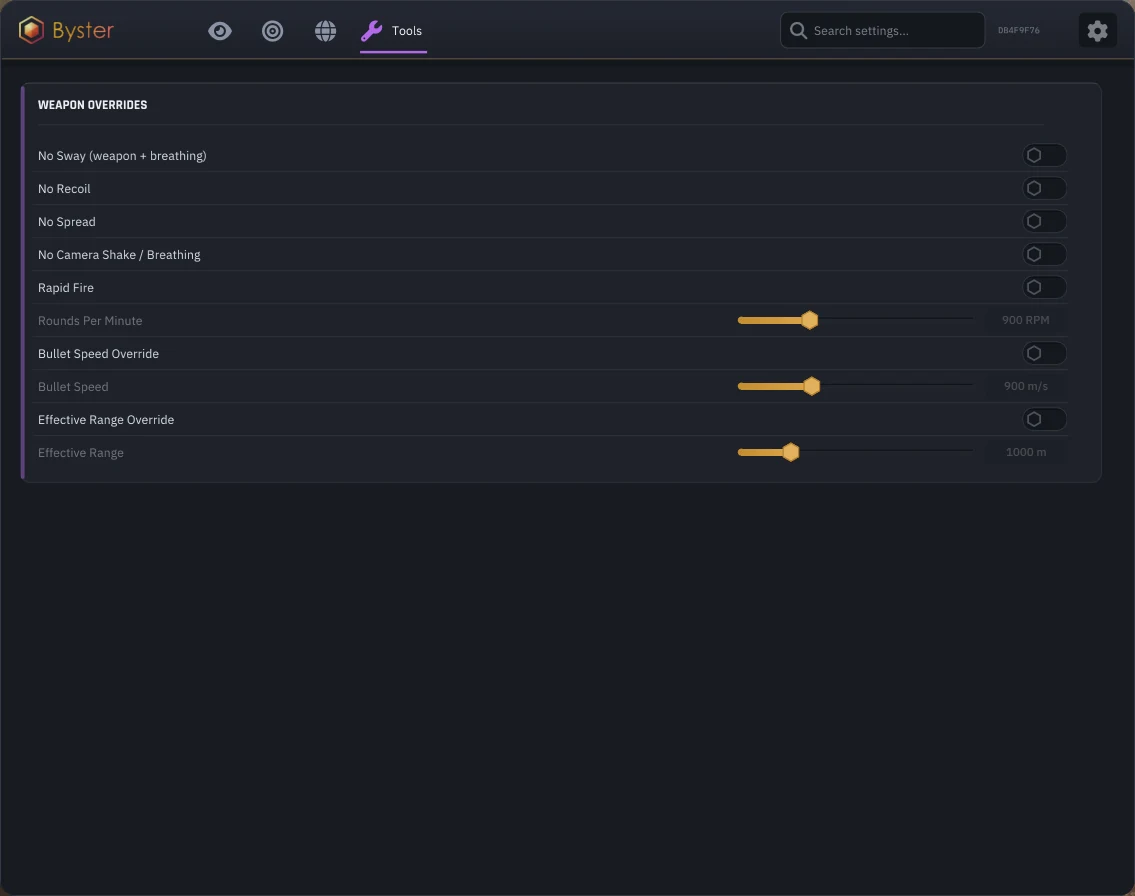
These features differ a lot in how visible they are, and the risk depends on that. From our experience they sort out like this:
- no sway and no camera shake are almost invisible from the outside;
- no recoil and no spread only show during long bursts at long range;
- instant aim gives itself away if an observer watches you up close;
- boosted fire rate and custom bullet speed are obvious to anyone standing nearby or spectating you after dying.
The rule of thumb is simple: the more visible a feature, the higher the chance of a report. In Wardogs a report costs more than in most shooters. If the anti-cheat catches a cheater mid-match, the game is terminated for all 100 players, and on servers with termination switched off the ban is announced right in the chat. How this mechanic works and why community servers with active admins are riskier than official ones, read in our breakdown of match termination and reports. We barely used the fire rate boost in testing, weapon stability was more than enough.
HWID Spoofer and safety
BYSTER comes without a spoofer, and for Wardogs that is an important detail. Bulkhead has four penalty tiers: server restriction, temporary suspension, permanent account ban and hardware ban. The last one hits every account on the device through an identifier derived from your hardware, in other words it is an HWID ban, and it cannot be appealed. Appeals via appeal@bulkhead.com are accepted only for a permanent account ban.
So if you have already been banned in Wardogs or play on your main PC and do not want to risk the hardware, pick a separate spoofer from the HWID Spoofer section before the first launch. BYSTER's undetected status is valid at the time of purchase, but nobody can promise zero risk, and with hardware bans the cost of a mistake is higher than usual. Steam Family Sharing, disabled on September 18, leaves no loophole either: a second copy will cost you $39.99.
BYSTER stability and launch
The cheat starts through the shared Byster launcher, the same one used for the developer's other games. The card lists these requirements: the Steam version of Wardogs, Intel and AMD processors, Windows 10 and Windows 11 builds 22H2-25H2, and the game strictly in Windowed mode. Borderless and fullscreen are not supported, so switch the window mode in the game settings before the first launch.
During the test we had no crashes caused by the cheat, including after reconnecting to another server and switching maps between Bakurani and Ozeti. The menu opens over the game without stutters, and the config is saved between sessions. Most Wardogs tickets to our support are not about cheats but about the anti-cheat itself: the WD-L020 error after the Windows 11 preview update KB5124010, or the "ANTI-CHEAT LOGIN FAILED" message when drivers conflict. If the game will not start even without BYSTER, start with Windows, not with the launcher.
The game is in Early Access and gets patched often, so check the status on the product card after every major update. While the developer updates the build, the status changes, and you should not run the cheat during that time.
BYSTER pros and cons
Pros:
- aim at vehicle crews and turret gunners plus separate aiming at the vehicle itself;
- ballistics with automatic projectile speed and gravity compensation;
- world ESP with point timers, hot zones, buildables and FOB resources;
- armor durability, stance and wound state right in the player label;
- the cheapest entry to Wardogs in our catalog, about $3 per day.
Cons:
- Windowed mode only, Borderless is not supported;
- Windows 10 and 11 only on builds 22H2-25H2;
- no stream protection in the card, so no streaming with it;
- the loudest Tools features are visible from the outside and raise the risk of reports.
BYSTER price and how to buy
There are three periods, and the catalog prices are fixed:
| Period | Price | Per day |
|---|---|---|
| Day | about $3 | about $3 |
| Week | about $14 | about $2 |
| Month | about $29 | about $1 |
A day key is enough to test the cheat on your own hardware and see whether windowed mode works for you. For regular play the month is better value: a day costs about a third of the daily key. For comparison, a day of GHOST costs about $3.5 and a day of NN PRO $5. You can get a key on the buy BYSTER for Wardogs page, and after payment the key and the launcher link appear in your account. If you want to compare builds first, look at the Wardogs cheats section, where all live listings are collected, including ESP-only and DMA builds.
Questions about setup and launch are easier to ask in the community: Telegram (200+ members) and Discord (637+ members). That is also where news about build status after patches appears first.
Who BYSTER is for
The same cheat scores differently depending on the task, so we split the verdict by scenario.
If price matters: BYSTER gives you a full internal with aim and world ESP for about $3 a day. Only visual builds without aim are cheaper in our catalog of cheats for Wardogs, and in terms of features for the money it is the best-value entry.
If safety and streaming matter: the missing stream protection is decisive here. For streaming and recording videos GHOST with OBS and Discord hiding makes more sense, and we covered its full pack with Loot, Vehicle and Corpse ESP in our GHOST for Wardogs review.
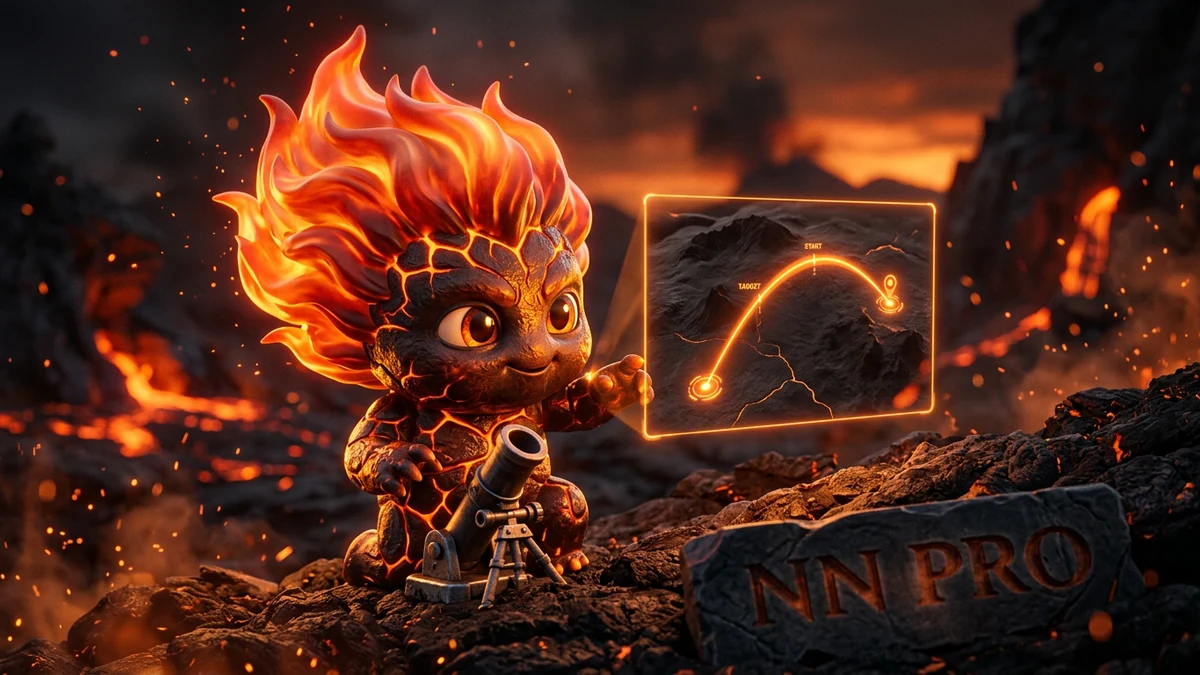
If you want the most vehicle and building features: BYSTER is stronger at aiming at vehicles and at point timers, while NN PRO adds mortar targeting, vehicle hull condition and occupied seats. Details are in our NN PRO review.
If you play around points and the Hot Zone: this is where we would put BYSTER first. Point timers, hot zones and a full map over the radar in one build are not found anywhere else in our Wardogs catalog.
BYSTER FAQ
Is BYSTER detected or undetected right now?
At the time of publishing, in September 2026, BYSTER for Wardogs is undetected and works with Elytra on the client after Patch 0.11. The status changes after major game patches, so check the current mark on the product card before every purchase. There is no such thing as a guarantee against bans, the risk is always there.
How much does BYSTER for Wardogs cost?
The ForgeCheats catalog has three periods: a day for about $3, a week for about $14 and a month for about $29. The month works out to roughly $1 per day, about a third of the daily key price. A day is enough for a first look at the software, and for regular play the month is better value.
BYSTER will not start, what should I do?
First check the window mode: the cheat only works in Windowed. Then check your Windows build, it has to be 22H2-25H2. If the game fails to start even without the cheat with error WD-L020, uninstall update KB5124010. Support in Telegram or Discord will sort out other cases, just attach a screenshot of the error.
Do I need a spoofer with BYSTER?
BYSTER has no spoofer of its own. On a clean account with fresh hardware it is not required, but Bulkhead issues hardware bans that hit every account on the device and cannot be appealed. If you have been banned before or this is your main PC, it is better to pick a spoofer in advance.
Can I stream with BYSTER?
Better not. The card lists no stream protection, so the overlay will show up in OBS and in Discord recordings. For streams our Wardogs catalog has builds that hide from screen capture, for example GHOST, NN PRO and ANCIENT. Keep BYSTER for playing without a broadcast.