If you need map information in PUBG without injecting into the game process, then MEMEZ WebRadar covers that task in one of the safest ways under BattlEye. This is an external web radar: the map opens in a separate browser tab and shows enemies, teammates, bots, their nicknames, HP, the weapon in their hands, and loot on the ground. The PUBG client is left untouched, the game memory is not read by a third-party module inside the process itself, which means the anti-cheat has nothing to catch in foreign code layered on top of the game. Its status in our catalog at the time of testing is excellent, undetected, and the price starts from 159₽ per day. There is no spoofer in the bundle, and that is logical: the radar leaves none of the injection traces that a separate spoofer is usually bought to hide.
We ran this radar on the current build of PUBG in 2026: we checked position accuracy, map update delay, readability on a second monitor and on a phone, and behavior on Erangel and Miramar. The breakdown below is built from hands-on practice, not from marketing promises, and we honestly show where an external radar has its limits. There will be no promises like "100% no ban" here: no private software guarantees that, but lowering the risk through an external working scheme is something the radar genuinely helps with.
How We Tested MEMEZ WebRadar
The test ran on fresh PUBG matches in Solo and Squad modes, on the Erangel and Miramar maps, under active BattlEye. We kept the radar on a second monitor and at the same time tried opening it from a phone on the same network, to understand how convenient it is to watch the map without minimizing the game. We looked at four things at once: whether player marks match their real positions, how much delay there is between an enemy moving and the icon updating, how readable the loot and the weapon in hand are, and whether the browser tab interferes with the client itself. We separately noted that the radar works on top of the Steam version in windowed and Frameless mode, without modifying game files and without any overlay on the main screen. In every game we compared what the map showed against what actually happened in the match, in order to judge working accuracy rather than the advertised kind. We deliberately took both early drops into hot spots and long survival games all the way to the final circle, because the load on the radar in these scenarios differs: in a firefight update speed matters more, while in the late zone map completeness does. Our catalog status at the time of the check: excellent, undetected. Below we break down each point in more detail and show interface screenshots.
MEMEZ WebRadar Features: A Hands-On Breakdown
What an External Web Radar Is and Why It Is Safer
The main idea of MEMEZ WebRadar is that it is not part of the game process. A regular internal cheat loads its code into PUBG memory, reads coordinates straight from the client, and draws ESP over the picture, and it is exactly this foreign module inside the protected process that BattlEye hunts for. A web radar works differently: you see the result as a map in the browser, not as an overlay built into the game. For an anti-cheat that watches over the integrity of its own process, this scheme offers fewer surfaces for detection. We do not promise invulnerability and we do not call it a "bypass" of BattlEye, but in fact external radars have historically lasted longer and been caught by ban waves less often than aggressive inject cheats. That is exactly why the radar is often recommended to players who have already been banned and now want the quietest possible tool.
Match Map and Player Marks
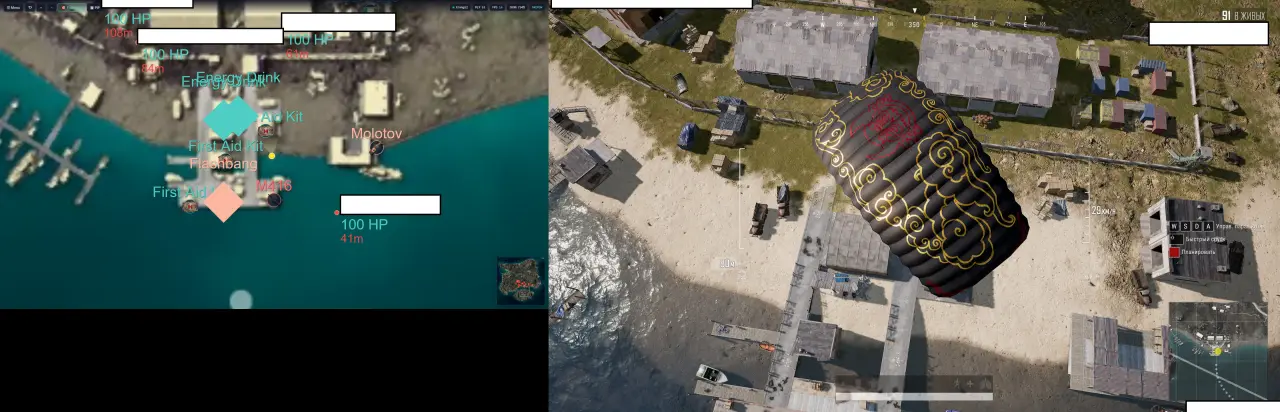
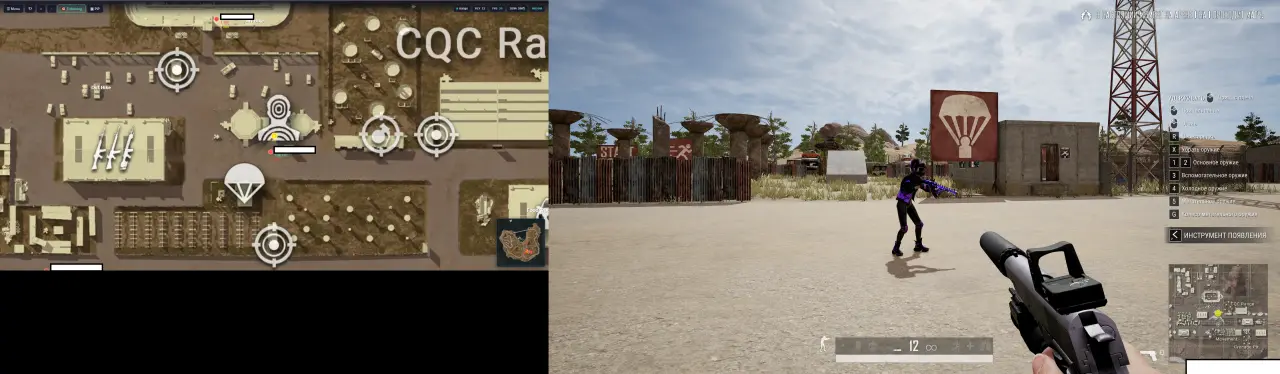
On the map the radar shows enemies, teammates, and bots with separate icons, so in a squad game you immediately see where your team stands and where the others are. The marks are labeled with nicknames, so you can tell in advance whether a lone player is moving nearby or a full squad, and avoid flying blindly into someone else's fight. In our test the positions matched the real ones: when an enemy ran between houses on Erangel, the icon followed him with a small delay of a fraction of a second, which is enough to keep the overall picture, but not as instant as in-game ESP. Bots are marked separately, and that is handy in the early stage of a match, so you do not confuse a real opponent with an NPC and waste ammo and position for nothing. In essence the map turns into a constant view of the whole sector around you, which in a normal game you would have to piece together from sound and rare spottings. This is especially valuable on the open stretches of Miramar, where an opponent can keep you at range and without a radar you would not even understand which side the damage is coming from.
Loot and Items on the Map
The radar highlights items and loot on the ground, which helps you pick a drop point and a route across the map. You can see where worthwhile gear is lying, and you can plan a rotation so you do not land in an empty sector or run through houses at random. In PUBG this noticeably saves time in the first minutes: instead of a dash through random buildings, you head to where the map already shows weapons and attachments, and reach your rotation already kitted out. For us this turned out to be just about the most useful radar scenario, because loot information directly affects how fast you gear up, and in a battle royale it is the first minutes that decide whether you enter a fight with a decent gun or with a pistol. In the late circles item highlighting helps you grab the consumable you need without stepping out under fire one more time. It also came in handy during looting: after a successful trade the map immediately makes it clear whether it is worth going to the enemy bodies or everything valuable has already been picked up, and whether you are catching yourself stepping out under someone's gun for a couple of rounds.
Enemy HP and Weapon in Hand
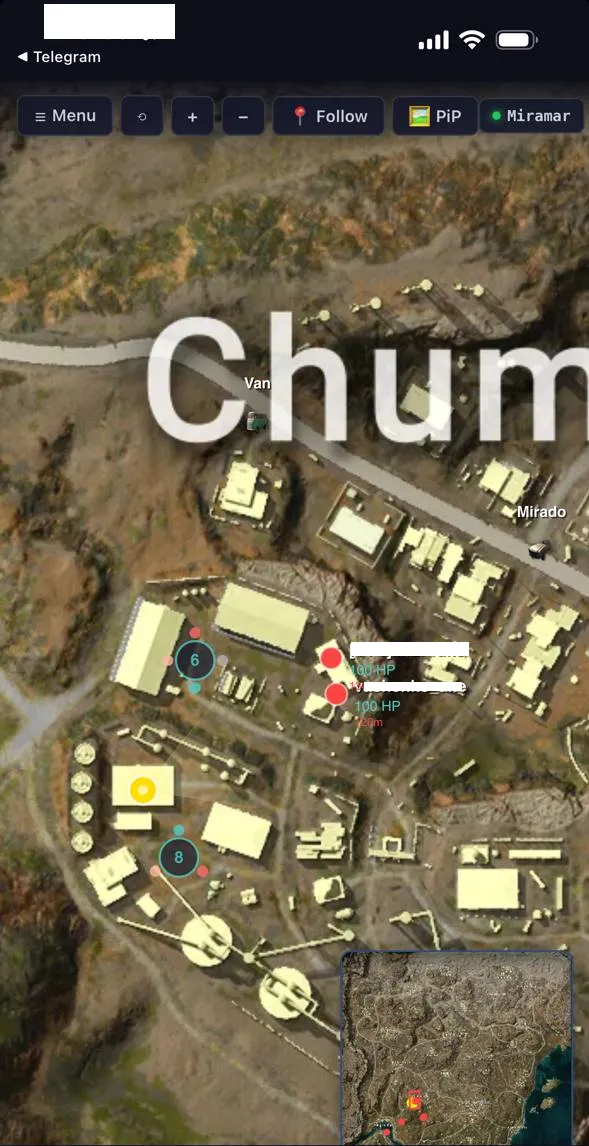
Besides positions, the radar shows the HP of marked players and the weapon they hold. This noticeably changes fight tactics: you can see whether an opponent is nearly down to zero and worth finishing the trade against, or whether he has a shotgun and close combat is best avoided. Combined with nicknames and labels, you get a fairly full picture of who is armed with what at nearby positions, and you can consciously choose which squad to engage and which to skirt around the edge of the zone. We would not call this a replacement for full in-game ESP, since the radar does not draw enemies through walls right in your sights, but for decisions at range and for planning rotations the data is quite enough. It especially helps in squads, where it matters to understand not only where an opponent is, but what state he is in. From the weapon in hand you can also gauge the fighting distance the enemy is set up for: if he has a sniper rifle, you should not cross an open field once more, and if he has a submachine gun, then at medium range you have the advantage and can force your own trade.
Display Settings: Icon Size and Transparency
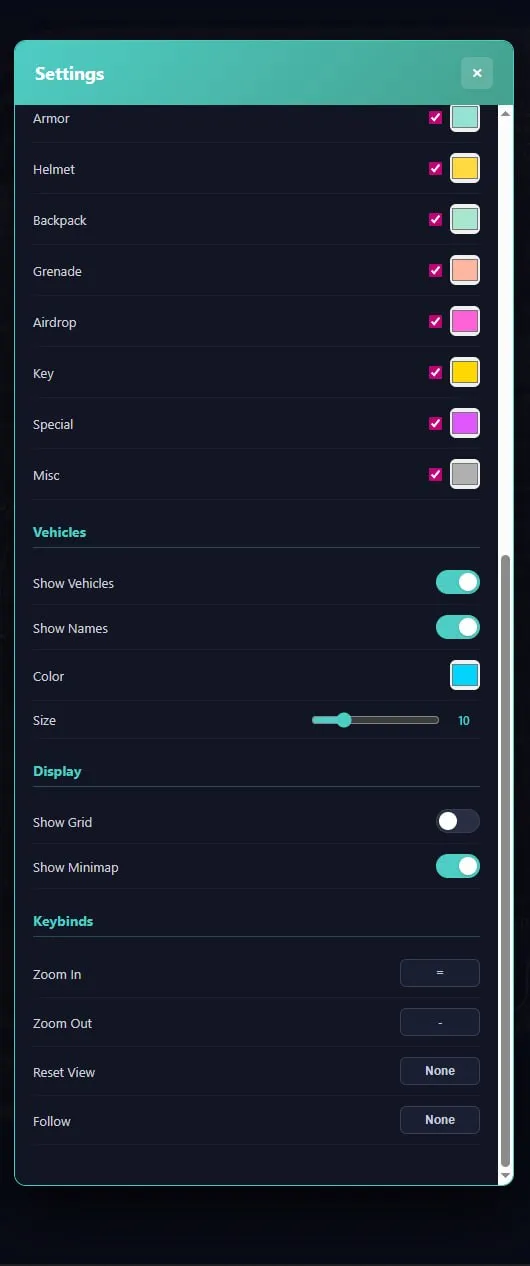
MEMEZ WebRadar lets you tune the look of the map to your taste: you can change icon size and element transparency so the radar reads equally well on a large monitor and on a small phone screen. We shrank the icons when we opened the map on a smartphone, and enlarged them on the second monitor, where there is more room and you want to see details from a distance. Transparency is useful if you place the radar over another window and do not want it to fully cover the background. There are no fine, professional loot filters by rarity here, but the basic customization is enough to keep the map from tiring your eyes during a fight and to keep it clear at a glance. The settings are simple, even someone opening an external radar for the first time will figure them out, and the saved configuration is pulled up on the next launch, so you do not have to fit the map to your screen from scratch every time.
Second Screen, Phone, and No-Inject Mode
Since this is a web radar, the most convenient way to open it is on a second device: a second monitor, a laptop next to you, or a phone on the same network. This way the main screen stays clean, and no overlay hangs over the game, because the radar physically lives in a browser on another display. If there is no second monitor, you can keep the map in a separate tab and switch with Alt+Tab, but in a dynamic fight that is less convenient than a quick glance to the side. It is exactly this separate-screen scheme that makes the radar so quiet for BattlEye: nothing foreign appears in the PUBG process itself. We explained in detail how webradar works in PUBG in a separate breakdown, where we compared the design of external radars with classic ESP and explained where the position data comes from.
Radar in Squads: Teamwork
The radar especially shines in squads, where not only your personal information matters, but also the overall picture for the whole team. Since the map shows both teammates and enemies with nicknames, a call in voice chat becomes more precise: you can name not just "someone is on the left," but the direction, distance, and number of opponents nearby. We played as a squad with the radar on the caller's screen, and rotations became noticeably more organized, because the whole team moved by the same map and understood where to expect a threat. For ranked games this is a tangible plus: in PUBG it is smart zone rotations and a timely retreat out of a fight that bring a Chicken Dinner more often than head-on shootouts. The radar does not shoot for you, but it gives information on which the whole squad's tactics are built, and in our experience it cuts the number of dumb deaths from flank ambushes.
MEMEZ WebRadar Safety Under BattlEye
The key argument for this radar is its working scheme: it is external and does not inject into the PUBG process, so it is considered one of the calmest types of software under BattlEye. Internal cheats are forced to place their code into the protected game process, and it is right there that an OS-kernel-level anti-cheat looks for them. MEMEZ WebRadar embeds nothing into the game: you receive match data as a map in the browser, while the client itself stays untouched. Less interference with the process means fewer reasons for the protection to trigger, and in practice external radars are caught by mass ban waves less often than aggressive inject solutions with an aimbot and ESP rendering.
This does not mean the risk is zero, and on principle we do not write "100% no ban": no private software gives such a guarantee, and Krafton additionally analyzes replays and player reports by HWID. So even with a quiet radar it is worth playing carefully and not showing suspiciously perfect play in the lobby with impossible awareness of other people's positions. The absence of a spoofer in the bundle is logical here: since the radar does not inject and leaves no traces inside the client, a separate spoofer is simply not needed by most users, while with an HWID ban already received it is bought as a standalone product. This balance of safety and price is what makes the radar a convenient entry point for cautious players who value peace of mind over a maximum of features.
MEMEZ WebRadar Stability and Launch
The launch is simple: the radar runs on top of the Steam version of PUBG in windowed or Frameless mode and does not require editing game files. As for requirements, the developer Memez lists Intel and AMD processors and Windows 10 or 11, including builds 22H2, 24H2, and 25H2, so the radar fits most current systems without any fiddling with settings. It does not ask for separate powerful hardware, and that is its strong side: the game itself is not burdened with an extra overlay, while the map runs in a browser on the second screen. That is exactly why an external radar is often recommended as PUBG cheats for a weak PC: it has almost no effect on FPS in the client itself, unlike internal cheats with constant ESP rendering. Over the test the map updated steadily, the tab did not drop out in the middle of a match, and we did not catch any noticeable performance dips in the game. Updates for PUBG patches come out regularly, and for undetected status that is essential: as soon as the game build changes, it matters that the radar quickly picks up the new version and does not leave the user without a map at the worst possible moment.
MEMEZ WebRadar Pros and Cons
Pros:
- External web radar with no injection into the PUBG process: minimal surfaces for BattlEye and fewer reasons for detection.
- Almost no impact on FPS, because it runs in a browser instead of drawing an overlay over the game.
- Shows enemies, teammates, bots, nicknames, HP, the weapon in hand, and loot right on the match map.
- Flexible output to a second monitor or phone, with adjustable icon size and transparency.
- Low price barrier to entry: a day costs 159₽, so you can test it without a large investment.
Cons:
- This is only a radar: there is no aimbot and no in-game ESP, you still have to shoot by hand.
- A spoofer is not included in the bundle, and with an old HWID ban you will have to buy it separately.
- Maximum comfort is reached on a second screen, and on a single monitor switching is less convenient.
- No private software gives an absolute guarantee: undetected is true at the time of testing, but not forever.
MEMEZ WebRadar Price and How to Buy
The radar's plans are short and inexpensive: a day costs 159₽, a week comes to 990₽, and a month to 1990₽. This kind of step is convenient for first taking a day and checking the radar on your own hardware and your own play style, and only then getting a week or a month for a serious rating grind. You can grab access and buy MEMEZ WebRadar on the product page, where the current periods and the activation method are also listed. If you want to compare the radar with other options, take a look at the PUBG cheats selection: it has internal cheats with an aimbot and ESP, and a separate spoofer for recovery after an HWID ban.
Questions about launch and compatibility are solved fastest in the community: Telegram (300+ members) and Discord (2000+ members). There they will also advise which period is more worthwhile for your schedule and how to set up the map on a phone correctly.
Who MEMEZ WebRadar Is For
The radar solves a specific task and does not claim the role of a universal cheat, so judge by your own priorities.
If safety matters: this is one of the calmest options under BattlEye, because there is no injection into the PUBG process and fewer reasons for detection. For careful players who fear an HWID ban, an external radar suits better than aggressive inject cheats.
If price matters: a day for 159₽ lets you test the software at almost no cost, and a month for 1990₽ comes out cheaper than most internal PUBG cheats with a full set of features.
If you have a weak PC: the radar runs in a browser and barely loads the game, so on a budget build it does not eat FPS the way an internal cheat with constant ESP rendering does.
If you need an aimbot: here a radar alone is not enough, it is worth looking at the internal catalog products that have aim and ESP right in the game, and accepting a slightly higher risk in advance. A radar and an internal cheat are not really head-on competitors: the first gives information and peace of mind, the second takes on the shooting and the visibility through walls, and the choice depends on what matters more to you in a given season.
It is worth saying separately about newcomers to external radars: if you have never played with a map on a second screen, at first you will have to get used to shifting your gaze and trusting the marks. On the other hand the entry barrier is gentle, and after just a couple of games the radar feels like a natural part of the interface rather than a separate screen you have to force yourself to watch.
Frequently Asked Questions About MEMEZ WebRadar
Is MEMEZ WebRadar detected or undetected right now?
At the time of our test the radar's status in the ForgeCheats catalog is excellent, undetected. Since this is an external web radar with no injection into the PUBG process, BattlEye has fewer reasons to notice it than internal cheats. No private software gives an absolute guarantee, but in our experience external radars hold up longer and are caught by ban waves less often.
How much does MEMEZ WebRadar cost?
Three periods are available: a day for 159₽, a week for 990₽, and a month for 1990₽. It is logical to start with a day, to check the radar on your own hardware and in your own modes, and then extend to a week or a month. The current prices and the payment method are always listed on the product page in the catalog.
Do you need a second monitor for MEMEZ WebRadar?
Not necessarily, but with one it is noticeably more convenient. The radar opens in a browser, so it looks ideal on a second monitor, a laptop, or a phone on the same network. Without a second screen you can keep the map in a separate tab and switch, it is just that in a dynamic fight this is less comfortable than a glance to the side.
MEMEZ WebRadar will not launch, what should I do?
First check that you are opening the radar in a supported browser and that PUBG is launched in windowed or Frameless mode, as stated in the requirements. If the map does not load or the marks do not appear, write to our Telegram or Discord: most often the issue is solved by adjusting browser access permissions or by updating the radar for the fresh game build.
Do you need a spoofer together with MEMEZ WebRadar?
For a new account without a ban a spoofer is usually not required, since the radar does not inject into the game process and leaves no traces inside the client. But if a BattlEye HWID ban is already on the hardware, a spoofer is bought separately, because it is not included in the radar bundle.