
Ancient Radar earns its price for anyone in Arena Breakout who cares more about routing and information than about aiming: it's a radar loader that shows the positions of players, bots and loot on a separate map overlaid on top of the game, without an aimbot and without classic wallhack ESP. The status has stayed undetected, updates come out after every game patch, and the price starts from 310 rubles per day. We tested Ancient Radar in the Airport Hunt season and broke down how the radar approach differs from regular ESP in practice.
If you also need an aimbot with aim assisting wallhack ESP, the catalog has separate options for that like Ghost, but Ancient Radar solves a different task: it's about overview of the whole map, not about aiming. Below we break down how the radar format performed over two weeks of testing, how it differs from regular ESP in practice, and who actually benefits from choosing a map over a crosshair.
How We Tested Ancient Radar
We tested on the current Arena Breakout: Infinite patch in the Airport Hunt season, on Farm, Northridge, and the new Guoyapos International airport map, in both Solo and Squad modes. We checked how quickly the radar identifies the map when entering a raid, how accurately the markers match the real positions of targets, and how the overlay behaves on top of the game in borderless windowed mode, which is mandatory for this cheat.
The game is protected by ACE, a kernel-level anticheat from Tencent. Over two weeks of testing, none of the test accounts got banned, which confirms the status in our catalog: undetected, with excellent reliability. The developer tests every update right after game patches, not as an afterthought.
We separately ran more than fifteen raids specifically to compare the radar format with regular ESP: some runs were done with no cheats at all as a control, others with Ancient Radar, to honestly evaluate the difference in decision speed rather than rely on a subjective feeling that "it got easier." Control raids without a cheat on average took noticeably longer to scout each next building, while with the radar turned on the team knew almost instantly whether it was even worth going in.
Ancient Radar Features: A Practical Breakdown
Ancient Radar has no aimbot and no classic box ESP through walls, instead all the information is displayed on a separate map in the corner of the screen. This is a fundamentally different approach to cheating in an extraction shooter: instead of tracking an enemy through a wall, you know in advance where they're headed and whether it's even worth crossing paths with them. A similar format has long been established in Escape from Tarkov under the name radar cheats, and for Arena Breakout: Infinite the developer Ancient adapted the same logic to the local maps and loot structure.
Radar Instead of ESP: How It Works in Practice
The overlay appears on top of the game right after entering a raid and automatically detects the current map with no manual setup, over two weeks of testing we never once had to select the location by hand. The radar shows dots for players, bots, and loot containers tied to the actual terrain, and location labels like Staging Area or Hospital appear right on the map when you zoom in.

The difference from regular ESP is noticeable fast: instead of studying a silhouette through a wall in one specific direction, the player immediately sees the overall picture of the raid, how many live opponents are left, where loot is clustered, and where it's safer to go next. For players used to aim cheats like Ghost, switching to the radar format takes a couple of raids, after that it becomes faster than reading ESP boxes.
In the top right corner of the radar there's a separate counter for live players, bots, and remaining loot on the map, which in practice replaces a good half of the usual reconnaissance by combat. Instead of blindly checking whether anyone is still alive in a building, the counter immediately shows the overall picture of the server, and the decision to push through or go around gets made in seconds, not after a cautious sweep through the entire floor.
| Parameter | Ancient Radar | Classic ESP (Ghost) |
|---|---|---|
| Aimbot | No | Yes |
| Wallhack view on a specific target | No | Yes |
| Overall raid map with positions of all targets | Yes | No |
| Sharing the map with the team | Yes | No |
| Items ESP with loot price | Yes, on the map | Yes, through walls |
| Price per day | from 310 rubles | from 500 rubles |
The table makes it clear: these aren't competing products but tools for different tasks, and some players in our catalog get both at once, the radar for scouting and routing, ESP with aim for the actual fight.
Players and AI on the Radar: What You Can See
For players, the radar shows nicknames, look direction, the weapon in hand, inventory value, and separately marks dead enemies on the map. Color coding is fully customizable: its own color for enemies, teammates, live targets, and dead targets, so the map doesn't turn into a mess of identical dots when there are a lot of targets on screen.
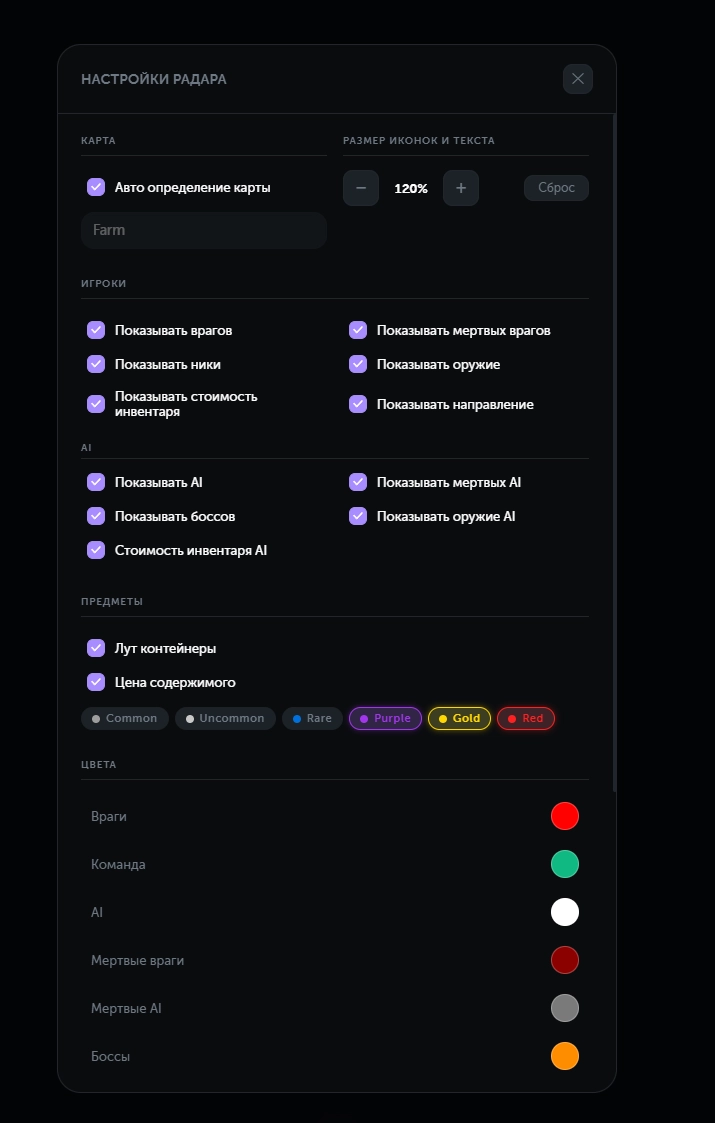
A separate line in the radar settings is called Instant Hit and it belongs specifically to the players section, not the Misc section, but it's important to understand: Ancient Radar has no aimbot functions at all, the aim settings block on the product page is empty, and this setting doesn't turn the radar into an aim cheat. It relates to displaying hit information on the map, not automatic shooting, and that's worth noting for anyone looking specifically for shooting assistance rather than just an overview. We clarified this point separately because the feature's name alone can mislead anyone who didn't read the full feature list before buying.
AI enemies and bosses are moved into a separate category with their own settings: showing AI, dead AI, their weapons, and their inventory value toggles independently from players. On maps with heavy AI activity like Farm this is especially useful for not confusing bots with real players at a glance. Bosses get their own color in the settings, which is genuinely convenient in practice: you don't have to walk right up to them to figure out whether it's even worth engaging a boosted enemy.
Loot and Item Rarity on the Map
Loot containers show up on the radar with the price of their contents and a rarity color tag: Common, Uncommon, Rare, Purple, Gold, and Red, each category can be set to its own color. In practice this speeds up your route around the map about as much as Items ESP does in regular cheats, just from a top-down view instead of looking through walls at one specific building.

The map auto-detection feature works together with the loot filter: as soon as the radar recognizes the location, every container on it lights up in the configured colors with no extra input from the player. Over the test period this noticeably cut down the time spent deciding whether to enter a specific building or just move straight to the next marker.
On maps with a lot of buildings like Northridge, the six rarity tiers turned out to be genuinely useful: without color separation everything blends into identical dots, while with a configured palette Gold and Red loot is visible on the map at a glance even from the opposite edge of the location. Regular Common containers can even be muted with a neutral gray so they don't pull attention away from markers that actually matter.
Over the test period the team changed its route several times mid raid after spotting a Gold marker off the planned path on the radar, and in most cases the detour paid off. Without a radar, finds like that come down to pure luck, since there's no way to gauge a container's value through a regular wall in advance.
Sharing and Quality of Life: What Simplifies Squad Coordination
A separate Sharing feature lets you share a link to the radar with your squadmates, and everyone gets the same map on screen with synchronized markers. For playing in a Squad, this is more convenient than explaining over voice chat exactly where an enemy or valuable loot is, especially on new maps like Guoyapos International, which not everyone has memorized yet.
During testing in Squad mode, a team of three connected to a single radar link in a few seconds, and from then on everyone saw the same picture of the server without needing to constantly check in over voice about who was where. This noticeably saves time at the start of a raid, when the team is still splitting up to their positions and usually spends the first minute on voice callouts.
A few smaller details: the interface is translated into Russian, English, and Chinese, there's a feature to follow a player and snap the camera back to your own position with a single button, map rotation to match your look direction, and text and icon scaling for a specific screen resolution. On high resolution monitors, larger icon scaling turned out to be more than a cosmetic touch, it's a genuinely necessary setting, without it small markers got lost against the map's background.
HWID Spoofer and Safety: What Ancient Radar Doesn't Have
Ancient Radar has no built-in spoofer, and it's worth being honest about one more point here: despite the marketing claim of staying hidden from screen recording, the status field in our catalog shows that the product doesn't officially have a guaranteed OBS bypass. The radar works as an overlay on top of the game rather than as a separate window on another monitor, so when capturing the whole desktop or the game itself through OBS, it can end up in frame right along with the rest of the interface.
With ACE's active kernel-level HWID bans, that's worth planning for in advance, a separate spoofer solution like Crooked for Arena Breakout covers exactly this need if a hardware ban has already happened.
The practical takeaway is simple: if your main goal is staying invisible on stream recordings, don't rely solely on the wording in the product description, it's better to test your specific screen capture setup on a trial raid before going live on a regular basis.
Ancient Radar Stability and Launch
Ancient Radar runs on Windows 10 and 11 (builds 1903 through 25H2), on Intel and AMD processors with no restrictions. Launching happens through its own proprietary loader, and the installation guide is on a separate page written for beginners. One mandatory condition: the game must be running in borderless windowed mode, in regular windowed mode the radar doesn't overlay correctly on top of the game.
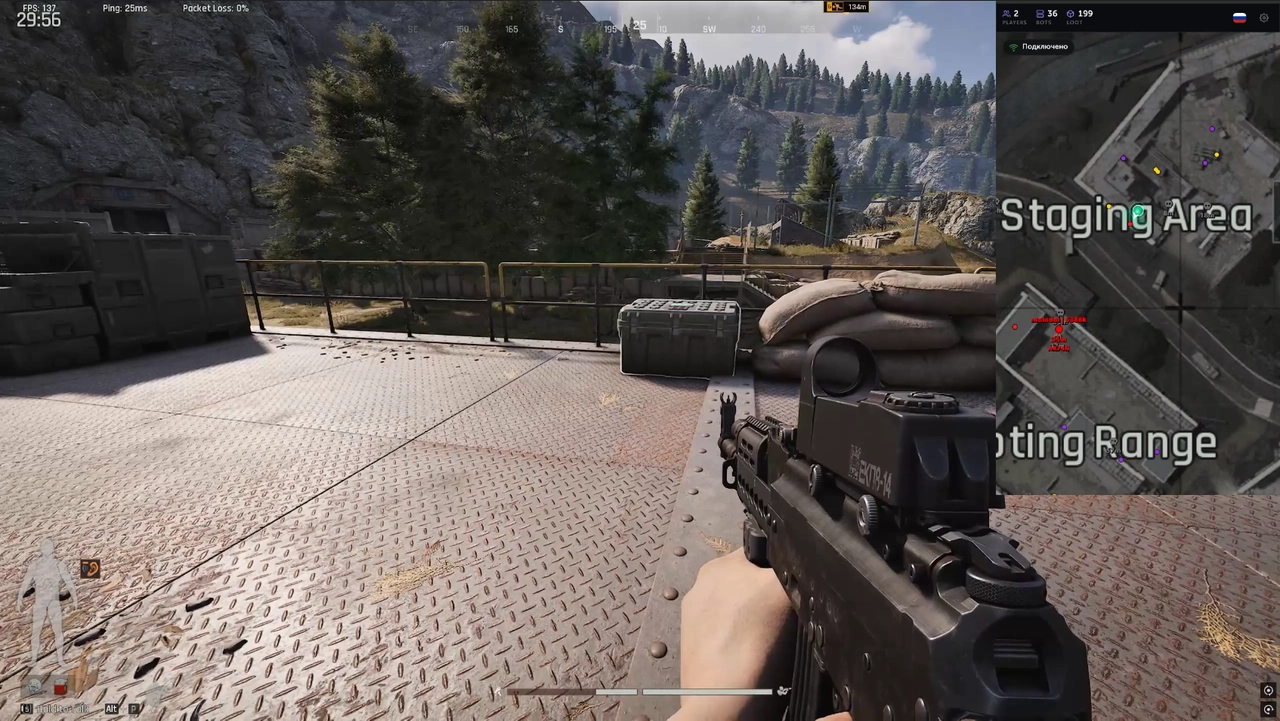
The first launch during testing took about five minutes: we downloaded the loader, logged in with the purchased key, waited for the radar to load, minimized the loader, and launched the game in borderless windowed mode. After that, the radar picked up automatically on every following raid with no need to set it up again, and every color and filter choice carried over between sessions.
Over two weeks of testing on the Airport Hunt season patch, Ancient Radar never crashed once and never lost connection with the game mid raid. The developer updates the build after every Arena Breakout: Infinite patch, not on a fixed schedule, which matters especially for radar cheats, since they're tied to the game's map structure more tightly than classic ESP: a new map or a reworked old location breaks a radar faster than it breaks regular player ESP.
In terms of system load, the radar turned out lighter than cheats with full wallhack ESP: rendering happens in a separate window on top of the game rather than being embedded into the game camera itself, so no FPS drops were noticed during testing on mid-range hardware even with a lot of targets on the map at once. For players with a weaker PC, that's an extra advantage compared to heavier cheats with a full set of visual effects.
Ancient Radar Pros and Cons
Over two weeks of testing, the radar format proved itself honestly: its strengths show up where information and coordination matter, and its weaknesses show up exactly where people usually expect an aim cheat.
Pros:
- Automatic map detection with no manual setup on every raid entry
- Detailed information on players, AI, and loot in one window instead of squinting through walls
- Sharing for Squad coordination with synchronized markers
- Flexible color settings for loot rarity and target types
- Updates right after game patches and an undetected status with no complaints
Cons:
- No aimbot and no classic wallhack ESP, just the radar map
- No built-in HWID spoofer, a separate solution is needed after a ban
- The claimed OBS bypass isn't confirmed by the official status in the catalog
- Only works in borderless windowed mode, some players are used to regular windowed mode
Ancient Radar Price and How to Buy
Current rates: one day from 310 rubles, a week from 1600 rubles, a month from 3150 rubles. In dollars, the same periods cost from $4, $20, and $40 respectively. Direct link to the product: buy Ancient Radar →. To compare with other options for the game, including cheats with an aimbot and aim ESP, check out the rest of the Arena Breakout cheats on the hub.
It makes sense to tie your subscription length to your play style, not just to the lowest price. A daily subscription pays for itself in one intense evening of combat scouting, a weekly plan suits players farming a specific Airport Hunt season event, and a monthly plan offers the best price per day of the three for anyone who plays Arena Breakout: Infinite almost daily.
Questions about installation and setup are handled in the community: Telegram (300+ members) and Discord (2000+ members).
Who Ancient Radar Is a Good Fit For
There's no universal answer here, it all depends on what bothers you most in Arena Breakout raids.
If price matters: a daily subscription from 310 rubles is cheaper than most fully featured cheats in the catalog, and the hit to your budget is comparable to a single meal, not a serious purchase.
If team play matters: the Sharing feature with a synchronized map for the whole team handles coordination better than voice callouts.
If you need an actual aimbot: Ancient Radar simply doesn't offer that, for aimed shooting and wallhack ESP it makes more sense to look at Ghost or other cheats in the catalog with those features.
If you play solo: the overall map overview compensates for not having a teammate who would normally watch your back and call out the direction of a threat, the radar takes over part of that scouting role in this case.
If you play in a Squad: the Sharing feature with one shared map for the whole team speeds up coordination more than any other radar feature, especially on unfamiliar maps like the new airport.
Frequently Asked Questions About Ancient Radar
Is Ancient Radar Detected or Undetected Right Now?
As of publication, Ancient Radar is undetected, the status is confirmed in the ForgeCheats catalog and gets updated along with the product itself after every game patch. The current status is always visible on the product page before purchase, and updates get posted there right after each check on the current patch.
How Much Does Ancient Radar Cost for Arena Breakout?
From 310 rubles per day up to 3150 rubles per month, dollar options are available from $4 to $40 through separate payment providers. The monthly subscription offers the best price per day of the three periods, and the weekly plan suits anyone farming a specific event.
Ancient Radar Won't Launch, What Should I Do?
First check that the game is running specifically in borderless windowed mode, not in regular windowed or fullscreen mode, that's a mandatory condition for this cheat. If the problem doesn't go away, message ForgeCheats on Telegram, cases like this get handled there quickly, not on a fixed support schedule.
Is Ancient Radar Visible on a Stream Recording?
The product doesn't have a definite guaranteed OBS bypass, despite it being mentioned in the description, so streaming raids with the radar turned on should be done carefully, with your specific screen capture setup checked in advance. A sensible practice: a five minute test recording before your first real stream.
What's the Difference Between Ancient Radar and Regular ESP Like Ghost?
Ancient Radar shows positions on a separate top-down map with no aimbot and no silhouette rendering through walls, while Ghost works as classic ESP with an aimbot right in the game camera. The choice depends on whether you need an overview of the whole map at once or accurate shooting at a specific target, some players end up getting both tools at once for different tasks.
Do I Need a Spoofer Along with Ancient Radar?
The radar itself doesn't include a spoofer, and the ACE anticheat bans by HWID, so after a real ban the hardware stays blocked without a separate solution. A spoofer like Crooked for Arena Breakout covers exactly this need if a ban has already happened.