ARCANE for Wardogs (a Wardogs cheat from the developer Arcane) suits players who want an aimbot with movement prediction and a clean ESP, and who can live without a radar or recording protection. It is an internal build listed in our catalog as undetected with an excellent reliability rating, and access starts at $4 per day. The product page with the current status is here: ARCANE for Wardogs. It does one thing really well: leading a running target at the ranges where Control Zone fights are actually decided, plus an enemy view line that even the flagship of our catalog does not have.
This review is based on our own test on the build after Patch 0.11, in September 2026. We played on Bakurani and Ozeti, on official servers and on community servers with active admins. We looked at four things: how the aim behaves with prediction turned on, how readable the ESP is in a hundred-player brawl, whether the software stays stable under the kernel anti-cheat Elytra, and what is actually in the menu. Below is only what we saw ourselves and what the product card states, with no retelling of other people's descriptions.
How we tested ARCANE in Wardogs
The test ran over several evenings in a row. We played the first matches on the default config to see the starting behavior, then tuned smoothing and FOV to our own hands and saved the result as a config. On each map we used both an official server and a community one: on the latter the admin sees the kill feed and can ban by hand, so any unnatural kill stands out more.
We also looked at how the build gets along with Elytra. The Steam page for Wardogs lists "Kernel Level Anti-Cheat Elytra"; the alpha and closed beta used Easy Anti-Cheat, which was replaced before release. According to the press, Elytra focuses on behavior analysis: unnatural aiming and repeated tracking of enemies through walls. We covered in detail what exactly it watches in our article on Elytra replacing EAC. Here is why that matters for this review: ARCANE is undetected at the time of publication, but behavior analysis catches the player, not the file, so the aim settings count for more here than the loader itself.
The servers felt noticeably different during the test. On official servers, when a cheater is caught mid-match, the anti-cheat can terminate the game for all hundred people, while on community servers that termination is sometimes turned off and the ban is announced in server chat instead. A community admin also bans on the spot, and the studio does not lift such bans. We deliberately checked how ARCANE looks to an observer: we recorded our matches from the outside and rewatched the moments when the aim was active.
Moderation in Wardogs has two layers: AI and manual review by a human. Punishments come in steps, and the top one is a hardware ban tied to a device identifier. That is why during the test we kept the aim in a "human" range on purpose and did not stage showy streaks through walls.
ARCANE features: hands-on breakdown
The menu of the private ARCANE software is split into four sections: Aimbot, Visuals, Miscellaneous and Settings. Visuals has two tabs, Player and World. In the lower left corner you see the remaining subscription time and the length of the current session, which is handy when you buy a one-day key.
ARCANE aimbot: targets, bones and smoothing
The aimbot is why most people buy ARCANE. The aimbot picks a target by the bone closest to the crosshair, a random one or one you set manually: head, neck, chest, body. You can tick several bones at once and enable priority, so the software looks for the head first and switches to the neck or chest when the head is covered. In fights around cover this is noticeable: the enemy is behind a concrete block with only a shoulder showing, and the aim does not jerk into empty space but takes the exposed part.
Next come the accuracy sliders. FOV is set in degrees and drawn as a circle on screen, so you can see where the aim will pick up a target. Max distance limits the lock range in meters. Smoothing and humanize control how the crosshair travels to the point: without them the aim looks like a snap, with them it looks like normal mouse tracking. The screenshot below shows our working setup: FOV 31°, distance 250 m, smoothing around 30.
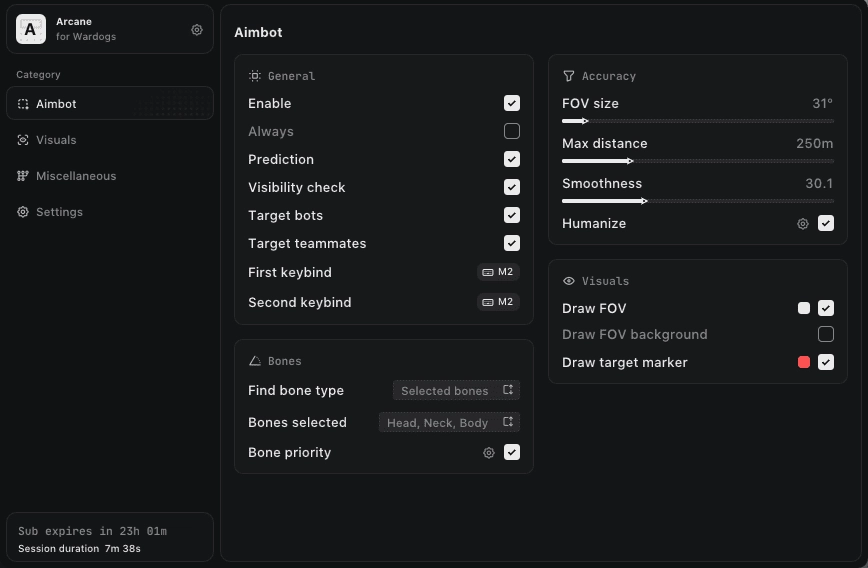
The visibility check is on by default, and we left it alone. Without it the aim will latch onto an enemy behind a wall, which is exactly the pattern Elytra looks for, according to the press. The target marker is drawn in its own color, so it is always clear who the software is holding right now.
Movement prediction at long Control Zone ranges
The Control Zone in Wardogs covers 2x2 km inside a 256 km² map, and most of the fighting over it does not happen at point-blank range. Teams hold the perimeter, move between cover and rush toward the spot where the Hot Zone counts every player as two. Bullets in Wardogs are not instant, and at 150 meters a normal aim without lead fires at the place a running enemy was half a second ago.
The Prediction feature in ARCANE solves exactly this problem: the software calculates the target's speed and direction and moves the aim point ahead. In practice the difference shows right away. Without prediction we missed players crossing open ground toward the zone; with it, bursts landed on the body. It works best at medium range; near the edge of the lock distance accuracy drops if the enemy changes direction sharply. Where these runs happen inside the Control Zone and why the Hot Zone pulls everyone to one point is covered in our breakdown of Control Zone and Hot Zone on the way to 100 points.
One caveat from the test: prediction combined with low smoothing on a distant target looks too confident. When the crosshair moves ahead in advance and waits for the enemy, anyone watching a replay will notice. We kept smoothing higher and used the aim in short presses instead of for the whole burst.
Two keybinds: hold and toggle
The aimbot has a First keybind and a Second keybind, and their modes are independent. We put the first one on holding the right mouse button: you aim, the aimbot works, you release, and only your own hand is left. The second keybind is convenient in toggle mode on a side button, when you sit on a position with a long open line of fire and do not want to keep a key pressed all the time.
Two keybinds let you split scenarios without opening the menu. On the move, in close combat among buildings, hold is more comfortable. When defending a point with a rifle, toggle takes the strain off your finger. There is also an Always option that keeps the aim running constantly; we did not turn it on, because constant aiming at everything inside the FOV does not mix well with behavior analysis.
Player ESP: boxes, skeleton, name and weapon
The Player tab in the visuals is built so that the picture can be either minimal or detailed. Boxes can be regular or corner, and the fill can be a solid color or a gradient. On top you can enable a skeleton and a circle above the head. The info block holds the nickname, team name, distance and weapon in hands. Team colors and the visibility check show who you see directly and who is behind cover.
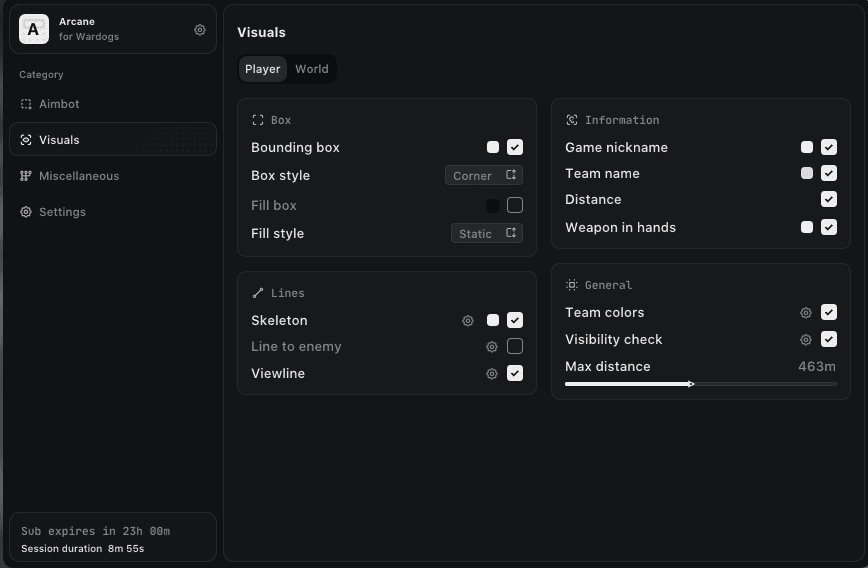
In a match with a hundred players, the main problem of any wallhack is that the screen turns into a mess of boxes. We settled on corner boxes without fill, skeleton and distance, and kept nicknames only for nearby targets. The max render distance is set with a slider; the screenshot shows 463 m, which is enough to see everything inside the Control Zone from its edge and not enough to flood the screen with players from the other end of the map.
View line: where the enemy is looking
Viewline draws a line from the enemy's head in the direction he is looking right now. Of all the ARCANE visuals, this one helped us the most. You can see who is holding your angle and who has turned toward another group. You can step out of cover the moment the line swings away, and it looks like ordinary luck rather than shooting through a wall.
For those who do not want to touch the aim at all, this feature makes ARCANE interesting as a pure visual tool too. We wrote in detail about why a wallhack without aim in Wardogs is less noticeable and how reports come in on such players. A line to the enemy (Line to enemy) is also available, but we switched it off: in a brawl it only adds noise.
Team name in ESP with three factions
Three teams fight in Wardogs: LONESTAR, VALKYRA and MANTICORE. In a two-sided mode, splitting players into "friend or foe" is enough, but here there are two enemies, and you need to know which of them is close right now. ARCANE shows the team name right above the player and colors the boxes by team.
This does change how you play. If two enemy groups at the edge of the zone are locked in a fight with each other, you can stay out of it and wait until they trade. When you see that only one faction is moving on your position, it is clear which side the pressure will come from. The field works together with the visibility check, so players from different teams do not blend into one pile.
World ESP: items and vehicles
The World tab is more modest than the player visuals. It has two layers: dropped items (Dropped item) and vehicles (Vehicle), each with its own color and distance display. There are no loot filters by category, and the menu does not list vehicle types by name either, unlike builds where Vehicle ESP is spelled out in detail.
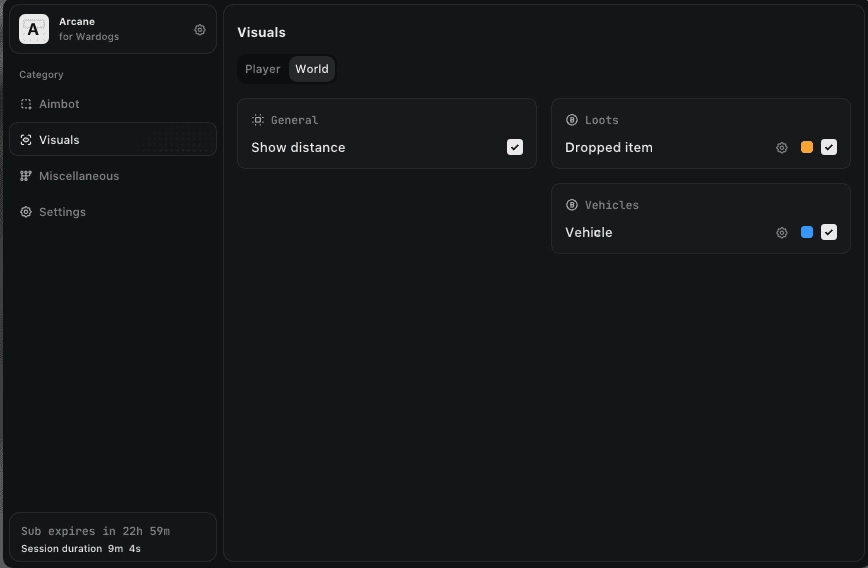
Even this set is useful in Wardogs. Vehicles are expensive in Season 1: the Artillery Tank costs $500,000 and the Little Bird with miniguns $50,000. Seeing where an enemy vehicle is parked before it drives out at you is nice. But if your game revolves around hunting vehicles, look at builds with a detailed Vehicle ESP instead.
Misc: a menu in three languages and configs by key
The Miscellaneous section collects service options: keys to open the menu and unload the software, VSync, dark and light themes. The menu switches between English, Russian and Chinese. For Wardogs this is no small thing: a noticeable share of search traffic for the game comes in Chinese, and players who find an English menu uncomfortable do not have to guess at every option.
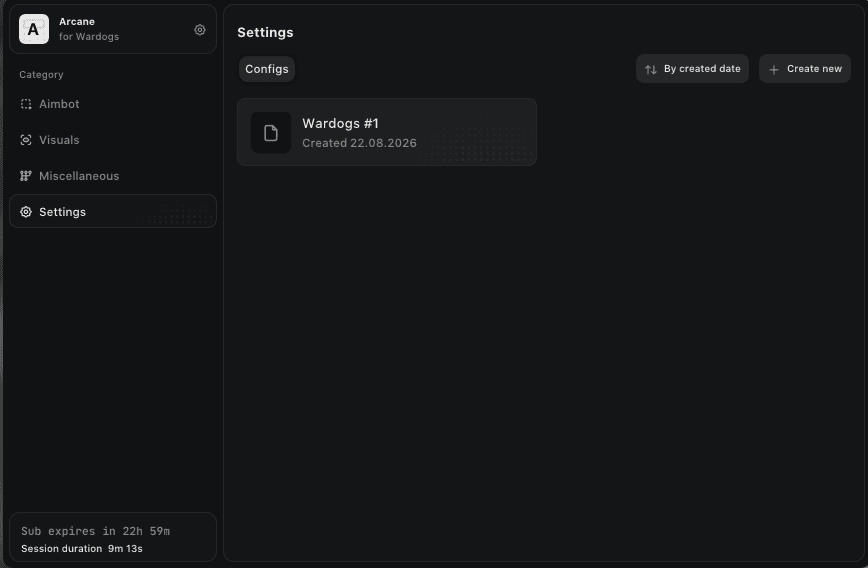
Configs are saved in the Settings section with a creation date; you can sort them and create new ones. The main trick is that a config can be shared by key: send the code to a teammate and he gets the same FOV, smoothing and set of visuals. For a squad that plays together, this saves half an hour of setup.
Spoofer and recording protection
The ARCANE product card lists no built-in HWID spoofer and no recording protection (stream-proof). The visuals will show up in OBS and in Discord recordings, so you cannot stream with ESP turned on. In Wardogs the spoofer question is sharper than in most games: the top step of Bulkhead's punishments hits the device, and every account on that PC goes down with the main one. If your hardware is already flagged, the spoofer is bought separately; a selection is in the HWID spoofer section.
ARCANE vs GHOST and ANCIENT
In the Wardogs cheat catalog, ARCANE has two close neighbors by use case: the flagship GHOST with a full set and ANCIENT, which offers ESP only. We compared them by what is actually stated in the product cards.
| Parameter | ARCANE | GHOST | ANCIENT |
|---|---|---|---|
| Aimbot | yes, with movement prediction | yes, with recoil control | no |
| Enemy view line | yes | no | no |
| Team name in ESP | yes | no | no |
| Vehicles and loot | world ESP | Loot, Vehicle and Corpse ESP | no |
| Radar | no | yes | no |
| Recording protection | no | yes | yes |
| Window mode | Windowed and Borderless | Windowed and Borderless | Borderless only |
| Price per month | $30 | about $35 | about $29 |
GHOST wins on volume: radar, Loot ESP, Corpse ESP, DOWNED status and stream-proof. A detailed look at the flagship is in our GHOST review for Wardogs. ARCANE wins elsewhere: with lead on moving targets and with information about where the enemy is looking and which faction he belongs to. If you do not need an aimbot at all, ANCIENT is cheaper and quieter; we covered it in detail in our ANCIENT review, pure ESP for about $3 a day.
ARCANE stability and launch
To run it you need the Steam version of Wardogs, and the game must be in Windowed or Borderless mode. Fullscreen is not supported, so keep that in mind before your first session. Intel and AMD processors, Windows 10 x64 or Windows 11. The loader comes after purchase together with the key, and the launch order is standard: start the loader, enter the key, then start the game.
During our test on the build after Patch 0.11 the software did not crash and did not bring the game down. The menu opens over the game with its own key, and unloading is also on a key, so you can close everything quickly before leaving a match. The FPS impact was within the margin of error, as long as you do not switch on every visual at max range at once.
A word about updates. Season 2 starts on October 15, and the seasonal patch will almost certainly touch the game files. On such days build developers put their software into update mode until they check it on the new version. Running a build with the Updating status is a bad idea, so in the first days after a patch look at the product card more often than usual.
Launch problems in Wardogs are more often caused by the game itself than by the cheat. Players complain about error 1628505086 ("anti-cheat login failed"), about WD-L020 after the Windows 11 preview update KB5124010, and about conflicts between the Elytra driver and an enabled Memory Integrity. If the game itself will not start, deal with that first and with the software second. One more thing: after a big patch the build status may switch to updating, so check it on the product card before every session.
ARCANE pros and cons
Pros:
- Movement prediction that really helps at medium range in the Control Zone.
- Two independent aim keybinds: hold for close combat, toggle for defending a point.
- Enemy view line and team name in ESP, useful precisely because there are three factions.
- Menu in Russian, English and Chinese, with dark and light themes.
- Configs shared by key, handy for a squad.
Cons:
- No radar at all, so you cannot see the fight beyond your screen.
- The product card lists no recording protection, so this software does not go together with streaming or OBS recording.
- Priced in dollars: for players paying in other currencies the final amount shifts with the exchange rate.
- The world ESP is basic: no loot filters by category and no FOB buildings.
ARCANE price and how to buy
The developer set prices in dollars: $4 per day, $15 per week, $30 per month. A day is handy for checking the build on your PC and seeing whether the menu suits you. A week pays off if you play every evening. A month makes sense once your config is tuned and you know you will stay on this software until Season 2.
The key is delivered right after payment, and the current status and all periods are on the product page: buy ARCANE for Wardogs. If you want to compare it with the other builds, the catalog has other Wardogs cheats, from visuals without aim to DMA on a second machine.
Questions about setup, keys or launch can go to the community: Telegram (200+ members) and Discord (637+ members). People post configs there and report if something breaks after a patch.
Who ARCANE is for
There is no single "best" cheat for Wardogs; it all depends on how you play.
If price matters: ARCANE at $4 a day is cheaper than the flagship, but the lowest entry in the catalog belongs to NN LITE at $3 and BYSTER at about $3. If you do not need an aimbot, look at them or at ANCIENT.
If caution matters: ARCANE works as long as the aim stays in a human range, with high smoothing and the visibility check on. The risk of a ban always exists, and in Wardogs it includes a hardware ban, so no showing off.
If you want the most features: look at GHOST with radar, Loot ESP and stream-proof. ARCANE is deliberately narrower here.
If you play long-range fights for the zone: then ARCANE is exactly your option. Movement prediction and the view line give the most right there.
ARCANE FAQ
Is ARCANE detected or undetected right now?
At the time of publication, ARCANE for Wardogs is listed in the ForgeCheats catalog as undetected with an excellent reliability rating. The status is valid at the moment of purchase: after a game patch the build may be moved to updating. Check it on the product page before every purchase, and remember that the risk of a ban in Wardogs exists with any software.
How much does ARCANE for Wardogs cost?
There are three periods: $4 per day, $15 per week and $30 per month. A day is enough for a first check; after that a week or a month pays off better if you play regularly and have already built your own config. Prices are fixed in dollars by the developer.
ARCANE will not start: what should I do?
First make sure Wardogs is launched from Steam in Windowed or Borderless mode, not in fullscreen. Then check that the game itself starts without anti-cheat errors such as 1628505086 or WD-L020. If the game works but the software does not, contact support or the Telegram chat and attach a screenshot of the loader error.
Do I need a spoofer with ARCANE?
ARCANE has no built-in spoofer. On clean hardware it is not required, but in Wardogs the top step of punishment is a hardware ban that closes every account on the device and cannot be appealed. If your PC has already been banned in this game, you need a spoofer before the first launch of the cheat.
Does ARCANE have a radar, and can I stream with it?
ARCANE has no radar, only on-screen ESP. The product card lists no recording protection either, so the visuals will end up in OBS and in Discord recordings. For streams and recording videos with software, builds with stream-proof such as GHOST or ANCIENT are a better fit.