VENGEANCE for PUBG is worth getting if you play a careful legit style and want an unnoticeable edge without a vulgar rage mode. This is a private cheat with excellent and undetected status at the time of our test, with a built-in spoofer and a StreamProof feature, which makes it convenient for anyone who records matches or streams. The entry barrier is low: the price starts from 350 rubles per day, so you can try the software without a big investment, and the product page VENGEANCE offers the full range of periods from a day to a lifetime option.
We tested the build from our catalog in the current 2026 season: ran it on Erangel and Miramar, solo and in squads, and watched how the aimbot behaves on a hold key, how readable the ESP is, and how stable the injection stays under BattlEye. This review goes in order: how we tested it, a breakdown of every feature with real observations, honest downsides, prices, and scenarios for who the product fits and who should pick something else from the catalog.
How We Tested VENGEANCE
Testing ran in windowed mode on Windows 11, and we assembled configurations on both Intel and AMD to rule out any tie to a single CPU vendor. We launched the loader, injected the menu, then went into a match: some rounds solo on Erangel, some in a squad on Miramar. The goal wasn't "get the most kills in one round," but how the software behaves over a long session: does the menu stay stable, does the ESP flicker, and do the settings let you stay within believable play without collecting reports.
A separate focus was on BattlEye. This is a kernel-level anti-cheat, it bans by HWID and relies on replay and report analysis from Krafton, so under it a spoofer and legit delivery matter more than raw aim power. The undetected status held throughout our entire session, but as a matter of principle we never promise eternal immunity: any private software lives until the next wave, and regular updates are exactly what keeps the risk minimal. Everything below is our own observations on this specific build, not a retelling of a description from someone else's site.
We deliberately picked different scenarios. There were hot drops, where the first seconds decide everything and what matters is whether the aim can keep up in a close-range brawl. There were late circles in a tight zone, where ESP and the ability to read positions through terrain folds move to the front. And there was a quiet rotation along the edge of the map, to see how the software behaves during long stretches of inactivity, whether the menu hangs, and whether the load grows over time. Across several hours of that rotation, the build never once forced us to restart the game.
VENGEANCE Features: A Practical Breakdown
The philosophy behind the build is simple: give enough to win fights, but not so much that every killcam screams cheat software. That's why the feature set here is tight, without overload, and almost every setting works toward staying discreet in one way or another. Let's break it down by subsystem.
Even before you get into fights, there's one thing worth understanding: VENGEANCE's feature set is built for one scenario, not for everything at once. It's not an all-in-one combine with a radar, loot, and a dozen exploits, but a compact legit toolkit made of aim, ESP, and recording protection. That focus is exactly its strength, because every feature is polished rather than tacked on just to pad a storefront feature list.
VENGEANCE Aimbot: Legit Hold-to-Aim
The aimbot here is built around discretion, not total domination. Aim assist activates on a hold key (Aim keybind): the crosshair locks onto an enemy only while you hold the button, rather than triggering automatically on every silhouette in view. That's the key difference between legit delivery and rage, because from the outside the movement looks like a live player's quick correction, not a crosshair teleporting straight to the head.
There are enough settings here to shape your own style:
- Smoothing: controls how smoothly the crosshair reaches the target, and at high values the correction is almost indistinguishable from a sharp manual flick.
- Bone selection: Head for fast kills, or Neck if you want hits to look more natural and give the software away less on the killcam.
- Visible Check: the aim only works on visible enemies, which removes the main complaint reporters raise when someone seems to be shooting through textures.
- FOV and Crosshair: the capture radius and on-screen crosshair adjust to your sensitivity, so the aim doesn't snag random targets at the edges of the screen.
- RCS recoil compensation: dampens muzzle climb and is especially helpful on automatic weapons at mid range.
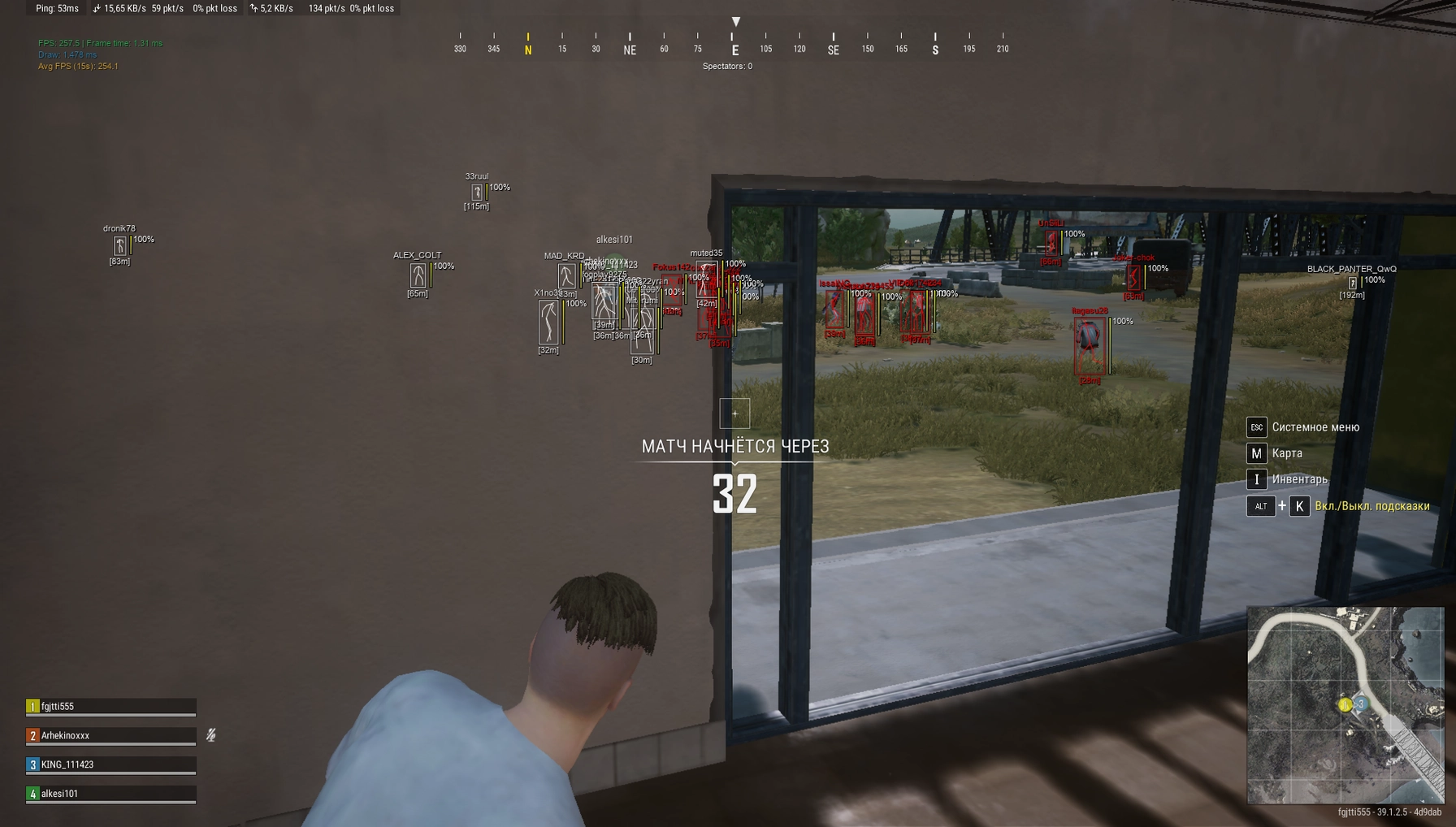
In practice, the combination of high Smoothing, the Neck bone, and Visible Check turned on gave the safest profile: killcams looked decent, and squadmates didn't ask awkward questions. If you crank smoothing down to zero, the aim turns into an obvious magnet, and that's a direct road to reports, so it's smarter to keep the power tuned for legit play rather than for a show. In practice, the aim reliably closes on the target at close and mid range, while at long range your own shooting still decides the fight, which for a legit build is more of a plus.
Ergonomically, the hold key turned out to be more convenient than you'd expect. You bind it to a side mouse button, and the aim assist becomes a natural extension of aiming: hold it for the correction, release it, and finish the kill by hand. The smoothing curve feels different depending on the weapon; on single-fire rifles you want a higher value so the correction stays completely unnoticeable, while on automatics up close you can ease off a bit, because there speed matters more than concealment. That fine-tuning by weapon and distance is exactly what separates thoughtful legit play from mindlessly holding one button.
ESP and Wallhack: What You Can See on the Map
The information layer in VENGEANCE covers basic needs without cluttering the screen. Player ESP shows opponents through obstacles, and the set of elements is hand-picked to match your playstyle:
- Box: a bounding box around the enemy, readable at any distance and keeps you from losing the target in bushes.
- Skeleton: a skeleton model that instantly shows posture, whether the person is prone, crouched behind cover, or running at you.
- Names and Distance: nickname and distance in meters, helping you quickly decide whether to engage or quietly go around.
- HealthBar: an HP bar so you can finish off wounded enemies and avoid trading when the enemy is at full health.
Visible Check is here too, and we recommend turning it on: when only genuinely visible enemies are highlighted on screen, the picture is cleaner, and the behavior gives the software away less when someone reviews a replay. 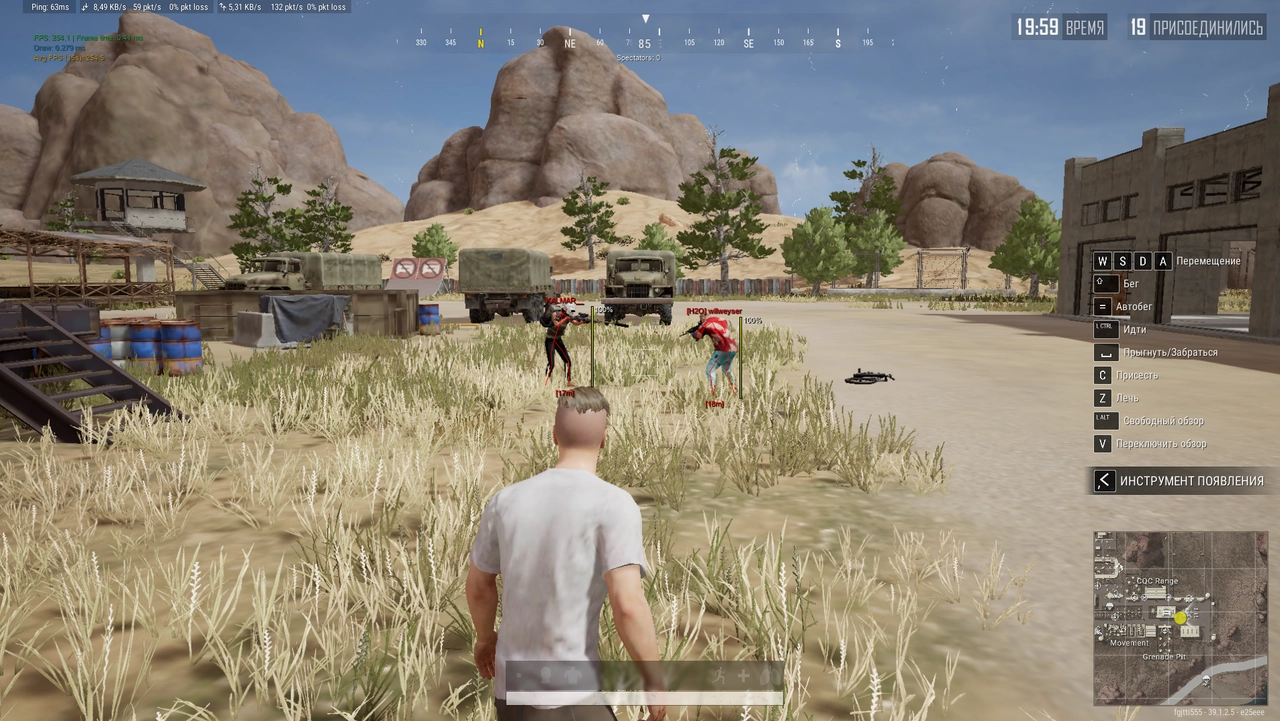
ESP shines the most in squads. Skeleton and HealthBar together let you call out a wounded target for the team, while Distance helps you decide in sync whether to push or hold a position with covering fire. At the same time, the set is deliberately modest, without dozens of warnings and icons covering the whole screen, and there's logic to that: the cleaner the picture, the smaller the chance you start playing unnaturally yourself by reacting to information a legitimate player couldn't possibly have.
What the build doesn't have is a heavy Loot ESP with rarity filters for attachments, the kind you'd find in purely ESP-oriented products. For a legit player that's not critical: loot in PUBG is fine to collect by eye anyway, and a screen overloaded with item markers gets in the way of staying discreet and distracts you in a fight. If you specifically need a detailed radar and loot breakdown by value, it's worth comparing VENGEANCE with other builds, and we'll touch on that separately in the section about the game hub.
StreamProof: Invisible for Recording and Streaming
The StreamProof feature solves the pain point for anyone who uploads highlights to YouTube or streams on Discord. The cheat's menu and overlay don't get picked up by screen capture: in recordings and broadcasts, the viewer sees clean gameplay with no ESP boxes or aimbot panels. We tested this through OBS and through Discord screen sharing, and the overlay never once leaked into the stream during our session.
An honest caveat: StreamProof hides the software from software-based capture, but not from someone filming the monitor with a phone, and not from a suspicious in-game killcam. It's a tool against accidental leaks in recordings, not a pardon from bans, so legit aim settings still come first. The combination works reliably, with no extra fiddling needed to set up capture around it.
The practical scenario is this: you're a streamer or clipmaker and don't want an obvious ESP to end up on camera. With StreamProof turned on, you can safely run a broadcast showing gameplay while still seeing all the information on your own monitor. That combination is rare, because many builds either don't hide the overlay at all or hide it too crudely and break the picture. Here the capture stays clean, and the in-game part of the frame isn't distorted.
Spoofer and Safety Under BattlEye
The built-in spoofer is arguably VENGEANCE's biggest argument next to builds that don't have one. It cleans the hardware fingerprint before a session, and that strikes directly at BattlEye's mechanic, which bans specifically by HWID. If you've been caught before, the spoofer lowers the chance that a new account gets banned over old hardware, though as we honestly warn, no one offers a hundred percent guarantee.
The type of cheat itself also affects risk, and it's worth understanding this before buying any private software. The difference between external and internal cheats for PUBG lies in how deeply the software reaches into the game process and how it interacts with the anti-cheat. VENGEANCE presents itself as a careful injection focused on discretion, and the built-in spoofer adds a second layer of protection at the hardware identification level, which matters under BattlEye.
We separately recommend figuring out what actually gets you banned in PUBG: most often what trips people up isn't the software getting detected, but their own greed in rage mode and a flood of reports over unnatural-looking shooting. VENGEANCE's legit philosophy is exactly about that, about staying under the radar. Keep smoothing high, the bone on Neck, Visible Check turned on, and your behavior profile stays in the shadows, which under a kernel-level anti-cheat matters more than any damage numbers.
Customization: Colors and Configs
A small thing that saves your nerves: a color palette for all ESP and menu elements, plus config saving and loading. You build one legit preset for solo and another for squads, then switch between them in a couple of clicks instead of readjusting every slider from scratch. It's convenient to tune the colors to the map and time of day so the boxes don't blend into Miramar's sand or Erangel's green, and that genuinely helps you not lose the target against a busy background.
Menu and Ease of Use in Combat
The interface is built without unnecessary flash: sections by feature, sliders and toggles, a live color preview. The menu opens with a hotkey over the game, and in windowed mode it doesn't get in the way of your controls. We liked that critical toggles like Visible Check and bone selection sit right in view instead of being buried deep in a submenu, because in PUBG you sometimes need to change the aim's behavior right between the drop and the first fight. Don't expect a localized menu; the interface is in English, but the terminology is standard for the genre and raises no questions.
VENGEANCE Stability and Launch
The launch process works the way you'd expect from private software: launcher, authorization, injection into PUBG in windowed mode. Windowed or borderless mode is mandatory here; in exclusive fullscreen the overlay won't render, and that's a standard requirement for almost all similar builds. The combo works on Windows 10 and Windows 11, on Intel and AMD processors, and we didn't notice any tie to a specific GPU vendor.
As for stability, we had no drops or crashes during our session; the menu opened predictably, and the ESP never flickered or dropped out. The impact on FPS was within the margin of error: the cheat is legit-oriented and doesn't carry a heavy radar, so frames barely dip even on a mid-range machine. The main factor in safety isn't the technology but update discipline: the Vengeance developer rolls out updates for PUBG patches and BattlEye waves, and keeping the software current is on you, so don't run an outdated build right after a major game patch.
A separate note on behavior after patches: if PUBG rolls out a major update, it's smart not to jump into the game with the cheat that same hour, and instead wait for the go-ahead from the developer and community that the build has been rebuilt for the new version. That's basic hygiene under a kernel-level anti-cheat, and it saves accounts far more reliably than any advertising promises. Restarting and re-injecting after a launcher update takes a minute and goes without any hassle.
Hardware requirements hold nothing exotic: a regular gaming PC on Windows 10 or 11 with an Intel or AMD processor is fine, and the build doesn't demand a separate UEFI with GPT or unusual BIOS settings, unlike some fussier private cheats. That makes getting into VENGEANCE easier for anyone running a stock system without juggling bootloader modes and disk configurations.
VENGEANCE Pros and Cons
Pros:
- A built-in spoofer is included, so you don't need to buy HWID cleaning separately.
- StreamProof genuinely hides the overlay from OBS and Discord screen sharing.
- A flexible legit aimbot: Smoothing, bone selection, Visible Check, and RCS to match your style.
- Low entry barrier from 350 rubles per day, with a lifetime period also available.
- Doesn't tax FPS and holds the injection stably over a long session.
Cons:
- No advanced Loot ESP or full radar; this build isn't about collecting items.
- The legit philosophy demands discipline: at maximum settings the aim gives itself away.
- Windowed mode only; fans of exclusive fullscreen will have to adjust.
- Undetected status isn't permanent; after major patches, wait for an update before playing.
VENGEANCE Price and How to Buy
The periods cover both a one-time trial and ongoing play:
- A day: 350 rubles, just to try the software and settings.
- 3 days: 750 rubles for an active weekend.
- A week: 1500 rubles for an intense stretch of play.
- A month: 3000 rubles, the most popular and best-balanced option for the price.
- Lifetime: 12000 rubles for those who've settled into PUBG seriously and for the long haul.
You can set up a subscription and choose the period you need right on the product page: buy VENGEANCE. If you want to compare before buying, check out other cheats for PUBG in the catalog: there's an external web radar in the browser, clean ESP-oriented builds, and a standalone spoofer if you only need hardware cleaning without aim features.
Questions about compatibility and payment are faster to resolve in the community: Telegram (300+ members) and Discord (2000+ members). They'll also tell you the current status of the build before you pay, so you don't buy the software blindly right after a patch.
Payment works the standard way for the store, and access is granted for the chosen period right after purchase. If you're unsure which period fits your schedule, start with a day for 350 rubles: that's enough to build a legit preset, run a couple of matches, and see whether the aim's feel suits your hand, before committing to a week or a month.
Who VENGEANCE Is For
The product doesn't cover every need at once, so let's break it down by priority instead of giving one universal answer.
If price matters: starting from 350 rubles per day makes VENGEANCE one of the most affordable entry points into legit PUBG cheating, and the lifetime option at 12000 rubles pays off if you play for months and don't want to keep renewing a subscription.
If safety matters: the built-in spoofer and StreamProof, plus legit aim settings, form a combination that covers both the HWID layer and the recording-behavior layer, and under BattlEye that matters more than raw aimbot power.
If you need maximum features: here VENGEANCE honestly falls short of heavier builds. There's no advanced Loot ESP or radar, so anyone who wants total map information should look toward ESP-oriented products or the external web radar from our catalog.
Putting it all together, VENGEANCE is a tool for a player who wants to quietly raise their win rate and avoid collecting reports, not put on a show wiping an entire lobby. In that niche, and for its price, the build looks appropriate and does exactly what it promises.
Frequently Asked Questions About VENGEANCE
Is VENGEANCE Detected or Undetected Right Now?
At the time of our test, the build held undetected status and an excellent rating. That means there were no known BattlEye flags against it, but the status is dynamic: no private software guarantees eternal immunity. Before buying, always check the current status on the product page and in the ForgeCheats community.
How Much Does VENGEANCE Cost?
The price starts from 350 rubles per day. After that comes 3 days for 750 rubles, a week for 1500 rubles, and a month for 3000 rubles, while the lifetime option costs 12000 rubles. That spread is convenient: you can grab access for one evening or pay once for unlimited duration.
VENGEANCE Won't Launch, What Should I Do?
First check the obvious: PUBG needs to be in windowed or borderless mode, not exclusive fullscreen, otherwise the overlay won't render. Disable third-party overlays and make sure you're running the current build for the current patch. If that doesn't help, write to ForgeCheats on Telegram or Discord, and they'll sort out your specific case.
Do I Need a Separate Spoofer With VENGEANCE?
In most cases, no: the spoofer is already built into the build and cleans HWID before a session, which matters under BattlEye. A separate PUBG SPOOFER makes sense only if you've already caught an HWID ban and need to recover before returning to the game on the same hardware.
Is VENGEANCE Good for Streaming?
Yes, StreamProof handles that: the menu and overlay don't get picked up by software capture, so in OBS recordings and Discord screen sharing the viewer sees clean gameplay. Just remember the feature doesn't protect against someone filming the monitor with a phone or the in-game killcam, so legit aim settings remain mandatory on stream too.